10 Essential Scheduling Automation Best Practices for Scaling Teams
As businesses grow and teams expand, scheduling becomes an increasingly complex yet critical aspect of daily operations. Manual scheduling methods, while practical for small teams or startups, quickly become inefficient as the number of meetings, appointments, and projects multiply. The result? Wasted time, miscommunication, scheduling conflicts, and reduced productivity. In today’s fast-paced work environment, scheduling automation is no longer a luxury—it’s a necessity for scaling teams efficiently while maintaining flexibility, agility, and cohesion.
In this guide, we’ll delve into 10 essential scheduling automation best practices that will help your organization optimize workflows, eliminate bottlenecks, and empower teams to focus on high-value tasks that drive growth. Whether your team is just starting to explore automation or already using tools but looking to refine processes, these best practices will help you unlock the full potential of scheduling automation.
The Importance of Scheduling Automation for Scaling Teams
Scheduling automation fundamentally transforms how teams manage time and resources by streamlining processes, improving communication, and reducing administrative overhead. As companies grow, manual scheduling can lead to inefficiencies that disrupt workflows and create frustration among team members. Automating these processes not only saves time but also ensures that key tasks and meetings are prioritized effectively.
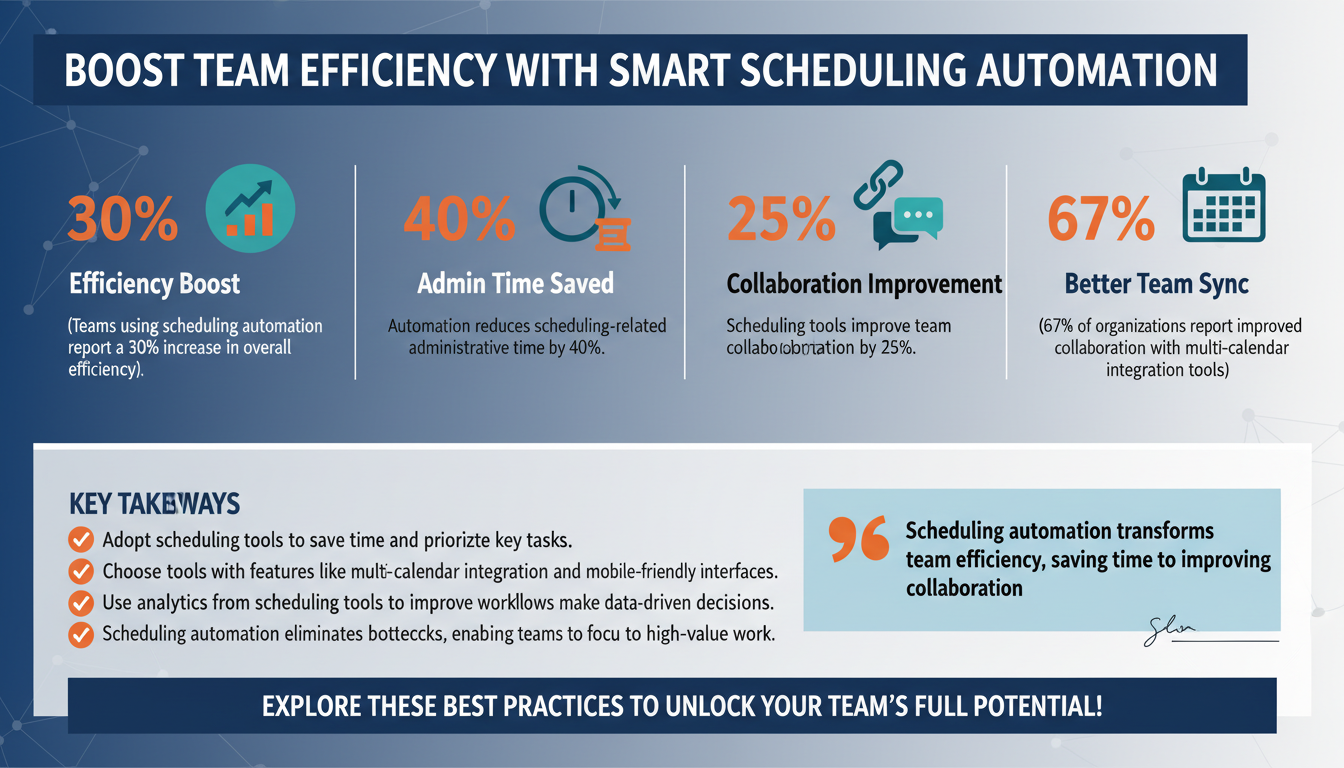
According to Gartner’s 2026 Productivity Report, companies that implement scheduling automation tools experience a 30% increase in overall team efficiency. Additionally, businesses report a 40% reduction in administrative time spent on scheduling and a 25% improvement in team collaboration. These gains highlight how automation can serve as a foundation for scalable growth, enabling teams to focus on strategic initiatives rather than logistical headaches.
By automating repetitive tasks like booking meetings, assigning resources, and syncing calendars, teams can free up time for high-priority work. For example, instead of spending hours coordinating schedules for a cross-functional project meeting, automation tools can instantly find available time slots that work for everyone. This not only speeds up the process but also ensures fewer scheduling conflicts or missed meetings.

1. Choose the Right Scheduling Automation Tool
The success of scheduling automation begins with selecting the right tool for your organization. With a plethora of options on the market, it’s essential to evaluate tools based on their features, scalability, and ability to address your team’s unique requirements. Not all scheduling tools are created equal, and choosing one that aligns with your business goals can make all the difference.
Key features to prioritize include:
- Multi-calendar integration: Ensures smooth coordination across different teams and departments, especially in organizations that use diverse platforms like Google Calendar, Outlook, or iCal.
- Customizable booking flows: Allows users to gather important information upfront, such as meeting agendas or client preferences, which helps streamline workflows.
- Advanced analytics: Provides insights into scheduling patterns, team availability, and overall efficiency, enabling data-driven decision-making.
- Mobile-friendly interfaces: Ensures that employees can manage their schedules on the go, which is especially important for remote or hybrid teams.
In a survey by Forrester’s 2026 Automation Tools Study, 67% of organizations reported improved collaboration after adopting scheduling tools with multi-calendar synchronization. For example, platforms like Calendly and Doodle allow for seamless integration with existing calendaring systems, making it easy for users to find mutually convenient times for meetings.
Before committing to a tool, involve key stakeholders in the decision-making process. Conduct trials with different platforms, gather feedback from team members, and ensure the selected tool can scale alongside your organization’s growth.

2. Standardize Processes with Scheduling Templates
Standardizing scheduling processes using templates is one of the simplest yet most effective ways to improve efficiency. Templates eliminate unnecessary guesswork, ensure consistency across the organization, and reduce the likelihood of errors. By defining clear workflows for common scheduling scenarios, teams can save time and reduce friction.
Examples of scheduling templates include:
- Recurring team meetings: Pre-defined agendas and time slots for weekly check-ins, ensuring everyone is on the same page.
- Client bookings: Templates that include buffer times for preparation and follow-up, minimizing scheduling conflicts and ensuring a smooth client experience.
- Project milestones: Scheduling workflows that align with project deadlines, helping teams stay on track and meet deliverables.
A study by Harvard Business Review found that teams using standardized templates for recurring tasks saved an average of 3 hours per week. For example, a marketing team that uses a pre-built template for scheduling content review meetings can eliminate back-and-forth emails and focus on delivering high-quality campaigns.

3. Integrate Scheduling Automation Across Platforms
To maximize the value of scheduling automation, it’s crucial to integrate it with the tools and platforms your team already uses. Whether it’s a project management system, customer relationship management (CRM) software, or communication platforms, seamless integrations ensure that scheduling data flows efficiently across your organization.
Popular integrations include:
- CRM tools: Platforms like Salesforce or HubSpot allow you to schedule client calls or follow-ups directly within the CRM, ensuring all interactions are tracked and accessible in one place.
- Project management tools: Integrations with Asana, Trello, or Monday.com help synchronize tasks and deadlines with scheduled meetings, ensuring alignment between project milestones and team availability.
- Communication tools: Connecting scheduling tools to platforms like Slack or Microsoft Teams allows for instant meeting reminders and updates, reducing the risk of missed appointments.
According to McKinsey’s 2026 Digital Transformation Insights, companies that integrate scheduling automation across multiple platforms report a 25% reduction in time spent on manual data entry. These integrations ensure that your team can focus on meaningful work rather than administrative tasks.

4. Leverage Data Analytics for Continuous Improvement
Scheduling automation isn’t a one-and-done solution. To ensure long-term success, teams must continuously monitor and refine their workflows using data analytics. Analytics can provide valuable insights into patterns, inefficiencies, and opportunities for improvement.
Metrics to track include:
- No-show rates: Identify trends in meeting attendance and take proactive steps, such as sending automated reminders, to reduce no-shows.
- Manual vs. automated scheduling time: Evaluate how much time is saved by automation and identify areas where additional efficiencies can be introduced.
- Peak scheduling times: Analyze team availability to optimize meeting times and resource allocation.
For example, HubSpot’s 2026 State of Scheduling Analytics highlighted that teams using data-driven scheduling saw a 15% increase in meeting attendance rates. By leveraging these insights, organizations can make informed decisions that enhance productivity and collaboration.

5. Train Your Team on Scheduling Automation Best Practices
No matter how advanced your scheduling automation tools are, they won’t deliver results without proper user adoption. Training your team on how to use these tools effectively ensures that everyone understands their features and benefits.
Best practices for training include:
- Onboarding sessions: Walk team members through the tool’s functionalities and demonstrate how it integrates with existing workflows.
- Video tutorials: Create step-by-step guides for common tasks, such as setting up meetings or customizing templates.
- Continuous support: Offer resources like FAQ documents, troubleshooting guides, and access to a dedicated support team.
According to Deloitte’s 2026 Automation Training Guide, organizations that invest in training report 40% higher adoption rates compared to those that don’t. For instance, a sales team that receives training on CRM-integrated scheduling tools is more likely to use them effectively, leading to better client interactions and pipeline management.
FAQs
1. What is scheduling automation?
Scheduling automation refers to the use of software tools to manage appointments, meetings, and workflows without manual intervention. It streamlines communication and eliminates repetitive tasks, improving efficiency.
2. How does scheduling automation improve productivity?
By automating tasks such as booking meetings and sending reminders, teams save time, reduce errors, and focus on high-value activities. Studies show that automation boosts team efficiency by up to 30%.
3. Can scheduling automation work for small teams?
Absolutely! Small teams benefit from reduced administrative burdens and better collaboration. Many tools offer scalable solutions to meet the needs of teams of all sizes.
4. What features should I look for in a scheduling automation tool?
Look for features like multi-calendar synchronization, customizable booking flows, analytics dashboards, and platform integrations to maximize efficiency and scalability.
5. How do I measure the ROI of scheduling automation?
Track metrics such as time saved, meeting attendance rates, and reduced manual work. Use analytics dashboards to quantify these benefits and continuously optimize workflows.