
Schedly resources
Automated Appointment Reminders That Cut No-Shows
No-shows cost businesses real money. Empty appointment slots mean lost revenue, wasted staff time, and scheduling chaos that demoralizes your team.
Automated appointment reminders are one of the most effective ways to fix this problem. At Schedly, we've seen how the right reminder strategy can dramatically reduce no-shows and keep your business running smoothly.
What No-Shows Actually Cost Your Business
No-shows drain revenue faster than most business owners realize. When a customer fails to show up for a scheduled appointment, you lose the income from that time slot entirely. A dental practice that charges $150 per appointment and experiences just five no-shows per week loses $39,000 annually. A medical clinic with twenty no-shows weekly at an average charge of $200 per appointment loses $208,000 per year. These aren't theoretical numbers-they're real money that walks out the door. Research from the American Journal of Medicine found that no-show rates typically range from 2% to 30% depending on your industry and patient demographics, meaning most businesses hemorrhage revenue without even tracking it properly. The financial impact compounds because you've already paid staff to be available, spent money on utilities, and allocated resources that generate zero return when an appointment slot sits empty.
The Hidden Cost Beyond Lost Revenue
The damage extends far beyond the immediate loss of appointment fees. When no-shows happen frequently, your staff must scramble to fill open slots or sit idle, which destroys scheduling efficiency and creates frustration among team members. Staff morale suffers when they're scheduled for appointments that never happen, especially in roles where they're paid hourly or commission-based. A receptionist or medical assistant scheduled for a full day of appointments where half don't show up faces an awkward situation-they're either overstaffed and bored or scrambling to find other work. This inconsistency leads to higher staff turnover, training costs, and reduced productivity. Additionally, no-shows prevent you from serving other customers who sit on your waiting list. If someone cancels last-minute or fails to appear, another customer who wanted that time slot misses the opportunity, potentially pushing them toward a competitor. The cumulative effect is a business that operates at partial capacity while your competitors who manage their no-shows effectively capture the market share you're losing.
Why Your Scheduling System Matters
Your current scheduling approach either amplifies or reduces no-show problems. Manual scheduling systems leave you vulnerable because they lack automated confirmations and real-time visibility into who plans to attend. Customers forget appointments when they receive no reminders, and staff waste time calling to confirm what should happen automatically. A scheduling platform that integrates appointment confirmations directly into your workflow prevents these gaps. The right system tracks which customers show up consistently and which ones require extra attention, allowing you to adjust your strategy accordingly. Without this visibility, you're essentially operating blind-you know no-shows hurt, but you can't identify patterns or take action to stop them.
How Automated Reminders Actually Reduce No-Shows
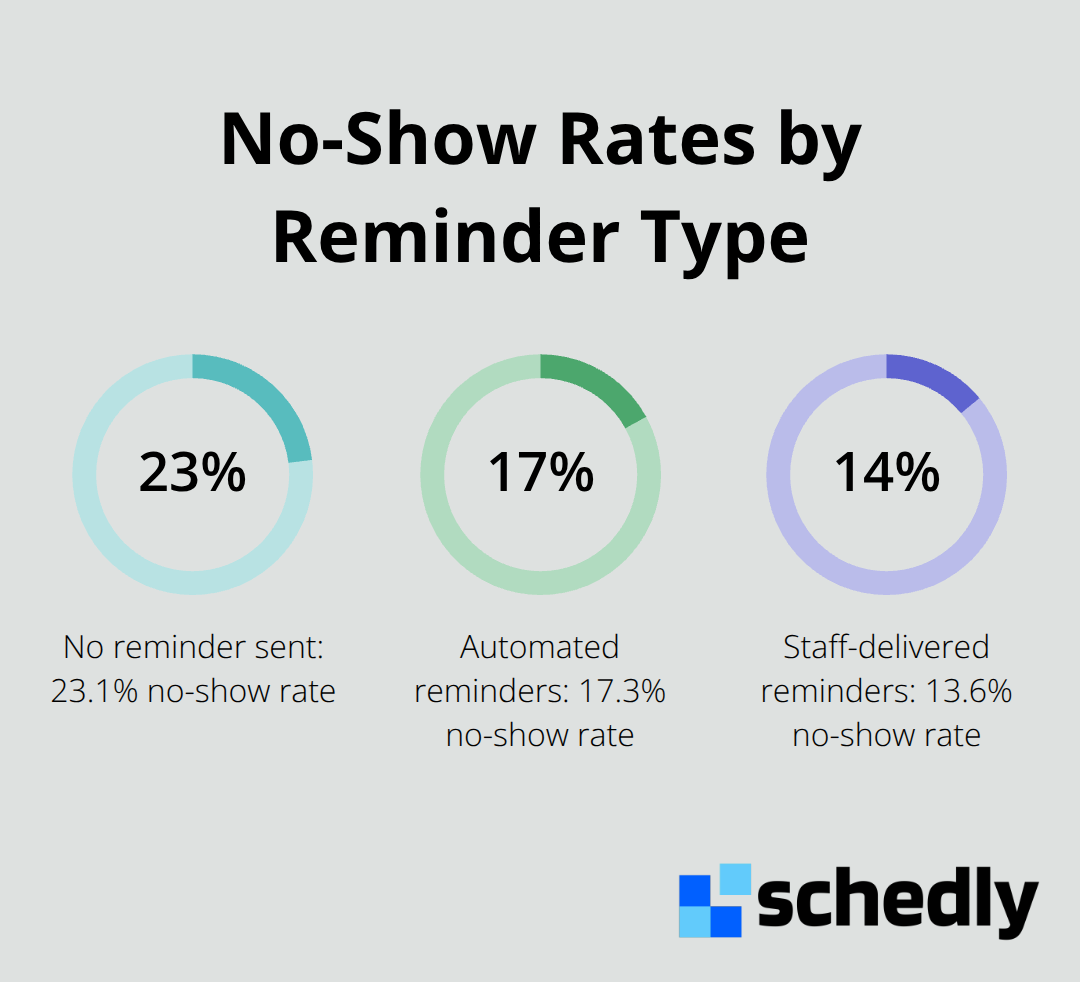
SMS and email reminders work because they interrupt the forgetting process before it happens. A study published in the American Journal of Medicine analyzing over 12,000 appointments across 10 medical specialties found that automated reminders cut no-shows to 17.3% compared to 23.1% when no reminder was sent at all. That's a meaningful reduction, though the same study revealed that staff-delivered reminders performed even better at 13.6%, showing that personalization matters.
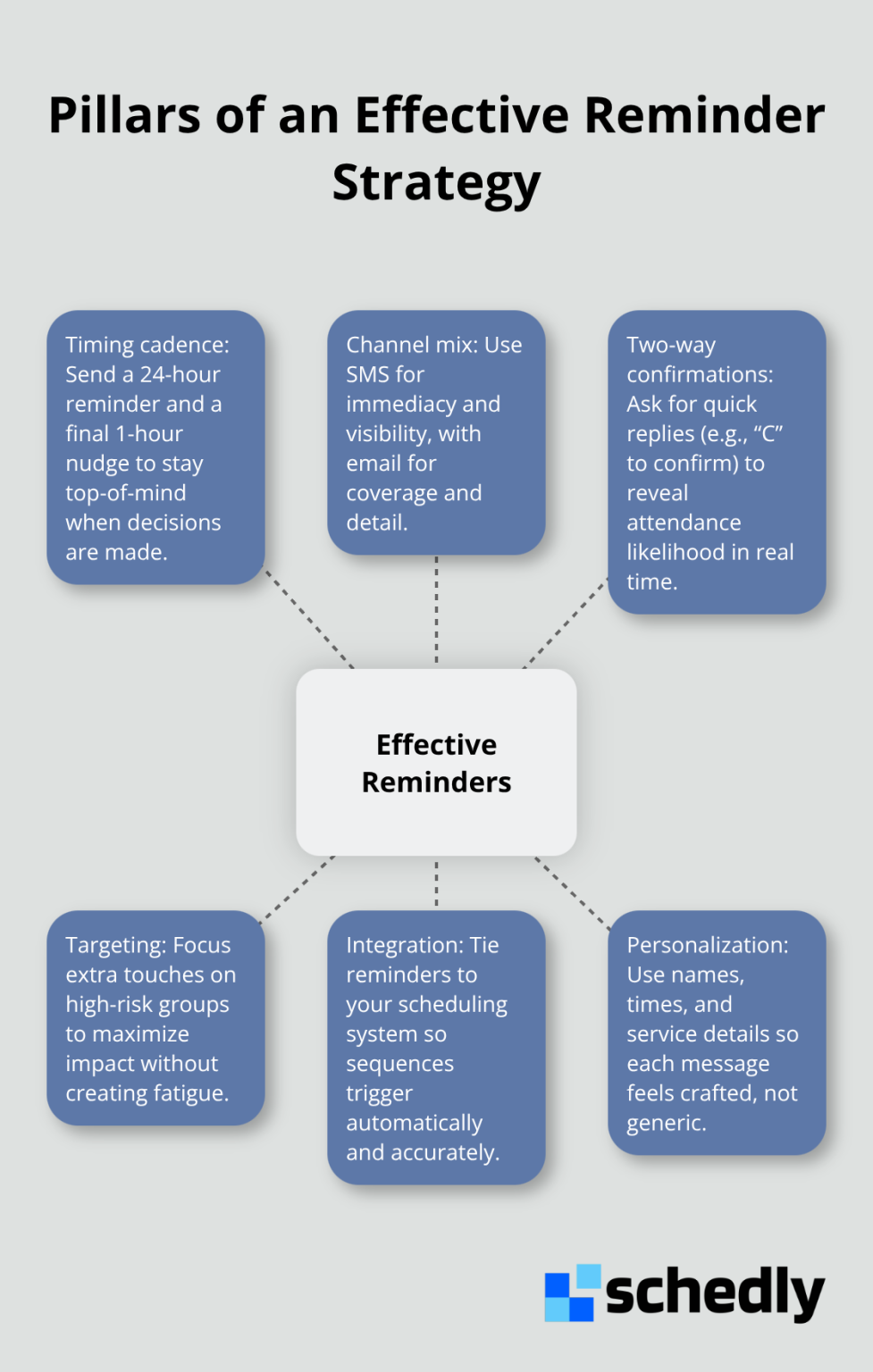
Most businesses send a single reminder days before an appointment and expect results. The data suggests a different approach works better. A 24-hour reminder followed by a final 1-hour notification creates multiple touchpoints that keep your appointment top-of-mind when customers actually make decisions about their schedules.
Two-Way Messaging Transforms Passive Notifications
Two-way messaging converts reminders from passive notifications into active confirmations. When your system allows customers to reply directly through the reminder message, you gain actionable information about attendance likelihood. Research on reminder effectiveness shows that among patients who recalled receiving a reminder, 78% found staff-delivered versions helpful versus 72% for automated versions, but the real advantage of automated systems is scalability. A dental practice with fifty daily appointments cannot have staff call each patient, but an automated system sends personalized messages to all fifty in seconds.
The confirmation response itself becomes a metric worth tracking. Practices that implement reply-based confirmations typically see confirmation rates climb because customers appreciate the simplicity of a single-character response versus navigating a phone call or portal. For telemedicine appointments, embedding the virtual meeting link directly in the reminder eliminates a common friction point where patients forget how to join or cannot find the link when the appointment starts.
Multi-Channel Delivery Reaches Every Customer
Multi-channel delivery matters more than most businesses realize. Customers have different communication preferences, and some check email religiously while others ignore it entirely. Sending reminders through both SMS and email ensures your message reaches them through their preferred channel rather than hoping they see one or the other. The timing variation also prevents reminder fatigue. A customer who receives the same message type at the same time daily starts ignoring it, but varying your approach keeps reminders novel enough to capture attention.
Integration Removes Manual Work That Defeats Automation
A reminder system disconnected from your scheduling software creates manual work that defeats the purpose of automation. When reminders require separate setup from your booking system, staff members forget to configure them or set incorrect times, which wastes everyone's effort. Scheduling platforms that integrate reminders directly into the workflow mean appointments automatically trigger reminder sequences without additional steps. This integration matters because it removes the human error that derails most reminder strategies.
A salon books someone for a 2 PM haircut through an online calendar and that reminder fires automatically at 24 hours and again at 1 hour before the appointment, with zero manual intervention required. Calendar integrations with Google Calendar, Outlook, and iCloud ensure that your reminders stay perfectly aligned with the appointments your staff actually schedules, even when multiple team members manage bookings.
Customization and Dynamic Content Drive Engagement
The ability to customize message templates for different service types prevents generic reminders that feel impersonal. A medical practice should send different reminder language for a routine checkup versus a surgical procedure, just as a real estate agent should send different reminders for property showings versus inspections. Dynamic tokens that automatically insert customer names, appointment times, and service details make each reminder feel individually crafted rather than template-based.
Payment integration within reminders adds another practical layer. Customers who see a reminder can immediately confirm attendance and process deposits through embedded payment links, which increases confirmation rates while securing revenue before the appointment date arrives. This combination of personalization, multi-channel delivery, and integrated payment options transforms reminders from simple notifications into revenue-generating tools that simultaneously reduce no-shows and accelerate cash flow.
Setting Up Reminders That Actually Get Results
Implementation determines whether your reminder system becomes a game-changer or another abandoned tool. The difference between 17% no-show rate and a 23% no-show rate comes down to execution details that most businesses overlook. Start with your customer segments before configuring any messages. A medical practice needs different reminder language for a routine checkup versus a surgical pre-op appointment, just as a salon needs different messaging for a first-time client versus a regular customer. First-time customers require more logistical detail-parking information, what to bring, how early to arrive-while returning customers need only the essentials. The American Journal of Medicine study revealed that new patients had significantly higher no-show rates than established patients, making targeted messaging especially important for your first-time booking segment.
Connect Reminders to Your Booking System
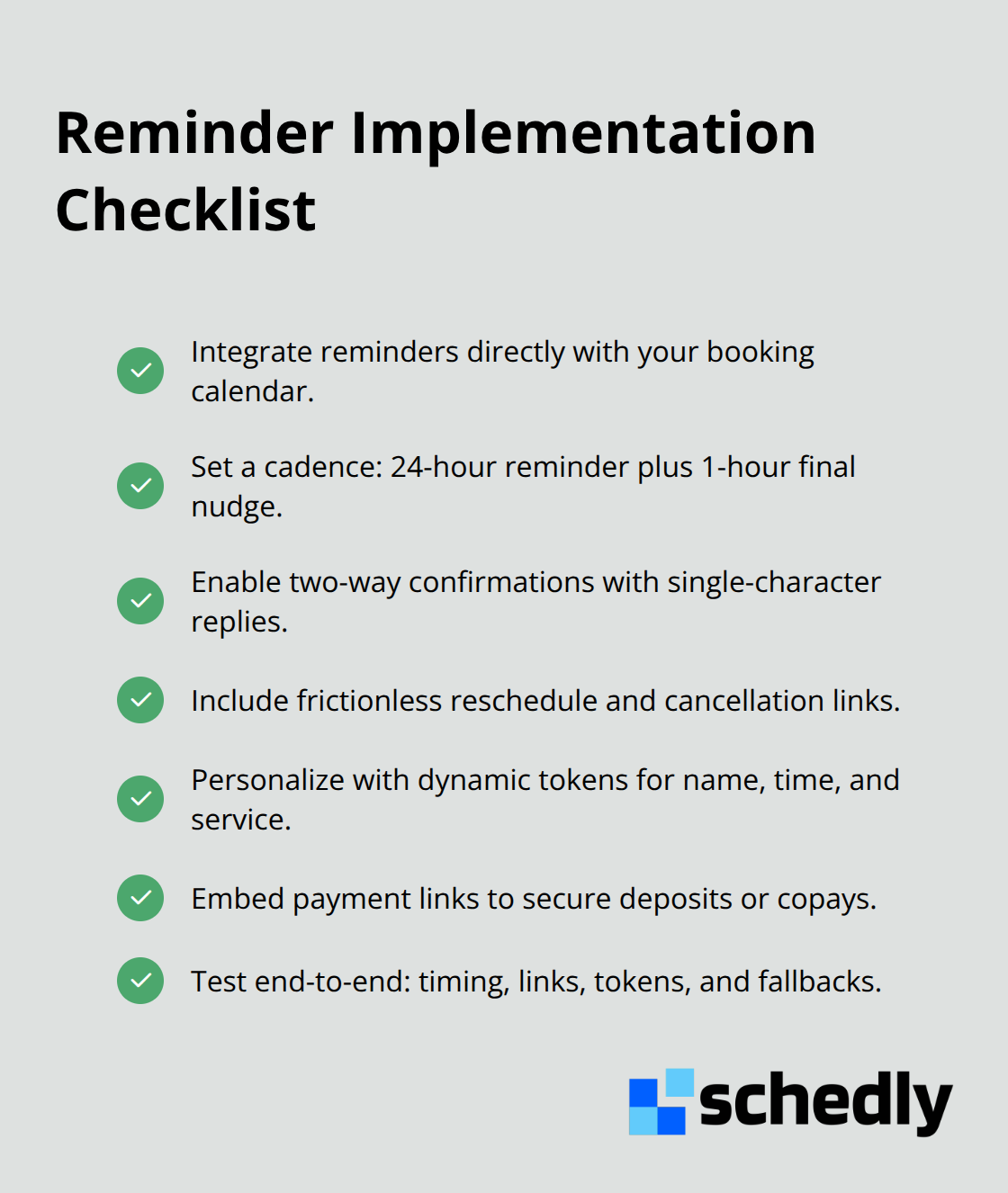
Your scheduling software must trigger reminders automatically without manual intervention. If staff members must configure reminder sequences separately from appointment bookings, your system will fail. Scheduling platforms that integrate reminders directly into the workflow mean an appointment created in your calendar automatically fires reminder sequences at preset intervals without requiring additional steps. This integration prevents the human error that derails most reminder strategies. A salon books someone for a 2 PM haircut through an online calendar and reminders fire automatically at 24 hours and 1 hour before the appointment. Calendar integrations with Google Calendar, Outlook, and iCloud keep your reminders perfectly synchronized with appointments your staff actually schedules, even when multiple team members manage bookings.
Transform Passive Notifications Into Active Confirmations
Two-way messaging converts reminders from passive notifications into active confirmations. When your system allows customers to reply directly through the reminder message, you gain actionable information about attendance likelihood. A customer who replies with a single character like C for confirm gives your staff real-time visibility into attendance likelihood. This information allows you to contact waitlisted customers immediately to fill slots where confirmations didn't arrive, recovering revenue that would otherwise disappear. Include direct reschedule and cancellation options within reminder messages so customers can adjust their plans without calling your business. Research shows that SMS appointment reminders result in less than 5% cancellation rates, but this shift from no-shows to cancellations actually improves your bottom line because cancellations allow you to serve other customers while no-shows leave your time slot completely wasted.
Embed Payment Links and Streamline Confirmation
Embed payment links directly in your reminders so customers can secure deposits or process full payment while confirming attendance. This approach accelerates cash flow while simultaneously increasing confirmation rates because customers appreciate the convenience. A medical practice requesting a $50 copay confirmation through a reminder link collects revenue days before the appointment while confirming attendance. Real estate agents can request earnest money deposits through reminder links, securing buyer commitment before showing properties. The confirmation process itself should require minimal effort-a single text character or one-click button eliminates friction that causes customers to skip confirmation entirely. Avoid asking customers to navigate to a portal or call your business to confirm; they will not do it. Test your entire reminder sequence with sample appointments before deploying to your full customer base. Send test reminders to yourself and staff members, verify that timing aligns with actual appointment windows, check that all links function correctly, and confirm that personalization tokens populate accurately. A single broken link or incorrectly timed reminder erodes trust in your system and reduces confirmation rates immediately.
Final Thoughts
Automated appointment reminders eliminate the gap between booking and attendance by transforming passive notifications into active confirmations that reach customers through their preferred channels. The data proves this works: businesses that implement reminder systems see no-show rates drop from 23% to 17% or lower, which translates directly into recovered revenue and improved staff efficiency. A dental practice losing $39,000 annually to five weekly no-shows can reclaim most of that money through a multi-channel reminder strategy that reaches customers via SMS and email at strategic intervals.
The real power comes from integration with your scheduling software, which fires reminders automatically without manual work and eliminates the confirmation calls that waste staff time. Two-way messaging transforms notifications into active confirmations, giving you real-time visibility into attendance likelihood so you can fill gaps with waitlisted customers before appointment time arrives. Customize your messages for different customer segments, embed confirmation options directly into reminders so customers reply with a single character, and test your entire sequence before deploying to catch timing issues or broken links that erode trust.
Treat automated appointment reminders as revenue tools rather than administrative tasks, and recognize that a 6% improvement in attendance rates compounds across hundreds of appointments monthly to generate thousands in recovered revenue. Schedly's scheduling software automates the entire booking and reminder workflow, integrating with your calendar systems and payment processors so reminders trigger automatically without manual intervention. Start by auditing your current no-show rate, then implement a structured reminder sequence targeting your highest-risk customer segments.