
Schedly resources
Automated Appointment Reminders To Cut No-Shows
No-shows cost businesses billions every year. A single missed appointment doesn't just mean lost revenue-it creates scheduling gaps, wastes staff time, and damages customer relationships.
Automated appointment reminders are one of the most effective ways to fix this problem. At Schedly, we've seen firsthand how the right reminder strategy can cut no-show rates in half.
The Price of No-Shows
The U.S. healthcare system alone loses about $564 million annually to missed appointments, according to the Veterans Health Administration and Sigma Repository data from 2024. Each missed visit costs an average of $196 in lost revenue. But healthcare isn't the only sector bleeding money from no-shows. Dental practices lose over $25,000 per year due to wasted chair time, while service-based businesses across industries report no-show rates averaging around 23.5% globally.
Some sectors face worse outcomes. Mental health practices frequently see no-show rates exceeding 30%, while procedural specialties tend to hover around 10-15%. The financial impact extends beyond immediate lost revenue. When a customer fails to show, that appointment slot remains empty, staff hours go unpaid, and the business loses the opportunity to fill that time with another paying customer.
The Real Cost to Your Bottom Line
For a practice with 500 monthly appointments and a 15% no-show rate at $200 per visit, the annual revenue loss reaches approximately $180,000. That's not a rounding error-that's a significant business drain that compounds month after month. This calculation reveals why appointment reminders matter so much. Even modest improvements in attendance directly translate to substantial revenue recovery.
Why Customers Actually Miss Appointments
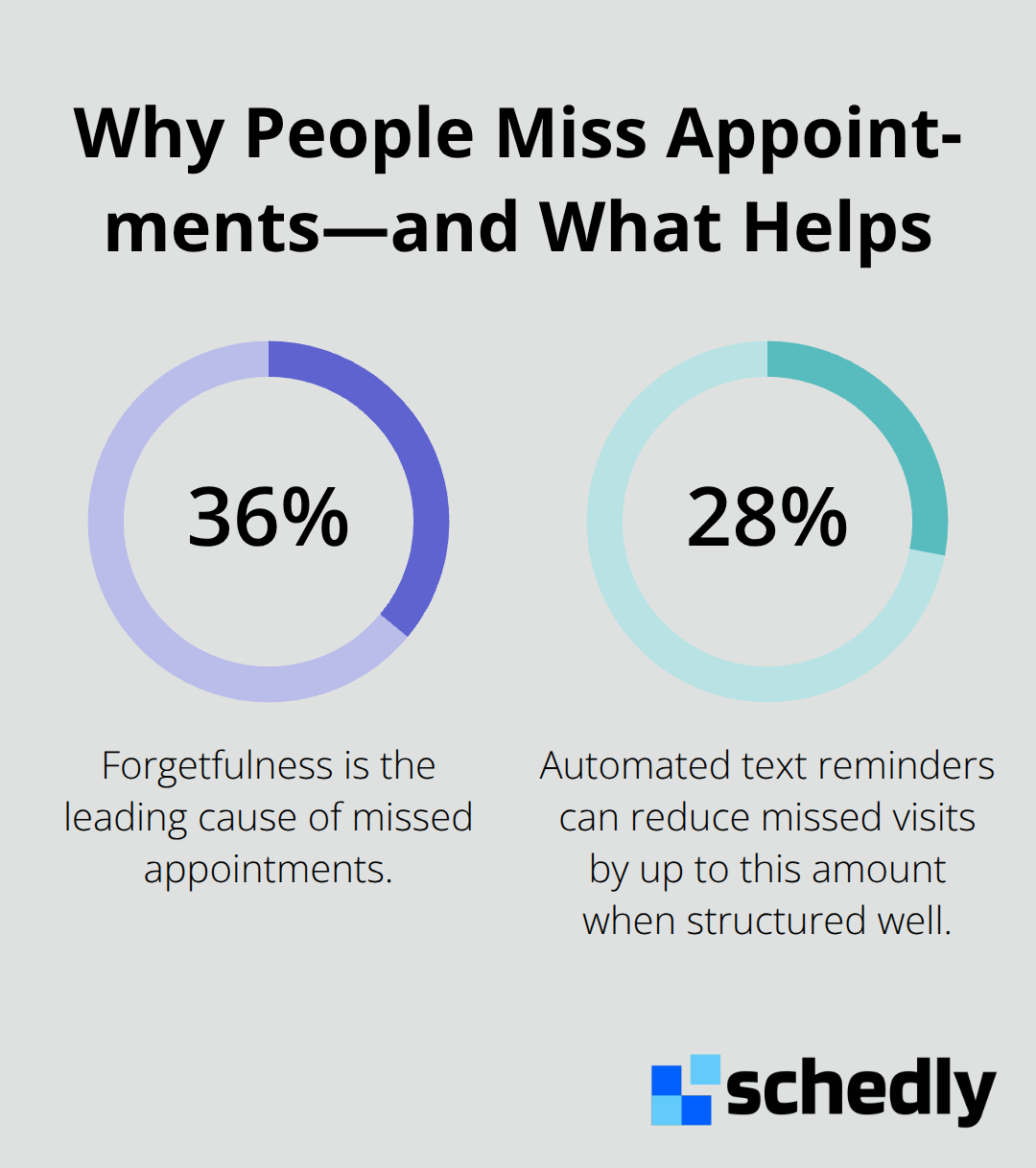
Forgetfulness accounts for about 36% of all no-shows, making it the leading cause. Customers genuinely forget their appointments despite booking them weeks earlier. Another substantial portion stems from scheduling conflicts that arise after booking, while a smaller percentage reflects genuine emergencies or transportation issues.
The problem intensifies for certain populations. Younger patients, who have higher mobile phone use, also tend to have higher no-show rates. Older patients often have multiple appointments and higher healthcare costs, making their attendance patterns critical. Customers from disadvantaged backgrounds, ethnic minorities, and those with complex medical conditions show even higher no-show rates (ranging from 20% to 50% depending on the practice type).
The Failure of One-Size-Fits-All Approaches
This reveals an uncomfortable truth: one-size-fits-all reminder approaches fail because they ignore the root cause. A single phone call reminder sent during business hours won't reach someone working a shift job. A generic email reminder won't help someone who genuinely forgot despite good intentions. The solution isn't simply reminding customers harder-it's reminding them smarter, through channels they actually use and at times they'll actually see the message. Understanding these patterns sets the stage for what actually works.
What Makes Reminders Actually Work
The Three-Message Cadence That Stops No-Shows
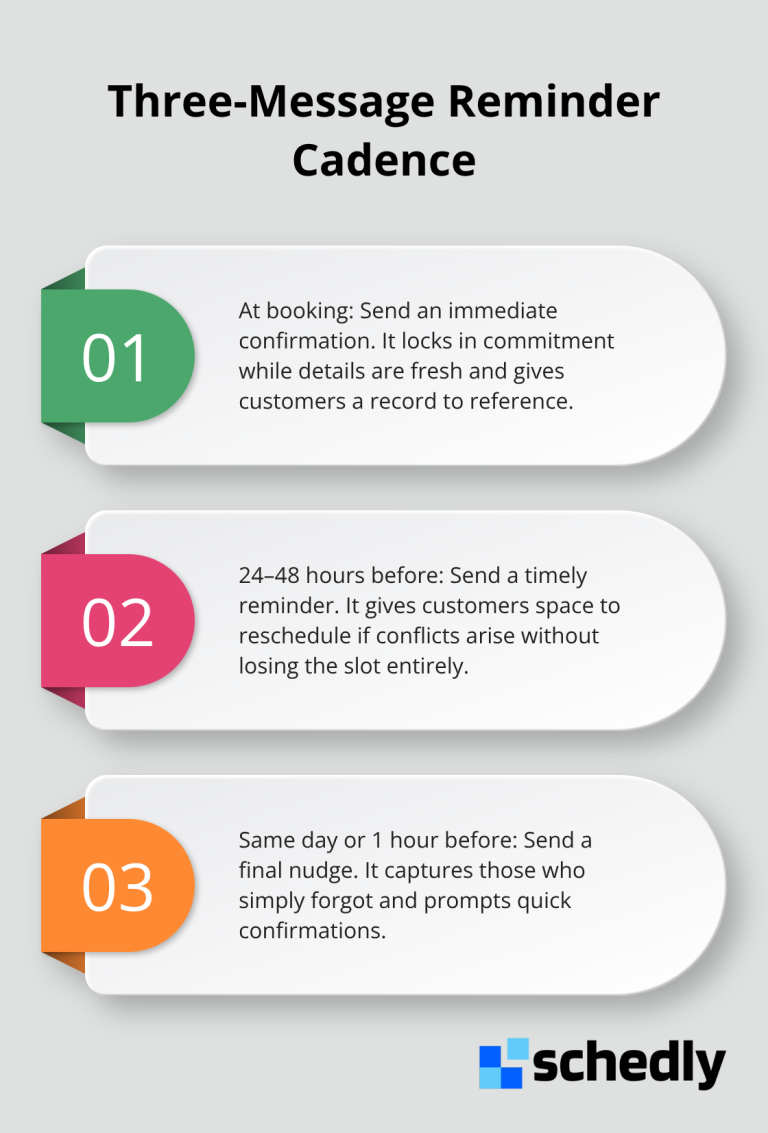
The difference between a reminder that stops no-shows and one that gets ignored comes down to strategy, not luck. A single generic text message sent three days before an appointment won't cut it. Research shows that automated text reminders can reduce missed visits by up to 28%, but only when they follow a specific cadence and structure. The most effective approach uses three touchpoints: an initial confirmation at booking, a 24 to 48 hour reminder, and a final same-day or 1-hour reminder.
This three-message sequence works because it targets different failure points. The booking confirmation catches people while the appointment is fresh in their mind. The mid-range reminder gives customers time to reschedule if conflicts arise. The final reminder catches those who genuinely forgot despite earlier messages.
Timing and Channel Selection Matter More Than Content
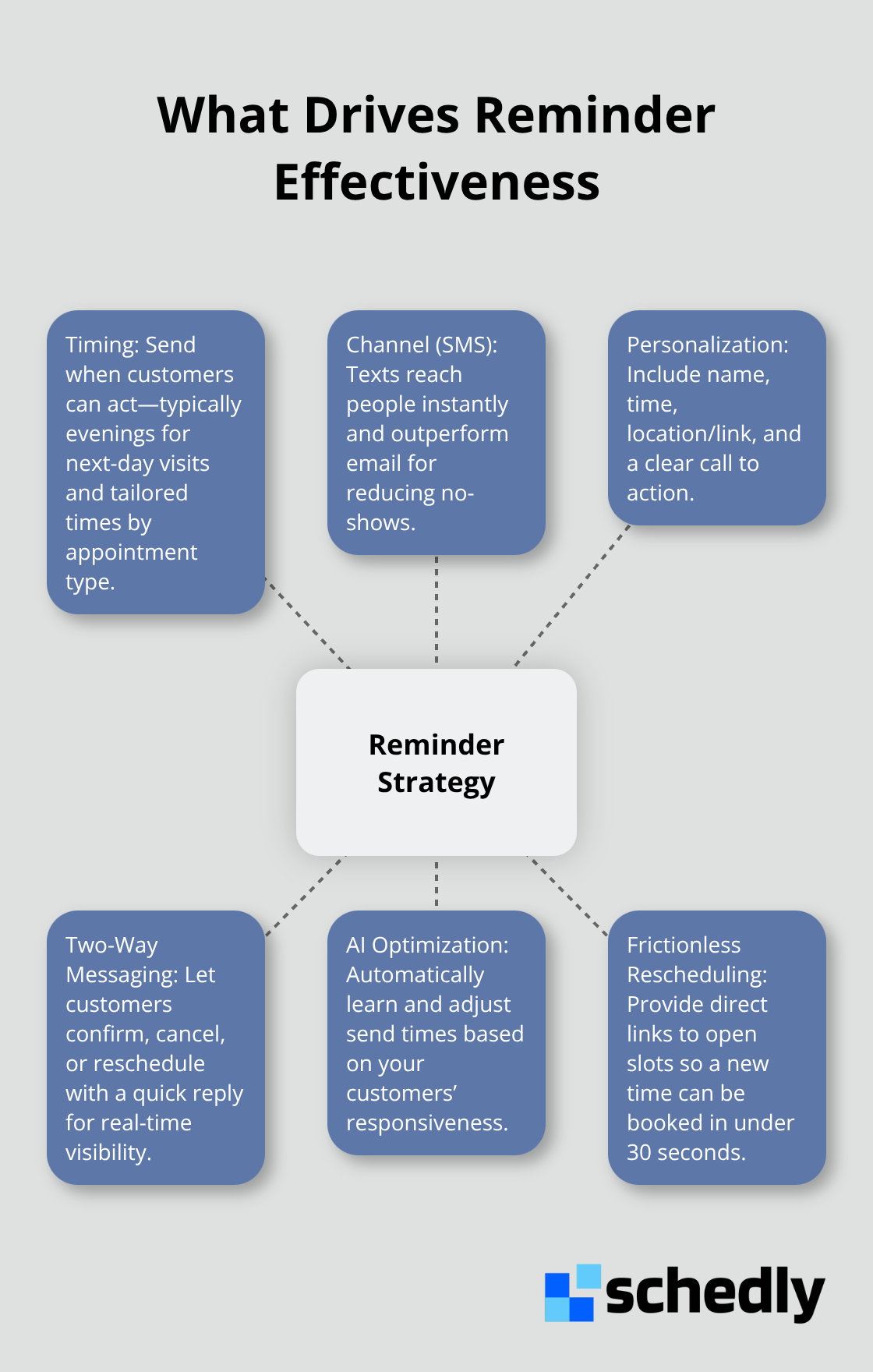
Timing matters equally. A reminder sent at 2 PM on a weekday reaches people during work, when they may not act on it. A reminder sent at 7 PM reaches people when they're home, planning their evening and more likely to confirm or reschedule. Research from Dialog Health in 2025 shows that text messaging delivers near-universal open rates, with most people reading texts within three minutes of arrival.
SMS reminders are roughly three times more effective than email for reducing no-shows. Email sits in an inbox alongside dozens of other messages, competing for attention. A text arrives as a notification on the phone itself. This channel advantage is so significant that even a poorly-timed SMS outperforms a perfectly-timed email.
Personalization and Two-Way Messaging Transform Response Rates
Personalization amplifies this effect. A generic message saying "You have an appointment tomorrow" generates far lower response rates than a message that includes the customer's name, the specific time, the location or virtual meeting link, and a clear call-to-action like "Reply C to confirm or R to reschedule." Personalization signals to the customer that this message matters to them specifically, not a batch message sent to hundreds of people. It also provides all the information they need to act immediately without hunting through emails or calling to confirm details.
Two-way messaging transforms reminders from one-directional announcements into conversations. When a customer replies with a single character to confirm, reschedule, or cancel, the business receives real-time data about who's actually coming and who needs a different slot. Two-way messaging cuts no-shows significantly according to implementation data from best-practice analyses. The customer benefits too. Instead of calling during business hours and waiting on hold, they text back while making dinner or preparing for bed. The response happens instantly.
Customizing Reminders by Appointment Type and Customer Behavior
For high-value or complex appointments, send the 24-hour reminder with extra details like parking instructions, pre-appointment requirements, or virtual meeting links. For routine visits, the day-of reminder is sufficient. Some practices send reminders at different times based on appointment type. A 6 AM reminder for a 9 AM appointment catches morning people. An 11 AM reminder for a 2 PM appointment reaches the lunch-break crowd. The data from your own practice tells you which times work best.
Track which reminders generate the highest response rates and confirmation percentages. Most platforms now offer AI-driven optimization that analyzes when your specific customers are most responsive and automatically adjusts send times. This removes guesswork and continuously improves performance as patterns shift seasonally or as your customer base changes. The next step involves measuring whether these optimizations actually translate to revenue recovery and identifying which customer segments respond best to different reminder strategies.
Implementation Strategy for Reminder Systems
Timing Reminders to Match Customer Behavior
Reminders land at the right time when you understand your specific customer base, not when you follow generic best practices. A 7 AM reminder works for early-morning appointments but fails for afternoon slots. Reminders sent 24 to 48 hours before appointments generate strong confirmation rates, yet this assumes the customer is awake and checking messages at that time. Afternoon reminders at 5 PM catch people during commute time or dinner prep, when they mentally plan their evening and act more readily. Morning reminders at 8 AM reach people during work, when they cannot easily reschedule even if they want to.
Test different send times against your own appointment data. Most scheduling platforms track which send times generate the fastest response rates for your practice specifically. Start with a 2 PM reminder for afternoon appointments and a 7 PM reminder for next-day appointments, then measure confirmation percentages for two weeks. Whichever time produces more responses becomes your baseline. Adjust from there.
Automating Optimization With AI
AI-driven systems automate this optimization, analyzing patterns across hundreds of appointments and continuously refining send times without manual intervention. The result: reminders land when customers are actually positioned to respond, not when your system happens to send them. This removes guesswork and continuously improves performance as patterns shift seasonally or as your customer base changes.
Making Rescheduling Frictionless
Rescheduling must be frictionless or reminders fail to recover canceled slots. A reminder that allows customers to reply with a single character like C to confirm or R to reschedule converts far more responses than messages requiring customers to call a phone number. Text-based rescheduling recovers roughly 27 to 40 percent of slots that would otherwise remain empty.
When a customer texts back R, they should receive an immediate reply with a direct link to available appointment times, not a request to call during business hours. The rescheduling link must show actual open slots in your calendar, allowing the customer to book a new time in under 30 seconds. Practices that force customers to call lose the momentum created by the reminder. The customer meant to reschedule but got distracted, and that slot disappears. Two-way messaging with direct rescheduling links eliminates this friction.
Staff also benefits. Instead of fielding dozens of confirmation calls, they receive real-time notifications when customers cancel or reschedule, allowing them to immediately contact waiting list customers or adjust staffing.
Measuring What Actually Matters
Calculate the baseline no-show rate for 30 days before implementing reminders, then measure the rate for 30 days after implementation. A practice with 500 monthly appointments and a 15 percent no-show rate can recover $36,000 to $54,000 in the first year if reminders reduce no-shows by just 20 to 30 percent.
Monitor confirmation response rates separately from no-show reduction. High confirmation rates signal strong reminder effectiveness, while low response rates suggest timing or channel problems that need adjustment. Track which appointment types generate the highest and lowest response rates. New patient appointments often need different reminder strategies than routine follow-ups.
Watch last-minute cancellations, measuring how many customers cancel within 24 hours of their appointment. This metric reveals whether reminders help people reschedule intentionally or simply prompt cancellations. The goal is not cancellations but confirmations and attendance.
Final Thoughts
Automated appointment reminders work because they address the actual reasons people miss appointments-forgetfulness, poor timing, and friction in rescheduling. A three-message cadence sent through SMS at optimal times with two-way rescheduling capabilities cuts no-shows by 20 to 30 percent in the first year, translating directly to revenue recovery. A practice losing $180,000 annually to no-shows can reclaim $36,000 to $54,000 by implementing reminders correctly.
The financial benefit extends beyond immediate revenue recovery. Staff spend less time on confirmation calls and more time on patient care, while customers experience better service through instant rescheduling without calling during business hours. Practices gain real-time visibility into who's coming and who needs outreach, allowing smarter staffing decisions and improved patient satisfaction that drives positive reviews and repeat bookings.
We at Schedly built our scheduling software to solve this problem through automated appointment reminders integrated with your calendar, payments, and performance analytics. Start measuring your no-show rate today-the revenue recovery begins immediately.