
Schedly resources
Automated Booking Workflows: From Click To Confirm
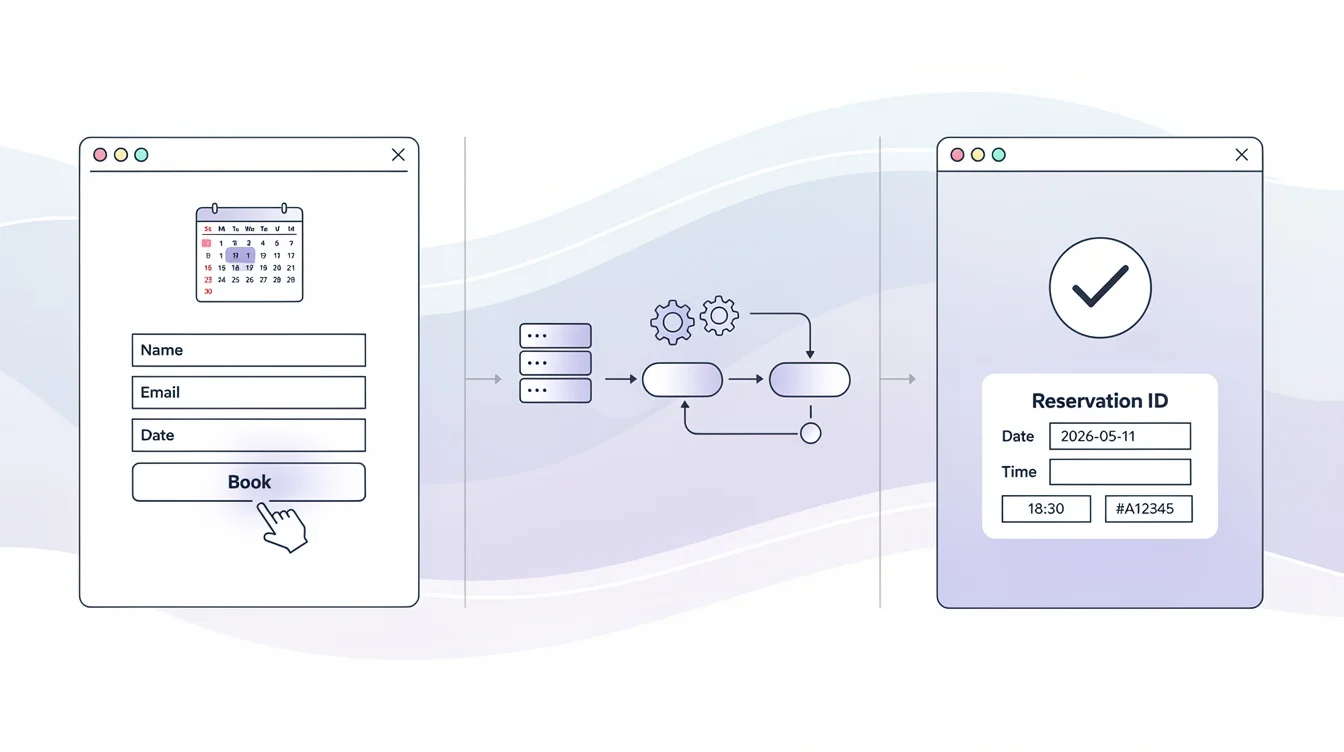
Manual booking processes waste time and create friction for both your team and customers. At Schedly, we've seen firsthand how automated booking workflows eliminate administrative overhead while cutting down scheduling errors.
When your booking system runs on automation, confirmations happen instantly, reminders go out automatically, and your calendar stays synchronized across all platforms. The result is happier customers and a team that can focus on what actually matters.
Why Automated Booking Workflows Matter
Slow responses kill bookings. Research shows that 89% of customers expect replies in under 1 hour, but the average is 12 hours. Manual booking processes force your team into a reactive cycle: someone checks email, manually updates a calendar, sends a confirmation message, then tracks down the customer if they don't respond. This friction exists at every stage.
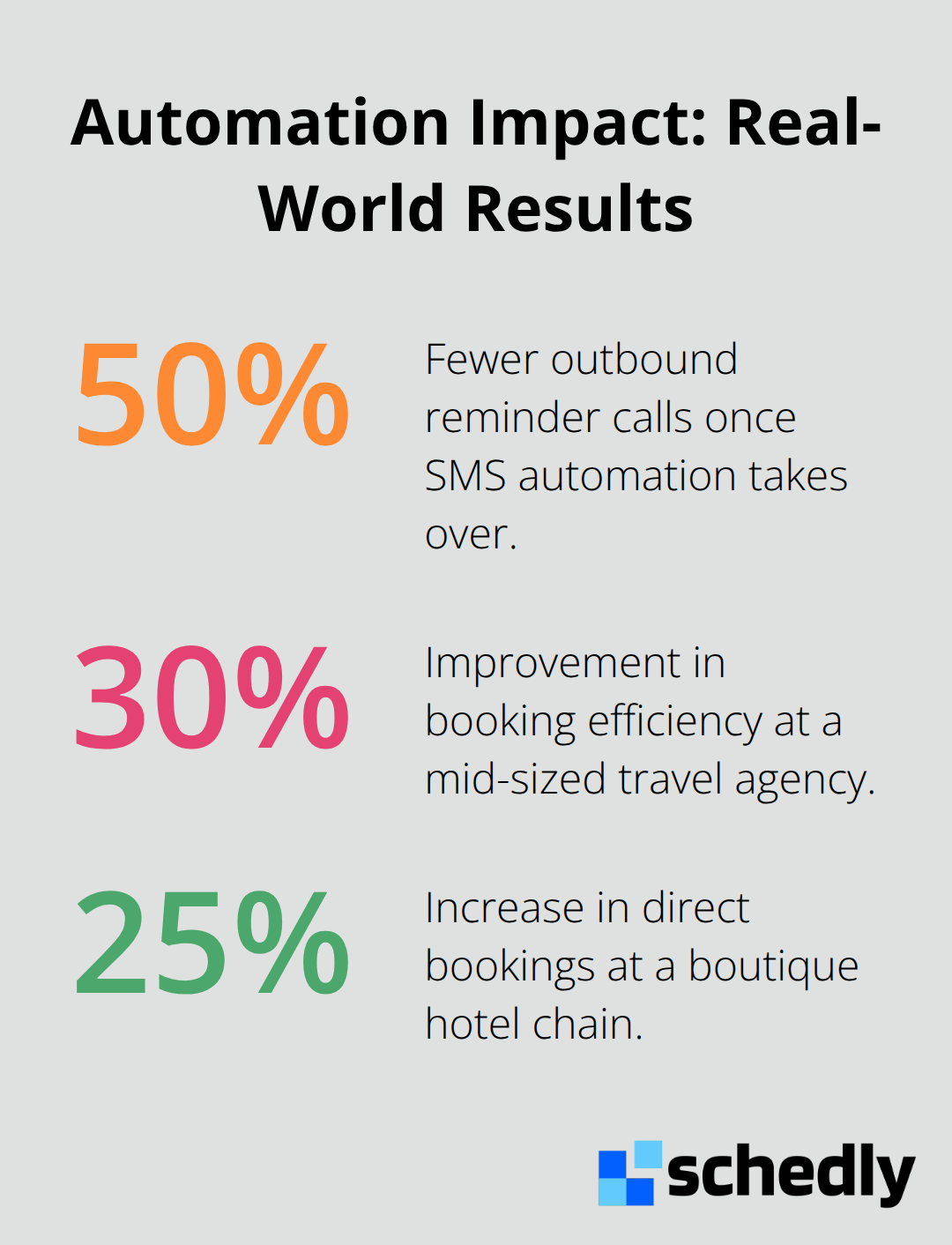
When you automate the workflow, that entire sequence collapses into seconds. Confirmations arrive instantly, calendar updates happen in real time, and reminders trigger without anyone lifting a finger. The operational impact is substantial. Teams report at least 50% fewer outbound reminder calls once SMS automation takes over, freeing staff for actual customer service work. A mid-sized travel agency achieved roughly 30% improvement in booking efficiency after implementing automation, while a boutique hotel chain experienced around 25% more direct bookings. These aren't marginal gains-they're the difference between a team drowning in administrative work and one that scales without hiring more people.
Real-Time Calendar Synchronization Eliminates Double-Bookings
Double-bookings happen because humans can't track availability across multiple platforms simultaneously. Your team member checks the Google Calendar, books a slot, then discovers the customer was already in your CRM calendar five minutes later. Automated workflows eliminate this entirely. Real-time calendar synchronization means every system sees the same availability at the same moment. When a booking confirms in one system, it automatically updates everywhere else. No gaps. No overlaps. No angry customers showing up to slots that don't exist. The result is fewer data-entry errors, faster confirmations, and a booking database that stays accurate without manual intervention.
Smart Reminders Drive Attendance and Reduce No-Shows
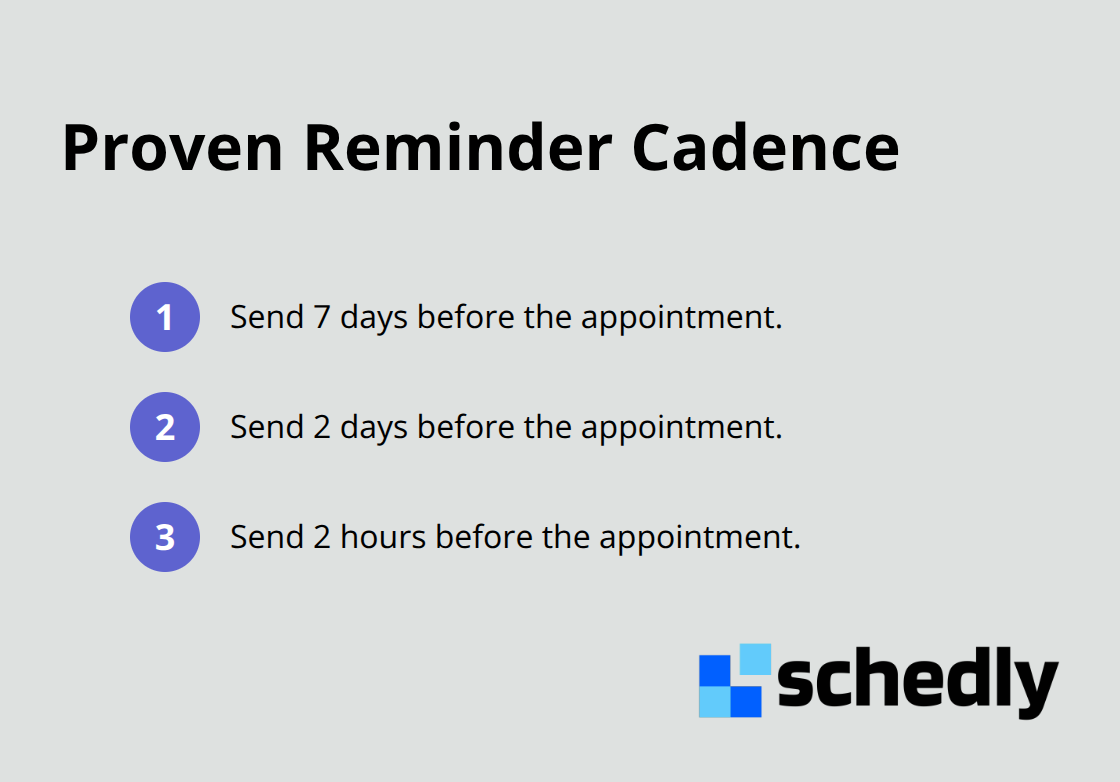
No-shows waste resources and create scheduling chaos. A three-step reminder cadence (seven days before, two days before, and two hours before) combined with two-way text replies produces measurable results.
These operational improvements set the foundation for what comes next: the actual components that make an automated booking workflow function at scale.
Key Components of an Effective Booking Workflow
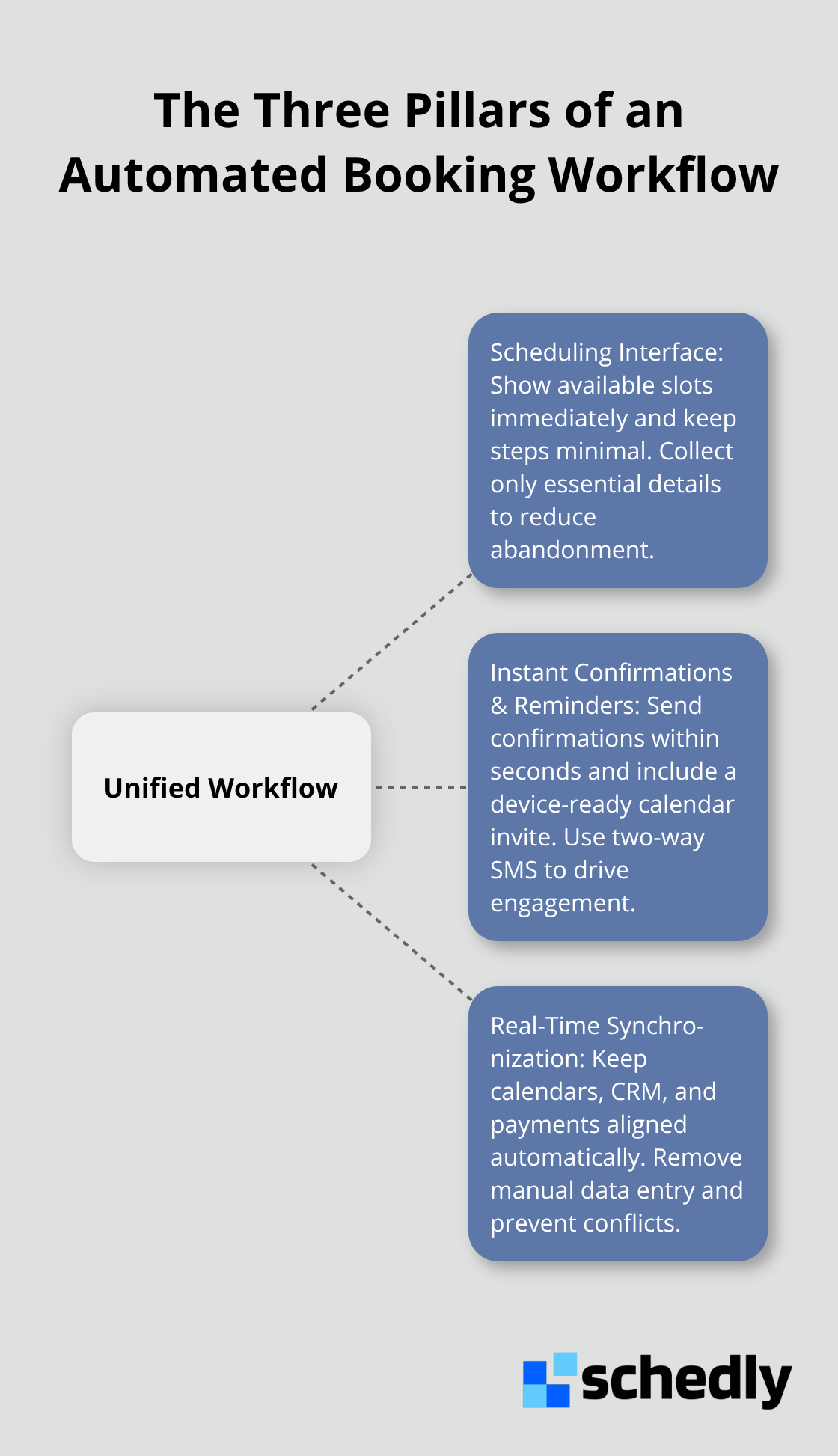
An effective automated booking workflow rests on three interconnected elements that must work together seamlessly. Each pillar supports the others, and weakness in any one undermines the entire system.
Your Scheduling Interface Sets the Tone
Customers judge your booking system in seconds. Too many interfaces ask for unnecessary information, force customers through multiple steps, or hide availability behind poor design. Your interface should display available slots immediately and let customers select a time in two clicks. Collect only the data you genuinely need: date, time, service type, party size, and contact details. Anything beyond that creates friction and abandonment. A seamless interface removes obstacles between intent and confirmation, which directly impacts conversion rates.
Automated Confirmations and Reminders Must Arrive Instantly
When someone books, they should receive confirmation within seconds, not hours. This confirmation needs to include a calendar invite they can add directly to their device, not a link they have to click. Reminders should follow a proven cadence: one week before, two days before, and two hours before the appointment. SMS works better than email because it has a 98% open rate, and customers can respond with a single text to confirm, cancel, or reschedule. This two-way interaction transforms passive notifications into active engagement.
Real-Time Synchronization Keeps All Systems Aligned
If your availability lives in Google Calendar, your customer data in a CRM, and your payments in Stripe, all three must update simultaneously when a booking happens. No gaps between systems. No manual data entry. No discovery calls where you realize the customer was already booked. Real-time synchronization eliminates the administrative work that typically falls on your team after a booking confirms.
Why These Three Pillars Must Connect
A beautiful scheduling interface means nothing if confirmations take three hours to arrive. Automated reminders fail if your calendar shows slots that are already taken. Real-time synchronization only matters if customers can actually book through an intuitive interface. These three elements succeed only when they operate as a unified system rather than disconnected tools.
When someone books through your scheduling page, the confirmation triggers instantly with a calendar invite, the reminder sequence activates, and your calendar, video conferencing platform, and CRM all update at the same moment. This interconnection transforms booking workflows from a collection of separate tools into a genuine system. The practical outcome is measurable: fewer no-shows because reminders actually reach people, faster team responses because there's no scrambling to update calendars, and happier customers because the entire experience feels frictionless from click to confirmation. With these three pillars in place, your team can now focus on the specific practices that keep them running smoothly at scale.
How to Set Up Booking Automation Without Creating Chaos
Map Your Current Booking Process First
Before you connect your first calendar or send your first automated reminder, you need a clear picture of what your booking process actually looks like today. Most teams operate on assumptions about their own workflows, which means they automate the wrong things or create bottlenecks in unexpected places. Start by mapping your current booking process, documenting every step a customer takes from first contact to post-booking follow-up, then document what your team does after each step. Does someone manually check availability? Does a confirmation email get sent from Gmail instead of your system? Does a calendar update happen hours later? These inefficiencies are exactly what automation should eliminate, but you can't automate what you haven't mapped.
Write down the actual time spent on each step. A healthcare practice might discover that staff spend significant time sending reminder SMS messages manually, while a salon might realize that calendar conflicts happen because someone updates Google Calendar but forgets to update the booking system. These concrete numbers justify the automation investment and show you where to focus first.
Prioritize Your Highest-Friction Points
Once you understand your current process, identify the three highest-friction points and automate those first, rather than trying to automate everything simultaneously. Most teams see immediate returns from automating confirmations and reminders because these tasks consume disproportionate time relative to their importance. This focused approach prevents overwhelm and delivers quick wins that build momentum for broader implementation.
Test Integrations Before Going Live
Integration is where most automation projects fail. You have a calendar system, a CRM, possibly a payment processor, maybe a video conferencing tool, and now a booking automation platform. Each system must speak to the others in real time, or you're back to manual data entry. Before selecting any automation tool, audit what you already use and verify that integrations between booking platforms and existing business tools exist. Google Calendar, Zoom, Stripe, and Salesforce are standard, but your practice management software or custom database might not integrate easily.
Test integrations in a sandbox environment before going live, because discovering that your CRM doesn't sync with your booking system after launch creates chaos. The practical approach is to start with a booking platform that connects to your most critical system first-usually your calendar or CRM-then layer additional integrations once that connection runs smoothly.
Monitor Data Flow and Catch Errors Early
Monitor data flow for sync errors before they affect customers. Set up alerts if a booking fails to sync or if availability information doesn't update within five minutes, so you catch problems immediately rather than discovering them when a customer complains about a double-booking. This proactive monitoring transforms potential disasters into minor adjustments.
Final Thoughts
Automated booking workflows transform how teams operate by eliminating hours of administrative work each week and cutting scheduling errors to nearly zero. You give customers the instant confirmations they expect, reduce no-shows because reminders actually work, and keep calendars synchronized across all systems. The operational gains are real and measurable: a mid-sized travel agency improved booking efficiency by 30%, while a boutique hotel chain increased direct bookings by 25%.
Getting started doesn't require overhauling your entire operation. Map your current process, identify your highest-friction points, then automate those first. Test your integrations before going live, monitor data flow to catch errors early, and watch your team reclaim hours each week as you expand to other parts of your workflow. The businesses seeing the biggest returns started small with confirmations and reminders, then expanded once they saw the impact.
Schedly handles this entire workflow for you with a branded scheduling page, 24/7 online booking, secure payments, and integrations like Google Calendar, Zoom, and Salesforce. Audit your current booking process, identify where time gets wasted, then implement automation where it matters most. The payoff starts immediately.