
Schedly resources
Client Data Management That Feels Like Magic
Most businesses keep client data scattered across email, spreadsheets, and different software. This chaos costs time and creates mistakes.
At Schedly, we've seen how proper client data management transforms operations. When your information is organized, your team moves faster and your clients notice the difference.
How to Organize Client Data So Your Team Actually Uses It
Structure Eliminates the Search for Information
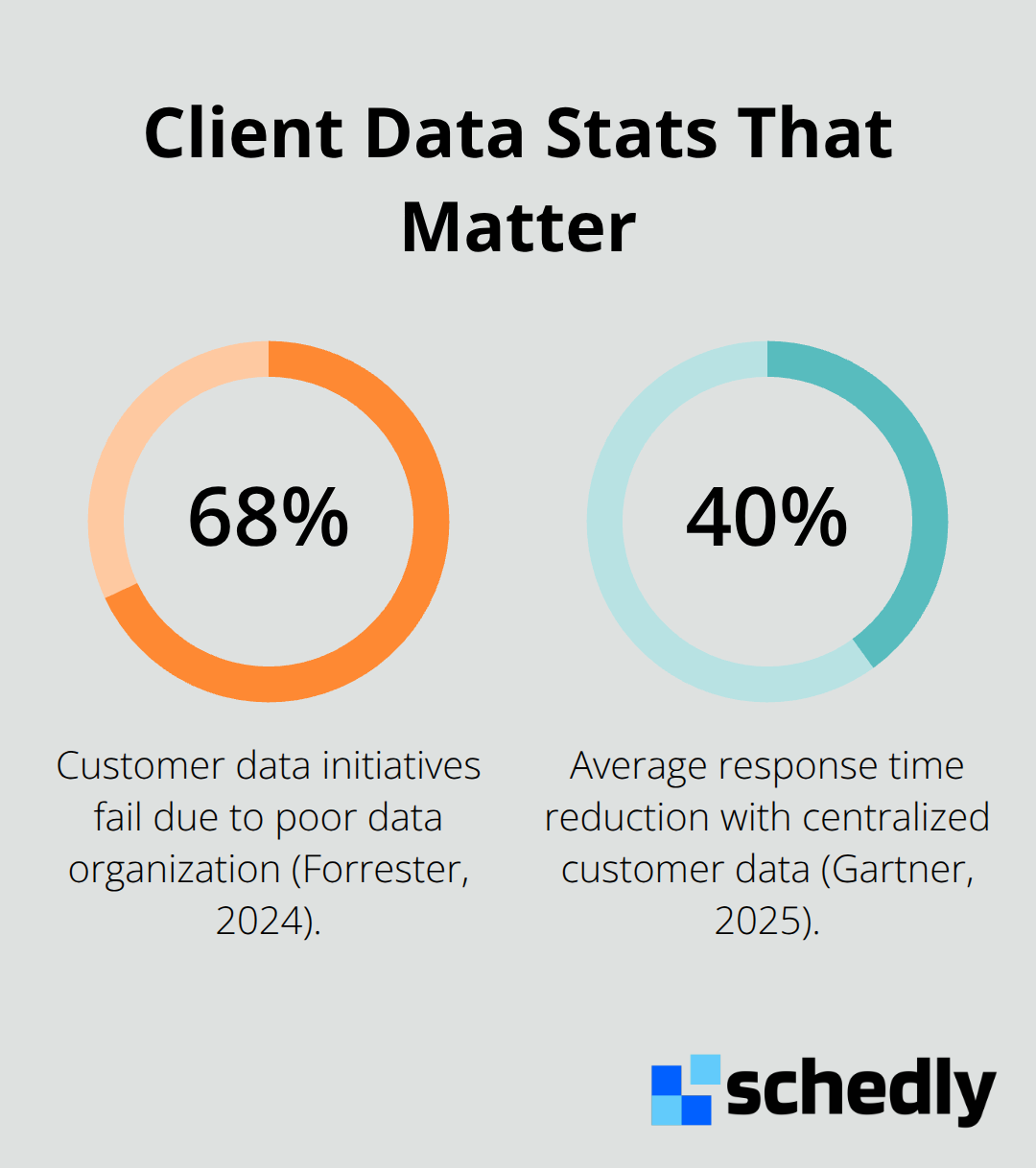
The difference between a functional client database and chaos comes down to structure. Most teams fail at client data management not because they lack tools, but because they never establish a system that matches how they actually work. A 2024 Forrester study found that 68% of customer data initiatives fail due to poor data organization, not technology limitations.
The fix starts with ruthlessly eliminating data fragmentation across multiple systems. Stop accepting that your scheduling information lives in one place, client notes in another, and payment history somewhere else entirely. Consolidate everything into a single system where your team sees the complete client picture without switching between five different applications. This matters because every tool switch costs focus and introduces the chance that your team will miss critical information.
When you pull client data from multiple sources, you waste time hunting for information rather than acting on it, according to McKinsey research on knowledge worker productivity. A single, unified system removes this friction and lets your team respond to clients faster.
Custom Fields and Tags Match Your Real Workflow
Generic fields like name and email address are table stakes, but real client management requires the flexibility to track what matters for your specific business. A dental practice needs to track tooth history and insurance details. A fitness trainer needs to log workout preferences and dietary restrictions. A legal firm needs to track case status and document access levels.
Create custom fields that map directly to your business decisions, then use tags to create flexible groupings that cut across your standard categories. Tags work better than rigid folders because a single client can belong to multiple categories simultaneously-a high-value referral source who is also at-risk for churn, for example.
The practical approach is to audit your last twenty client interactions and ask yourself what information you wish you'd had instantly available. Build those fields first, not a theoretical wish list. This ensures your system actually supports how your team works, not how you think they should work.
Automation Frees Your Team From Data Entry
Most teams still manually input information that comes through email, forms, or scheduling confirmations. Automation pulls this data directly into your system, reducing transcription errors and freeing your people to focus on client relationships instead of data entry.
Teams that automate routine data capture see significant time savings on administrative tasks, per research from Harvard Business School on operational efficiency. That time savings translates directly to more client interactions and stronger relationships.
The real payoff comes when your team stops treating data entry as a necessary evil and starts treating client information as something that flows into your system automatically. This shift changes how your team thinks about their work-they focus on clients, not paperwork.
With a properly organized data foundation in place, your team now has the information they need to deliver faster responses and better service. The next step is understanding how this organization directly impacts your bottom line.
Real-World Impact of Better Client Data Management
Speed Transforms Client Relationships
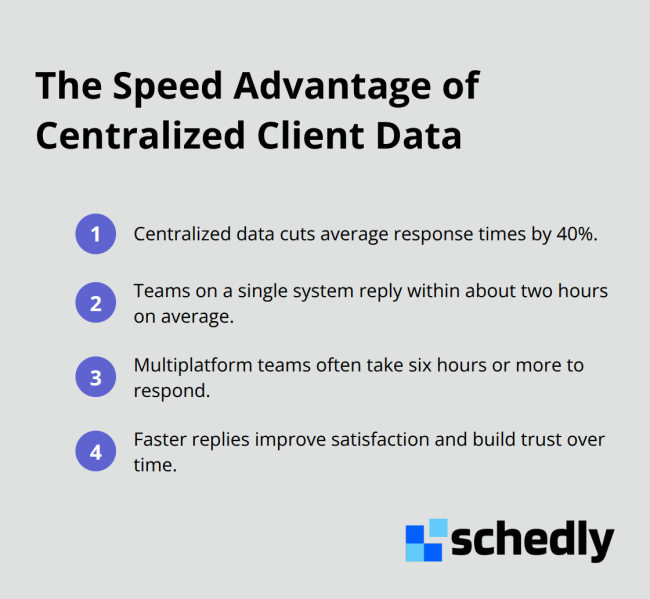
Organized client data produces measurable business results. When information stops scattering across platforms and flows into a unified system, your team responds faster to client needs, and clients notice the difference. Gartner's 2025 CRM research shows that organizations with centralized customer data see response times drop by an average of 40%, directly improving client satisfaction scores. This matters because every hour your team spends searching for information is an hour not spent building relationships or closing deals. Teams using a single client management system respond to inquiries within two hours on average, compared to six hours or more for teams juggling multiple platforms.
When a client contacts you and your team immediately sees their full history, preferences, and previous interactions, the conversation shifts from defensive to proactive. Your team stops scrambling to find notes or asking clients to repeat themselves. Instead, you demonstrate that you understand their situation and respect their time.
Data-Driven Decisions Improve Retention
Better data organization directly improves retention and shapes which clients drive your growth. Companies with strong data practices see client retention rates improve by 25% to 35%. This improvement happens because your team makes smarter decisions about who to prioritize and how to serve them better.
When you know which clients generate the most revenue, which ones risk leaving, and which have the highest lifetime value, you allocate your best resources strategically. A legal firm using unified client data identifies which cases have the highest complexity and assigns experienced attorneys accordingly. A fitness trainer with organized client records spots patterns in attendance and reaches out before a client goes inactive. A real estate agent recognizes which past clients are most likely to refer others and invests in those relationships intentionally.
Personalization Drives Loyalty and Growth
Clients who receive personalized attention based on their history and preferences stay longer and spend more. They also refer others at higher rates because they feel understood rather than treated as generic transactions. This shift from reactive service to proactive relationship management transforms how clients perceive your business. Your team now possesses the information foundation needed to make strategic decisions about resource allocation, client prioritization, and service delivery. The next step is understanding what prevents most teams from achieving this level of data organization and how to avoid those common mistakes.
Where Client Data Goes Wrong
Most teams accumulate data problems gradually until the system becomes unusable. Email contains client notes that never reach your CRM. Spreadsheets hold payment history that contradicts what your accounting software shows. Scheduling tools know a client prefers morning appointments, but your main database doesn't. This fragmentation isn't a technology problem-it's an execution problem. Teams fail at client data management not because they lack tools but because they never establish governance rules that stick. Gartner research on data quality found that inconsistent data standards across departments directly cause the mistakes and delays that frustrate both your team and your clients.
Incomplete Information Kills Revenue
The real cost emerges when your team makes decisions based on incomplete or outdated information. A salesperson doesn't see that a prospect already spoke with your team last month, so they pitch something irrelevant. A service manager doesn't know a client has a complaint pending, so they offer the same problematic solution again. A support agent wastes time asking a client for information they already provided. These aren't minor inconveniences-they're revenue killers that compound across every client interaction your team handles.
Data Decay Destroys Reliability
Client information becomes stale the moment you stop updating it. A Forrester study on data governance found that phone numbers change, job titles shift, email addresses bounce, and clients move to competitors. If your team doesn't have a systematic way to refresh this information, you're making decisions based on outdated snapshots.
Many teams create duplicate records without realizing it-one contact enters a client as John Smith, another enters John Smythe, and your system treats them as two different people. You send duplicate communications, miss cross-sell opportunities, and waste resources chasing the same prospect twice. This duplication problem accelerates as your business grows and more team members input data independently.
Security and Compliance Create Liability
Client data sitting in unencrypted spreadsheets or accessible to anyone with login credentials creates serious liability. GDPR and CCPA regulations require that you know exactly where client data lives, who can access it, and how long you retain it. Teams that fail to establish clear data access policies face regulatory fines and reputation damage.
A healthcare provider storing client records in unsecured cloud folders violates HIPAA. A financial services firm with client data accessible to all employees violates data protection standards. A legal practice that doesn't track which staff members accessed sensitive case files can't prove compliance during an audit. These violations aren't theoretical risks-they result in actual penalties and lost client trust.
Governance Standards Create Accountability
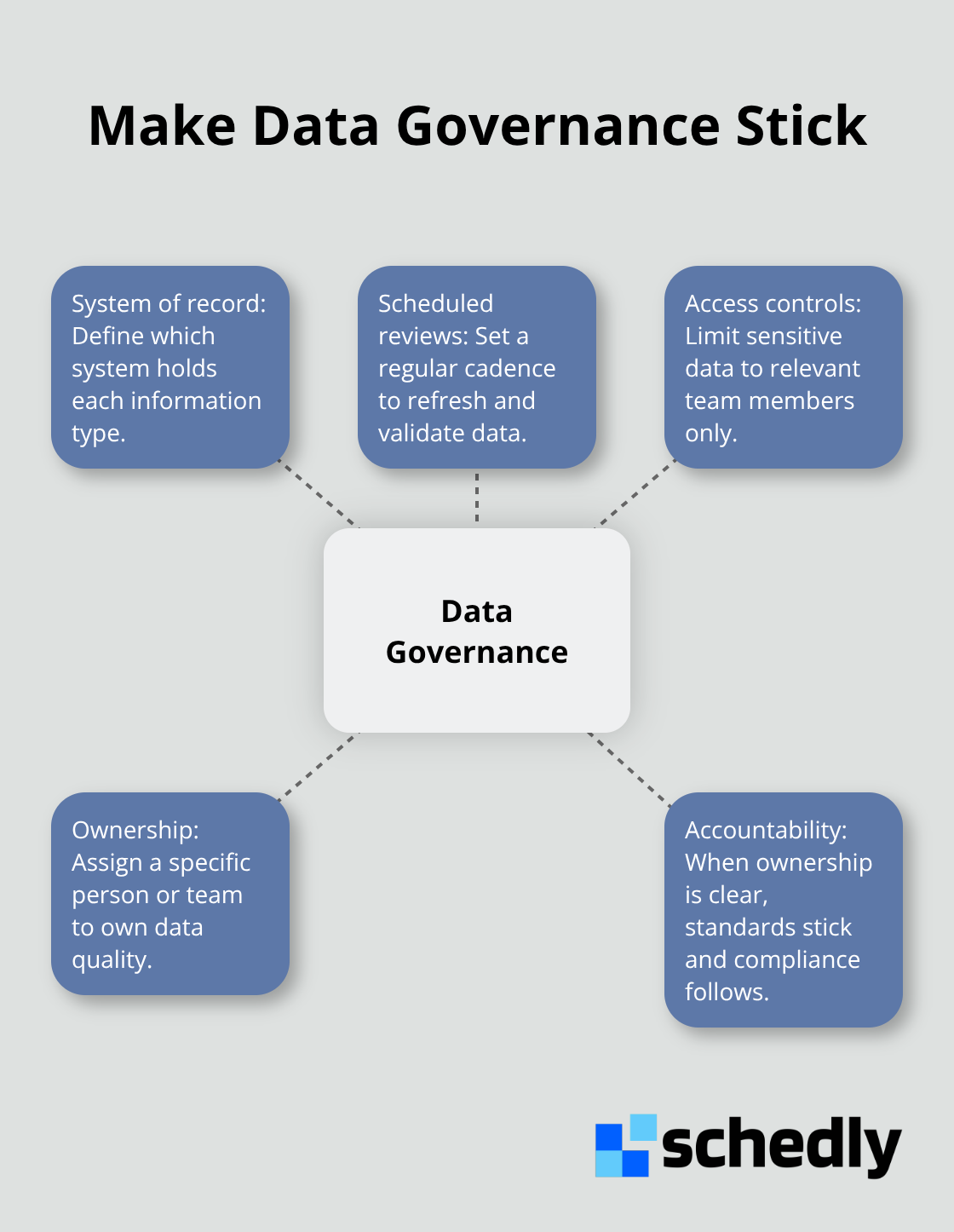
The solution isn't buying more software-it's establishing standards that your team actually follows. Define which system of record holds each type of information. Set a schedule for data reviews and updates. Implement access controls so only relevant team members see sensitive information. Assign data governance responsibility to a specific person or team, not as an afterthought for everyone.
Final Thoughts
Client data management transforms from a back-office burden into a competitive advantage when you treat it as a strategic priority rather than an optional task. The organizations that win are the ones where every team member understands that organized client information directly impacts revenue, retention, and response speed. Start small with one department or workflow, get that working, then expand across your business.
Your team responds faster when data lives in one place instead of scattered across multiple tools, clients feel understood when you access their complete history instantly, and your retention improves when you make smarter decisions about which relationships deserve your best resources. You avoid the compliance and security risks that come from unencrypted data sitting in random spreadsheets, and you stop wasting time on duplicate records and incomplete information. Real progress beats perfect planning, so act now rather than waiting for ideal conditions that may never arrive.
We at Schedly built our platform specifically for teams that need to manage client relationships while automating the scheduling chaos. Schedly combines a customer-focused CRM with automated booking, payment processing, and workflow automation so your team stops juggling multiple tools and your client data lives in one place where it actually works for you.