
Schedly resources
Customer Data Privacy Tips: Protect Client Information Across Channels
Data breaches cost companies an average of $4.45 million per incident, according to IBM's 2024 Cost of a Data Breach Report. Beyond the financial hit, losing customer trust can take years to rebuild.
At Schedly, we know that customer data privacy tips aren't optional-they're fundamental to running a responsible business. This guide walks you through practical steps to protect client information across every channel you use.
Why Customer Data Privacy Matters for Your Business
Regulatory Fines Hit Hard and Fast
Regulatory fines aren't theoretical threats anymore. The GDPR levies penalties up to 20 million euros or 4% of annual revenue, whichever is higher. The CCPA in California allows fines of up to 7,500 dollars per intentional violation. If your business operates across multiple states or serves EU customers, you're already subject to these laws whether you've acknowledged them or not. Compliance isn't optional-it's a legal requirement that directly affects your bottom line. Non-compliance triggers enforcement actions that halt operations, drain resources through legal battles, and create administrative burdens that pull your team away from growth. Many industries like healthcare, legal, and financial services face even stricter requirements under HIPAA, FERPA, and GLBA, making data protection a competitive necessity rather than an optional practice.
Customer Trust Determines Your Market Share
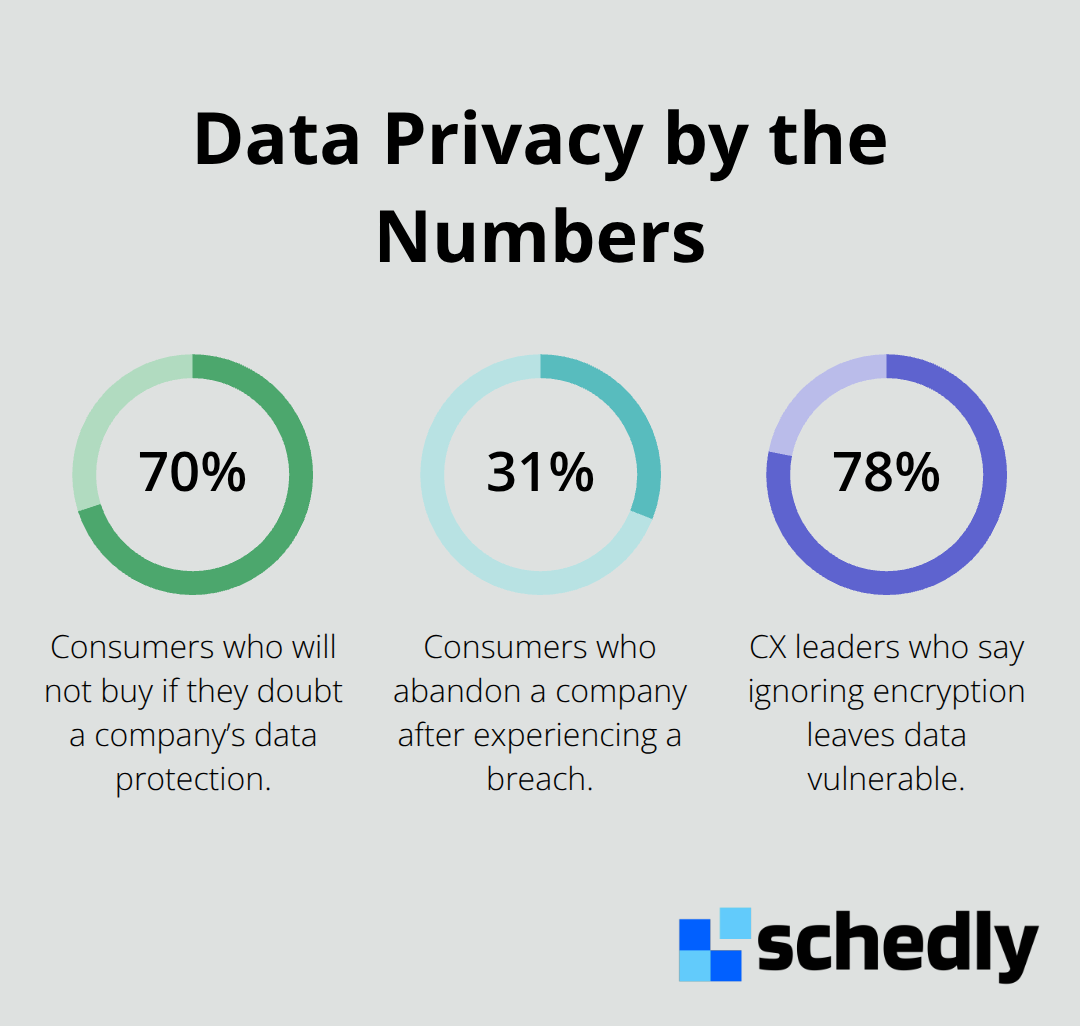
The trust factor is where data protection becomes a business strategy, not just a compliance checkbox. According to Zendesk's 2024 CX Trends Report, 70% of consumers won't buy from a company if they doubt its ability to protect their data. That's not a small segment-that's the majority of your potential market walking away. When a breach happens, the damage extends far beyond the immediate financial cost.
Operational Disruption and Liability Exposure
The operational disruption alone-notifying affected customers, working with regulators, conducting forensic investigations, and implementing fixes-consumes resources that could fuel growth. Data breaches also create liability exposure. If you store payment card information, you're subject to PCI DSS compliance, and violations result in fines from payment processors. If you handle health information, HIPAA breaches trigger mandatory notifications and potential enforcement actions from HHS. The smartest approach treats data protection as foundational infrastructure from day one, not as something you add after a crisis forces your hand. With these risks in mind, the next section outlines the essential practices that protect client information and reduce your exposure across all business operations.
Essential Privacy Practices for Managing Client Information
Control Who Accesses Customer Data
Strong access controls start with a simple principle: only the people who absolutely need to see customer data should have access to it. Assign role-based permissions in your systems so a receptionist cannot access payment records, and a billing team member cannot view medical histories. This approach limits exposure when an employee leaves or a credential gets compromised. Zendesk's 2024 CX Trends Report found that 78% of CX leaders say ignoring encryption leaves data vulnerable, which tells you how widespread this oversight remains across businesses.
Encrypt Data at Every Stage
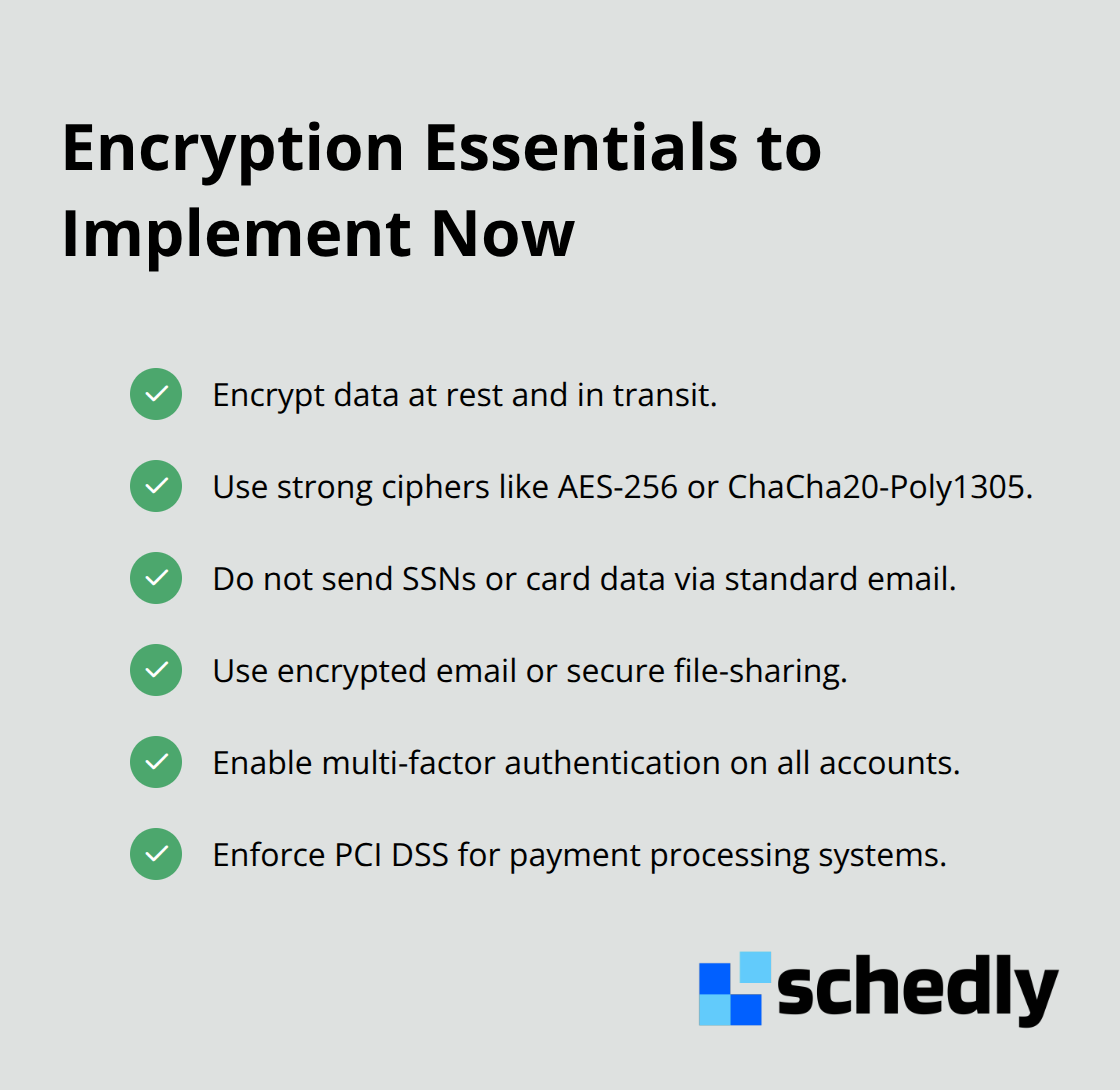
Encryption transforms readable data into unreadable code, making it useless to anyone who shouldn't have it. Apply encryption to data at rest (stored on servers or devices) and to data in transit (moving between systems) using modern cipher suites such as AES-256 and ChaCha20-Poly1305. Your payment processing systems must enforce this immediately because PCI DSS standards mandate encryption for all cardholder data.
Audit Your Data Systems and Locations
Security audits expose the gaps that criminals exploit. Conduct a full inventory of where your customer data lives across all systems, devices, and locations, then map how that data moves through your business. Identify which employees actually need access to sensitive information and remove access for those who don't. A written data retention policy matters more than most businesses realize because keeping data longer than necessary increases your breach risk. Set specific timeframes for how long you retain customer records, then securely delete or destroy data when that period ends.
Train Your Team on Data Security
Human error causes the majority of data incidents, making staff training essential for breach prevention. Your team needs to recognize phishing emails that attempt to steal credentials, understand why they cannot share passwords, and know how to report suspicious activity without fear of punishment. Make training mandatory at least annually and include new hires immediately.
Protect Your Backups and Recovery Systems
Store backups separately from your main systems so a ransomware attack does not wipe out both your primary data and your recovery copies. Encrypt backups the same way you encrypt live data, test that your backups actually restore correctly, and keep at least one backup copy offsite or in a separate cloud region. The cost of implementing these practices now remains minimal compared to the average 4.88 million dollar cost of a breach globally. With these foundational protections in place, the next section addresses how to extend this security across the different communication channels your business uses to interact with customers.
How to Secure Customer Data Across Email, Payments, and CRM Systems
Protect Sensitive Information in Email Communications
Email remains your most vulnerable communication channel, and the statistics prove it. Forrester research shows email volume increased 30% since 2022, making it the primary outbound channel for most businesses. Most teams treat email like an open postcard, sending sensitive information in plain text where anyone intercepting the message can read it instantly. Stop this practice immediately. Never send Social Security numbers, credit card details, bank account information, or authentication codes through standard email. Instead, use encrypted email services or secure file-sharing platforms that require password verification before recipients access attachments. If your team communicates with customers through messaging apps or chat platforms, apply the same encryption standards. Implement multi-factor authentication on all email accounts so a stolen password alone cannot grant access to customer communications. Your messaging systems should also log who accessed what information and when, creating an audit trail that helps you detect unauthorized access quickly.
Enforce Strict Controls on Payment Card Data
Payment processing demands a different level of rigor because payment card data attracts criminals directly. PCI DSS standards mandate encryption for all cardholder data, and compliance violations result in fines from payment processors that dwarf the cost of proper implementation. Use established payment gateways like Stripe or PayPal that handle encryption and compliance for you rather than storing card data on your own servers. This approach eliminates the burden of managing sensitive payment information internally while maintaining full compliance with industry standards.
Restrict Access and Monitor Activity in Your CRM
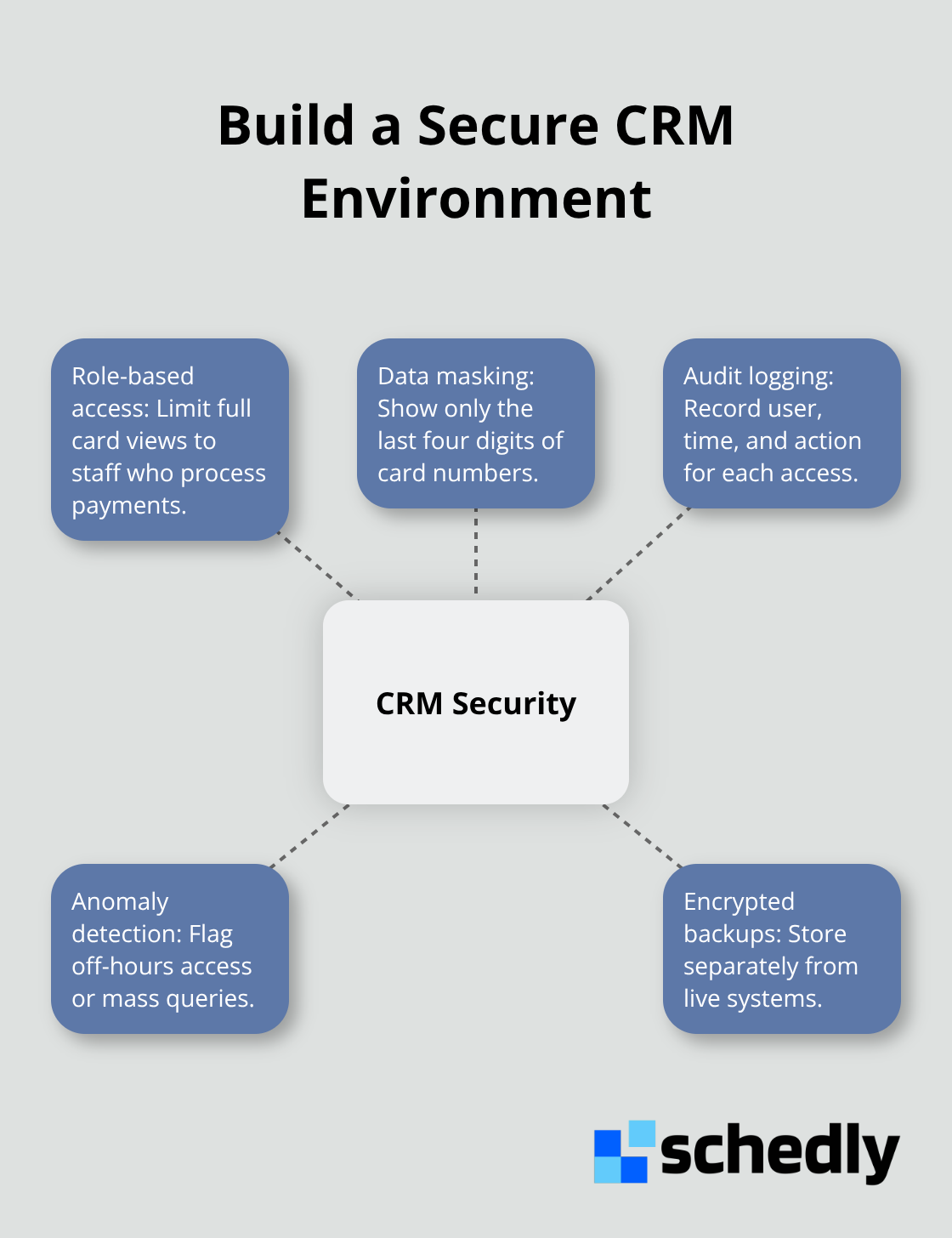
Your customer relationship management system should restrict access so only employees who actually process payments can view full card numbers. Mask card data in your system so team members see only the last four digits, reducing exposure if credentials get compromised. Your CRM should also track every data access with timestamps and user identities, enabling you to spot suspicious patterns like an employee accessing customer records outside their normal work hours or querying thousands of files simultaneously. This audit capability transforms your CRM from a simple contact database into a security monitoring tool. Regular backups of your CRM data must be encrypted separately and stored in a different location than your live system, protecting you against ransomware attacks that encrypt both your primary data and recovery copies.
Final Thoughts
Start your data protection work today by auditing where customer data lives across your systems and who accesses it. Remove unnecessary information immediately, tighten access permissions so employees see only what they need, and implement encryption for data at rest and in transit. These customer data privacy tips form the foundation that prevents breaches and builds customer confidence.
Your next step is selecting tools that enforce these practices automatically rather than relying on manual processes that fail. A CRM with built-in audit trails, encryption, and role-based access controls reduces human error and creates accountability, while Schedly helps you manage client data securely while automating your booking process and freeing your team to focus on service delivery. If you handle payments, use established gateways that manage PCI compliance for you instead of storing card data internally.
When customers know you take their data seriously through transparent privacy policies and visible compliance efforts, they stay loyal even when competitors emerge. The 70% of consumers who won't buy from companies they don't trust represent your market opportunity, and investing in data protection now directly strengthens your business's future.