
Schedly resources
Efficient Appointment Scheduling: Save Time and Money
Scheduling appointments manually costs businesses thousands of dollars every year. Between staff time spent on bookings, missed appointments, and double-booked slots, the inefficiencies add up fast.
At Schedly, we've seen firsthand how efficient appointment scheduling transforms operations. This guide shows you exactly where money is being lost and how to reclaim it.
What Manual Scheduling Really Costs Your Business
The Hidden Time Drain
Staff members waste roughly 10-15% of their workday on scheduling-related tasks when using manual systems. For a small business with five employees, that translates to nearly 4-6 hours per week lost to phone calls, emails, and calendar coordination. These hours accumulate into thousands of dollars annually in lost productivity-time your team could spend on actual customer service or revenue-generating work instead.
Capacity You're Leaving on the Table
Online appointment scheduling increases patient satisfaction and enables more efficient care. When your calendar sits half-empty because clients can't easily book online, you leave money on the table every single day.
No-Shows Destroy Your Revenue
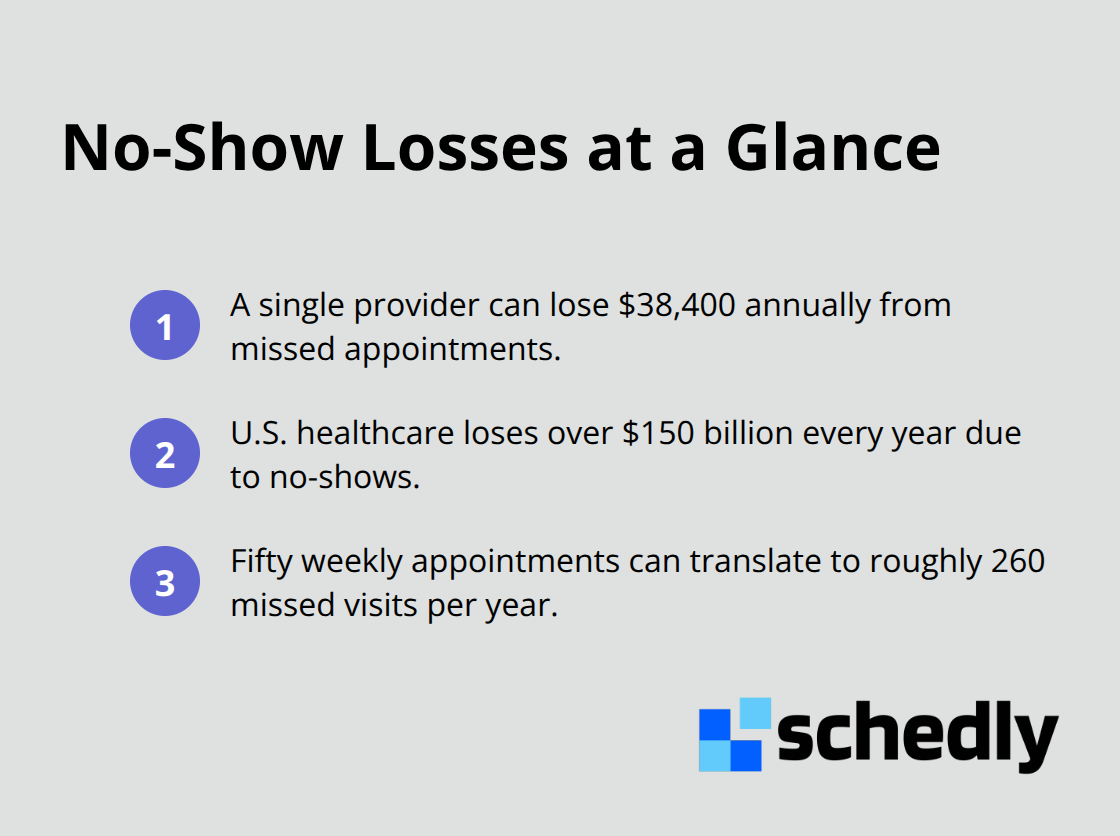
A single provider can lose $38,400 annually from missed appointments. U.S. healthcare loses over $150 billion every year due to no-shows. A business with 50 appointments per week loses roughly 260 appointments annually to no-shows-revenue that vanishes before it even appears on the books. Staff then spend additional time following up on cancellations and rescheduling gaps, compounding the financial damage.
Double-Bookings Create Chaos
When two clients show up for the same slot, you damage customer relationships, strain staff, and often lose both appointments' revenue while spending extra time managing the crisis. Local businesses that added online booking saw revenue increases up to 120% according to analyses from GetApp and WebFlow, which demonstrates that scheduling efficiency directly impacts your bottom line. This isn't theoretical-it's measurable, real-world impact.
How Reminders Change the Game
Personalised phone call reminders seem to be more effective than SMS in reducing missed appointments, especially among older patients. The data proves that manual scheduling systems hemorrhage money through preventable inefficiencies, while automated systems recapture that revenue and free staff to focus on customer service rather than calendar management.
These losses compound across weeks and months. The question isn't whether you can afford to fix your scheduling-it's whether you can afford not to.
How Scheduling Software Fixes What Manual Systems Break
Reclaiming Lost Appointment Slots
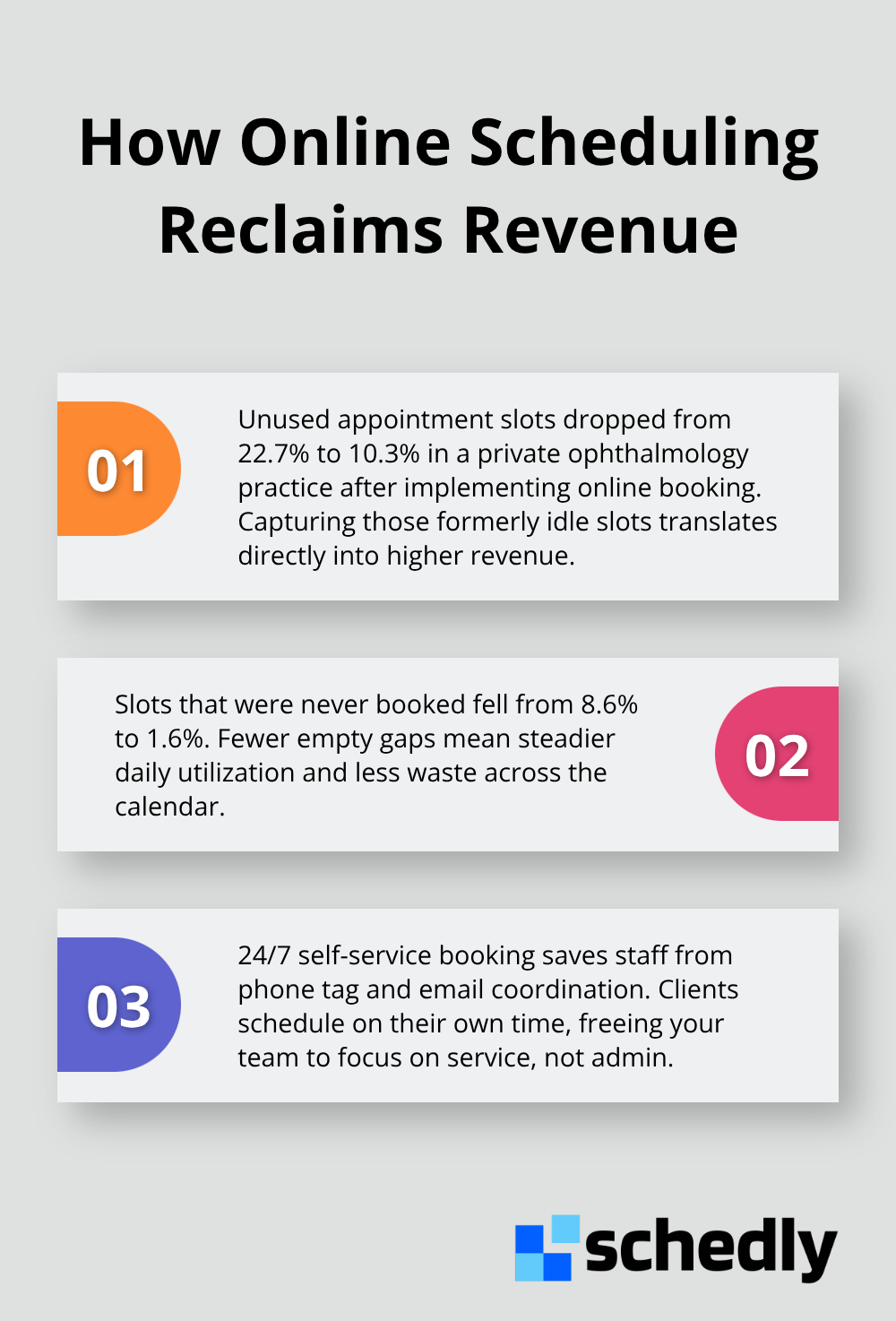
Scheduling software eliminates the administrative bottleneck that bleeds time and money from your operation. When clients book 24/7 on a branded scheduling page without contacting your staff, you reclaim those hours currently spent on phone tag and email coordination.
Preventing Double-Bookings and Conflicts
Real-time availability syncing across your calendar system prevents the double-bookings that create customer service disasters. When your scheduling software integrates with Google Calendar, Zoom, or Outlook, conflicts become impossible because availability updates instantly across every platform. The same ophthalmology practice reduced no-show rates compared to offline bookings, a statistically significant difference that protected thousands in lost revenue.
Automated Reminders That Actually Work
SMS reminders prove far more effective than relying on staff follow-ups. SMS text reminders are 3x more effective than email for reducing no-shows. Patients who received SMS reminders showed measurably reduced no-show risk compared to those without reminders, meaning your revenue stays protected and your staff avoids wasted follow-up work.
Accelerating Payment Collection
Payment processing built directly into your booking system accelerates revenue collection. Clients pay at the moment they commit to an appointment rather than months later during or after service delivery. This timing shift improves cash flow and eliminates follow-up invoicing work. Secure payment gateways like Stripe and PayPal process transactions without leaving your scheduling interface, protecting both your business and your customers.
Using Data to Match Supply with Demand
Analytics dashboards track which time slots fill fastest and which sit empty, revealing exactly where demand exists and where your staffing misaligns with customer behavior. This data transforms scheduling from guesswork into strategy. With these insights in hand, you can adjust your team's availability to match when clients actually want to book, rather than hoping your current schedule happens to work.
Best Practices for Maximizing Scheduling Efficiency
Set Clear Cancellation and Rescheduling Policies
Cancellation policies exist for a reason, but most businesses treat them as afterthoughts rather than revenue protection tools. Vague policies cost thousands annually because clients don't understand the consequences of canceling late or missing appointments. Your policy should state exactly how far in advance clients must cancel to avoid charges, what happens if they reschedule within 24 hours, and how you handle no-shows. Make this policy visible during booking, not hidden in terms of service. Set Clear Cancellation and Rescheduling Policies is a good practice that will limit the impact of missed appointments on your business. The specificity matters: a policy stating clients forfeit payment for cancellations within 48 hours drives different behavior than vague language about fairness. Post your policy on your booking page, in confirmation emails, and in reminder messages so clients see it multiple times before their appointment arrives.
Deploy SMS Reminders at Strategic Times
SMS reminders outperform every other reminder method, and the data is unambiguous. Patients who received SMS reminders showed measurably reduced no-show risk, while email reminders produce far weaker results. Send your first reminder 48 hours before the appointment and a second reminder 2 hours before, not the day-before-only approach most businesses still use. The timing prevents the common scenario where clients forget overnight but remember when they receive a final text. This two-touch strategy protects your revenue without overwhelming clients with excessive notifications.
Track Patterns in Your Scheduling Data
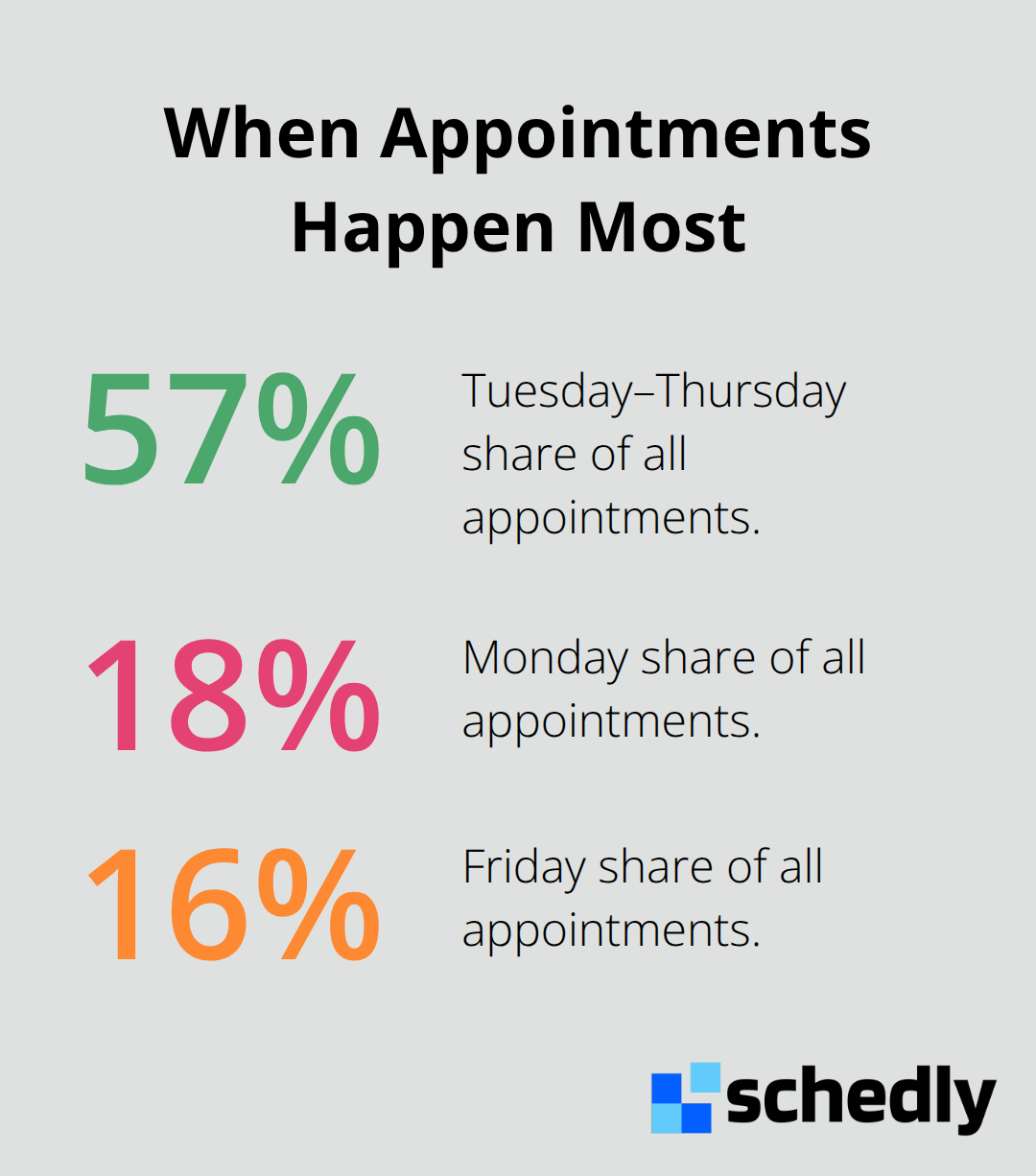
Analytics dashboards reveal which appointment types, days, and time slots generate the highest no-show rates. Tuesday, Wednesday, and Thursday bookings represent 57% of all appointments, while Monday accounts for roughly 18% and Friday 16%, with weekend bookings lowest. If your data shows Friday afternoon slots have no-show rates above 20% while Wednesday mornings sit at 5%, adjust your staffing accordingly or limit Friday availability.
Optimize for Mobile-First Booking Behavior
Mobile devices generate over half of all bookings, yet many businesses still optimize their scheduling pages for desktop only. Your analytics should show what percentage of your bookings originate from mobile versus desktop, revealing whether your mobile experience needs improvement. A mobile-optimized booking page captures appointments that desktop-only interfaces lose entirely. Test your booking flow on smartphones to confirm that clients can complete reservations in under two minutes without frustration.
Segment Your Cancellation Analysis
Track cancellation rates by patient segment, appointment type, and booking window to identify which segments cancel most frequently. This segmentation reveals patterns that blanket strategies miss entirely. If new clients cancel at twice the rate of returning clients, you might adjust your deposit requirements or confirmation process for first-time bookings. If appointments booked more than 30 days in advance show higher cancellation rates, you could implement a mid-point confirmation email to re-engage clients and reduce abandonment.
Final Thoughts
Manual scheduling costs your business thousands annually through wasted staff time, missed appointments, and empty calendar slots. Efficient appointment scheduling eliminates these losses by automating what humans currently handle manually. A private ophthalmology practice cut unused appointment slots from 22.7% to 10.3% after implementing online booking, directly capturing revenue that was previously invisible, while SMS reminders reduced no-show risk measurably and protected thousands in lost revenue.
The transition from manual to automated scheduling happens quickly when you choose the right tools. Start with software that integrates with your existing calendar system and payment processor, set clear cancellation policies visible during booking, and deploy SMS reminders 48 hours and 2 hours before appointments. Track your analytics to identify which time slots and appointment types generate the highest no-show rates, then adjust your staffing to match actual demand patterns, and optimize your booking page for mobile devices since over half your bookings originate from phones.
We at Schedly built our platform specifically for this transformation with branded scheduling pages and 24/7 online booking, secure payment processing, and workflow automation that reveals exactly where your scheduling inefficiencies hide. The businesses winning right now automated their scheduling and redirected their staff toward actual customer service. Implement one change this week-start with SMS reminders if you're not sending them yet, or switch to online booking if you're still managing appointments by phone.