
Schedly resources
How Scheduling Automation Can Help Freelancers Double Their Billable Hours
Freelancers are no strangers to the constant juggling act required to balance client work, administrative tasks, and personal life. While freedom and flexibility are major draws of freelancing, these benefits often come at the cost of reduced efficiency and productivity. One of the most significant challenges freelancers face is maximizing their billable hours—the time spent performing revenue-generating work. Enter scheduling automation: a game-changing solution that can help freelancers streamline their workflows, minimize administrative burdens, and ultimately double their billable hours.
In this definitive guide, we’ll explore how scheduling automation works, its impact on productivity, and actionable strategies tailored specifically for freelancers. Whether you’re an experienced consultant, a creative professional, or a solopreneur, this article will shed light on how the right tools and practices can help you reclaim your time and boost your income.
Understanding the Freelancer Time Dilemma: Where Does Your Time Go?
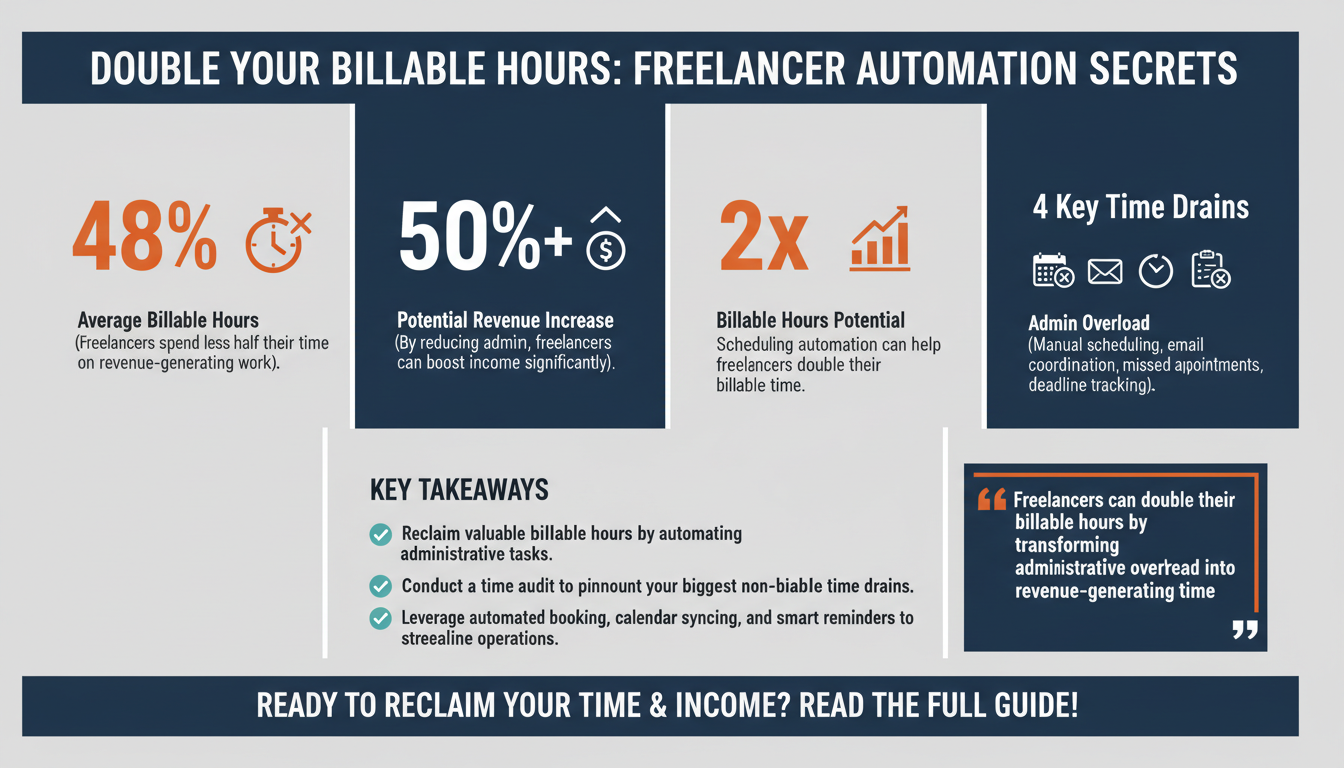
Freelancers often wear multiple hats, from marketing and client acquisition to project management and invoicing. Unfortunately, this multitasking can eat into the time available for actual billable work. According to a 2025 study by Gartner, the average freelancer spends only 48% of their working hours on billable tasks, with the rest consumed by administrative and operational duties. This discrepancy represents a massive opportunity cost for freelancers striving to grow their businesses.
Key time-draining activities include:
- Manually scheduling meetings and consultations
- Responding to back-and-forth emails to coordinate availability
- Managing missed appointments and last-minute rescheduling
- Tracking deadlines and juggling multiple client demands
Scheduling automation directly addresses these pain points by eliminating repetitive tasks and creating a seamless scheduling experience for both freelancers and their clients.
The Hidden Costs of Administrative Overhead
When freelancers spend nearly half their working hours on non-billable tasks, the financial impact is significant. For example, if a freelancer charges $100 per hour and works 40 hours a week, only 20 of those hours are spent on billable tasks, resulting in $2,000 of revenue. However, if administrative overhead is reduced by automating tasks, that same freelancer could potentially bill 30 or more hours per week, increasing their revenue by 50% or more. This highlights the high cost of inefficiency and the untapped potential of reclaiming time through automation.
Pro Tip: Conduct a Time Audit
To get a clearer picture of where your time goes, conduct a time audit. Use tools like Toggl or RescueTime to track your daily activities for a week. Once you identify the tasks consuming the most time, prioritize automating or delegating these activities. This data-driven approach provides a strong foundation for optimizing your workflow.

What Is Scheduling Automation and How Does It Work?
Scheduling automation involves using technology to automate the process of setting up meetings, managing appointments, and organizing calendars. Tools equipped with automation capabilities allow freelancers to create customizable scheduling workflows that eliminate the need for manual intervention.
Key features of scheduling automation software include:
- Automated booking: Clients can book appointments based on your real-time availability without the need for back-and-forth communication.
- Calendar syncing: These tools integrate with popular calendar platforms (e.g., Google Calendar, Microsoft Outlook) to ensure accuracy and prevent double-booking.
- Reminders and notifications: Automated reminders reduce no-shows and ensure clients are prepared for meetings.
- Time zone adjustments: Intelligent scheduling tools automatically account for time zone differences, which is critical for freelancers working with global clients.
For example, freelancers offering consultation services can provide clients with a scheduling link that displays only their available time slots. This eliminates the need for endless emails and ensures that appointments are booked seamlessly.
Real-Life Applications of Scheduling Automation
Imagine a freelance graphic designer juggling multiple clients across different time zones. Without automation, coordinating meetings manually can lead to scheduling conflicts or missed opportunities. With a tool like Calendly, the designer can easily share a link that reflects their real-time availability, eliminating confusion and ensuring smooth communication. Similarly, a content writer can use scheduling automation to set clear deadlines and follow-up reminders for projects, ensuring nothing falls through the cracks.
Expert Insight: The Role of AI in Scheduling
Modern scheduling tools are increasingly leveraging artificial intelligence (AI) to enhance efficiency. For instance, AI-powered assistants like Clara or x.ai can handle complex scheduling scenarios, such as finding mutually convenient times for multiple participants. These advancements make scheduling automation a valuable asset not just for individual freelancers but for collaborative teams as well.

The ROI of Scheduling Automation: Quantifying the Impact
Implementing scheduling automation is not just about convenience—it’s a strategic investment that delivers measurable returns. According to Forrester’s 2025 Total Economic Impact Report, businesses that adopt workflow automation see an average ROI of 312% within three years. While this data includes businesses of all sizes, the principles apply equally to freelancers.
Here are three ways scheduling automation contributes to increased revenue:
- Time saved on administrative tasks: Automating meeting bookings and reminders can save freelancers an average of 5-8 hours per week, according to a 2025 report by Statista.
- Reduced no-shows: Automated reminders decrease appointment no-show rates by up to 28%, based on data from ZDNet.
- Improved client satisfaction: Streamlined scheduling processes create a more professional experience, increasing client retention and referrals.
Freelancers who replace manual scheduling with automated solutions often find they can take on more clients without extending their work hours, effectively doubling their earning potential.
ROI Case Study: A Freelance Consultant
Consider a freelance consultant who charges $150 per hour. By automating scheduling and saving five hours per week previously spent on administrative tasks, they can now take on three additional client sessions weekly. This translates to an additional $22,500 annually—an impressive return on investment for a tool that may cost less than $20 per month.
Comparison Table: Manual vs. Automated Scheduling
| Criteria | Manual Scheduling | Automated Scheduling |
|---|---|---|
| Time Spent | 5-8 hours/week | 0.5-1 hour/week |
| No-Show Rate | 20-30% | 5-10% |
| Client Satisfaction | Average | High |
| Revenue Potential | Limited | Increased |

Actionable Strategies to Maximize Billable Hours with Scheduling Automation
While the benefits of scheduling automation are clear, maximizing its impact requires a strategic approach. Below are actionable tips freelancers can implement today:
1. Optimize Your Booking Process
Create a clear and user-friendly booking page that includes essential information such as your services, availability, and contact details. Ensure your scheduling tool integrates seamlessly with your calendar to avoid conflicts.
For example, platforms like Acuity Scheduling allow freelancers to customize booking forms, include intake questionnaires, and even collect payments upfront, streamlining the client onboarding process.
2. Leverage Buffer Times
Set buffer periods between appointments to prevent meetings from running into each other and to allow time for preparation or follow-up. This can be especially helpful for freelancers who need to shift focus between different types of projects or clients.
Pro Tip: Use 10-15 minute buffers for quick tasks like note-taking or email updates, and longer buffers for deep work or creative brainstorming sessions.
3. Automate Follow-Ups
Use your scheduling tool to send automated follow-up emails or surveys after meetings to maintain client engagement and gather feedback. Tools like HubSpot or Dubsado can integrate with scheduling platforms to create seamless workflows for post-meeting activities.
4. Batch Administrative Tasks
Instead of handling administrative tasks sporadically throughout the day, set aside specific blocks of time to focus on them. Scheduling automation can help by consolidating all meeting-related activities into organized time slots, freeing up mental energy for billable work.
Common Pitfalls to Avoid When Using Scheduling Automation
While scheduling automation offers significant advantages, improper implementation can lead to inefficiencies. Here are common mistakes freelancers should avoid:
- Overcomplicating the setup: Keep your scheduling workflows simple and intuitive to avoid confusing clients.
- Ignoring customization: Tailor your scheduling settings to match your specific needs and preferences.
- Failing to communicate changes: Inform clients promptly if your availability changes to avoid misunderstandings.
Checklist: Ensuring a Smooth Setup
- Test your booking link to ensure it works properly.
- Check calendar sync settings to prevent double-booking.
- Set up automated reminders for both you and your clients.
- Regularly review and update your availability.
By addressing these pitfalls, freelancers can ensure their scheduling automation tools function as intended and deliver maximum value.
Proprietary Framework: The FREELANCE Automation Blueprint
To help freelancers implement scheduling automation effectively, we’ve developed the FREELANCE Automation Blueprint:
- F: Focus on billable hours – Identify tasks that can be automated to free up time for client work.
- R: Refine your workflow – Continuously optimize your scheduling process based on client feedback and your experience.
- E: Evaluate tools – Choose a scheduling platform that meets your specific requirements.
- E: Engage clients – Use automation to enhance client communication and satisfaction.
- L: Leverage analytics – Track metrics like appointment bookings and no-show rates to measure success.
Expert Insight: Tracking Success Metrics
Freelancers should regularly review analytics provided by their scheduling tools. Metrics such as average booking time, no-show rates, and client feedback can provide valuable insights into areas for improvement. For instance, if no-show rates remain high despite automated reminders, consider adding incentives like early-bird discounts or late cancellation fees to encourage punctuality.

FAQ Section: Addressing Common Questions
Q1: What is the best scheduling automation tool for freelancers?
A: The best tool depends on your specific needs, but look for features like calendar syncing, automated reminders, and easy integration. Popular options include Calendly, Acuity Scheduling, and Doodle.
Q2: How much time can scheduling automation save?
A: Freelancers can save 5-8 hours per week on average by automating their scheduling tasks.
Q3: Can scheduling automation help with client retention?
A: Yes, a seamless scheduling experience improves client satisfaction, which can lead to higher retention rates and more referrals.
Q4: Is scheduling automation worth the cost?
A: Absolutely. The ROI from time saved and increased billable hours far outweighs the cost of most scheduling tools, which often range from $10-$50 per month.
Conclusion: Start Doubling Your Billable Hours Today
Scheduling automation is no longer a luxury—it’s a necessity for freelancers who want to maximize their efficiency and income. By implementing the strategies and tools discussed in this guide, you can eliminate time-consuming administrative tasks, focus on your core work, and ultimately double your billable hours. Start small, measure your progress, and refine your approach to achieve long-term success.
Ready to take the first step? Explore our platform features or browse our blog for more insights on scheduling automation.