
Schedly resources
How to Choose the Right Calendar Booking Tool for Your Business
Choosing the right calendar booking tool can make or break your business's scheduling efficiency. At Schedly, we understand the importance of streamlined appointment management.
This guide will walk you through the key features to look for, compare popular options, and highlight crucial factors to consider when selecting a calendar booking tool for your business.
What Features Make a Calendar Booking Tool Effective?
Seamless Online Booking
An effective calendar booking tool must offer a robust online booking system. This feature allows clients to view available time slots and book appointments at any time. Acuity Scheduling offers the ability to set limits on how and when appointments are scheduled, and add and edit multiple calendars. Each calendar has its own hours of availability, providing flexibility for businesses with multiple service providers or locations.
Integration Capabilities
Your calendar booking tool should integrate smoothly with your existing software ecosystem. Look for a tool that connects with your CRM, email marketing platform, and video conferencing software. This integration ensures a smooth workflow across your entire tech stack (e.g., connecting with popular apps like Google Calendar, Zoom, and Salesforce).
Customization for Brand Consistency
The ability to customize your booking page is essential for maintaining brand consistency. This includes adding your logo, selecting your color scheme, and tailoring the booking flow. A study by Demand Metric, in partnership with Lucidpress, explored the impact and value of brand consistency. Your booking tool should reinforce your brand identity, not detract from it.
Mobile-First Design
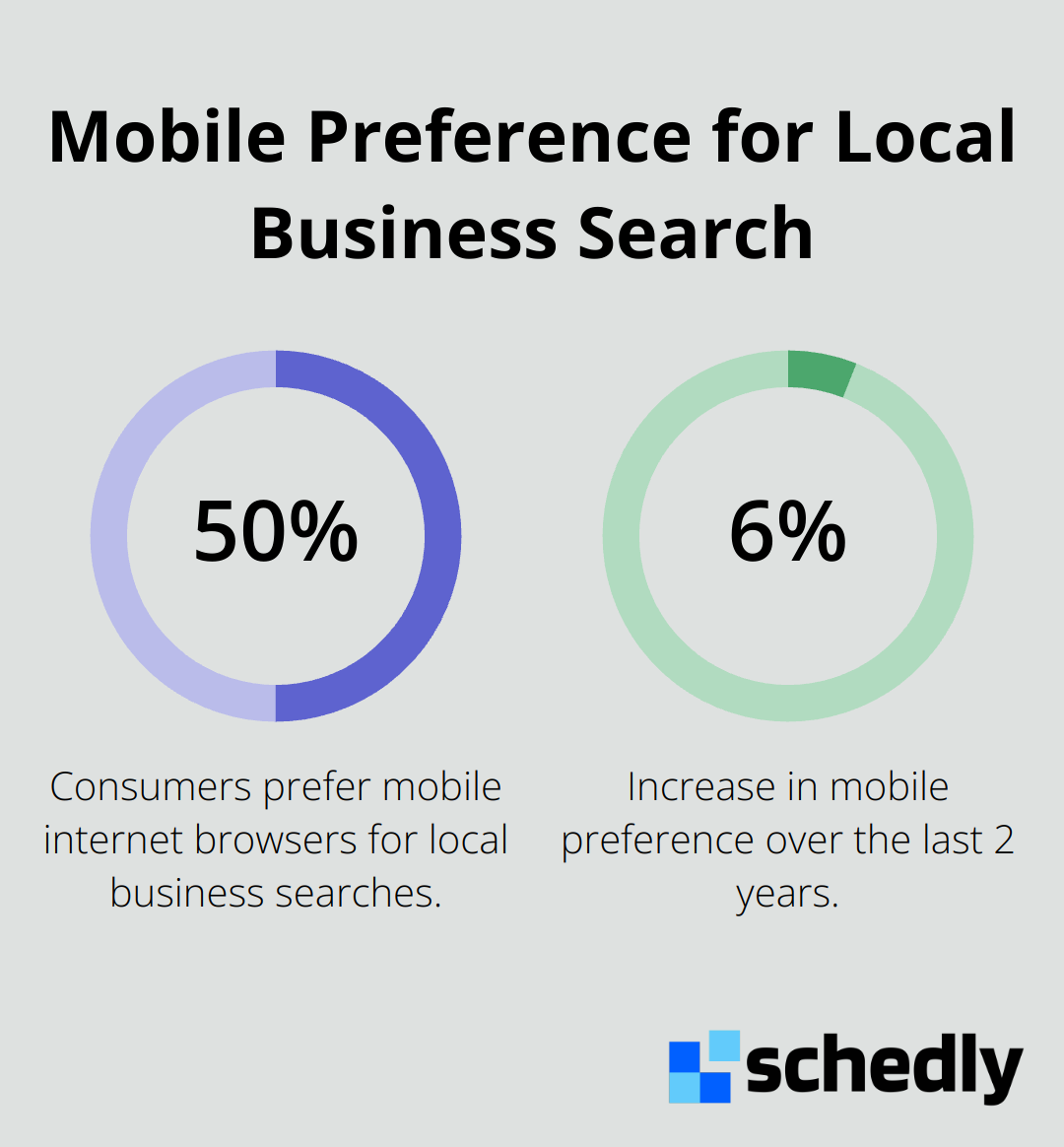
In today's mobile-centric world, your booking tool must function flawlessly on smartphones and tablets. A report by BrightLocal found that more consumers (50%) prefer to use a mobile internet browser when searching for a local business online, and this has increased 6% in the last 2 years. Ensure your chosen tool offers a responsive design that works seamlessly across all devices (including desktops, tablets, and smartphones).
Smart Reminders and Notifications
Automated reminders significantly reduce no-shows. Choose a tool that offers customizable email and SMS reminders. These notifications should be easy to set up and personalize to match your communication style.
The right calendar booking tool will not only meet your current needs but also support your business growth. The next section will compare popular calendar booking tools to help you make an informed decision for your business.
Which Calendar Booking Tools Stand Out?
Leading Tools in the Market
The calendar booking tool market offers various options. Calendly, a popular choice, provides a clean interface and strong integration capabilities. It offers more advanced features and integrations that large teams need compared to basic scheduling tools. However, some users find its customization options limited.
Acuity Scheduling caters to service-based businesses with robust features. Acuity Scheduling is an appointment booking software and scheduling app, offering scheduling automation and full customization. They offer a free trial for users to test their services.
YouCanBook.me focuses on simplicity, offering a straightforward booking experience. Their pricing begins at $10 per calendar per month, making it attractive for small businesses. However, it may lack some advanced features found in other tools.
Schedly emerges as a comprehensive solution, suitable for various industries. It offers a comparison between free and paid appointment scheduling tools to help businesses find the best fit for their needs and team collaboration.

User Experience and Interface Design
The user interface significantly impacts a booking tool's effectiveness. Calendly receives praise for its clean, minimalist design that both businesses and clients find easy to navigate. YouCanBook.me also offers a straightforward interface, though some users consider it less visually appealing.
Acuity Scheduling provides a feature-rich interface, beneficial for businesses with complex scheduling needs. This can result in a longer setup time and learning curve for new users.
Schedly balances functionality and simplicity. Its interface caters to businesses of all sizes while offering advanced features for those who need them. This approach ensures easy booking management for both businesses and clients.
Support and Resources
Customer support plays a vital role when implementing a new booking system. Calendly provides email support for all paid plans, with priority support for higher-tier subscribers. Acuity Scheduling offers email support and a comprehensive knowledge base, but limits phone support to higher-priced plans.
YouCanBook.me provides email support and a detailed help center, but response times may vary depending on the plan level.
Schedly prioritizes customer success by offering multiple support channels (including email, chat, and phone support) for all plans. Its extensive knowledge base and regular webinars equip users with necessary resources to maximize platform usage.
Pricing Structures
Pricing structures vary among calendar booking tools. Calendly's free plan offers basic features, with paid plans ranging from $8 to $16 per user per month. Acuity Scheduling offers a free trial, but specific pricing details are not provided in the search results.
YouCanBook.me charges $10 per calendar per month, which can add up for businesses with multiple team members. Schedly offers competitive pricing with flexible options to accommodate different business sizes and needs.
Integration Capabilities
Integration with existing tools enhances the efficiency of calendar booking tools. Calendly integrates with popular apps like Google Calendar, Zoom, and Salesforce. Acuity Scheduling offers similar integrations, with additional options for payment processors.
YouCanBook.me provides basic integrations but may lack some advanced options. Schedly stands out with its comprehensive integration capabilities, connecting seamlessly with a wide range of business tools and platforms.
The choice of a calendar booking tool depends on various factors, including features, pricing, user experience, and support. The next section will explore specific considerations to help you make the best decision for your business.
How Your Business Shapes Your Booking Tool Choice
Business Size and Industry Specifics
The size of your business directly affects your booking tool requirements. A solo entrepreneur might find a simple, user-friendly tool adequate, while a large corporation needs advanced features (such as multi-user support and complex scheduling rules).
Industry-specific needs also influence the choice. For example, a healthcare provider requires HIPAA compliance, while a salon needs a tool that supports multiple service bookings in one appointment. The appointment scheduling software market has experienced significant growth in recent years, driven by the increasing need for efficient scheduling. A recent study found that 60% of American consumers prefer online scheduling for health appointments, which underscores the importance of industry-tailored solutions.

Budget and Scalability Considerations
Your budget constraints will naturally influence your choice. While free tools might seem attractive, they often lack essential features.
However, don't focus solely on current costs. Consider the tool's scalability. As your business grows, the tool should grow with you. Look for providers that offer tiered pricing plans, allowing you to upgrade as your needs evolve.
Team Collaboration and Integration Needs
For businesses with multiple team members, collaboration features are essential. Tools that offer team calendars, resource allocation, and permission settings can significantly improve efficiency.
Integration capabilities hold equal importance. Your booking tool should connect seamlessly with your existing software ecosystem. For instance, if you use Salesforce for CRM, ensure your booking tool can integrate with it to avoid data silos.
Customization and Branding Options
The ability to customize your booking tool to match your brand identity is vital. This includes adding your logo, selecting your color scheme, and tailoring the booking flow.
Try to select a tool that allows you to create a branded scheduling page. This consistency in branding (from your website to your booking tool) can enhance the customer experience and reinforce your professional image.
Final Thoughts
Selecting the right calendar booking tool impacts your business operations significantly. The ideal tool aligns with your business size, industry requirements, and budget constraints while offering room for growth. It streamlines your scheduling process, reduces no-shows, and enhances customer satisfaction. A well-chosen tool also improves team collaboration, integrates with your existing software ecosystem, and provides valuable insights into your business performance.
We at Schedly understand the importance of finding the perfect fit for your scheduling needs. Our versatile platform caters to various industries, offering features like branded scheduling pages, secure payment processing, and workflow automation. Schedly helps you streamline your booking process, manage client data effectively, and gain insights through our analytics dashboard.
The right calendar booking tool simplifies your scheduling process, enhances your brand image, and contributes to your business growth. Take time to research and compare options before making your final decision (you might even want to trial different tools). Your choice will set your business up for improved efficiency and customer satisfaction in the long run.