
Schedly resources
How to Optimize Scheduling Automation for Cross-Functional Teams Without Losing Agility
In today's fast-paced business environment, cross-functional teams are essential for driving innovation and ensuring efficient operations. However, managing these teams can often present challenges, particularly when it comes to scheduling and coordination. Scheduling automation offers a promising solution, streamlining processes without compromising the agility that is vital for success. This comprehensive guide explores how to optimize scheduling automation for cross-functional teams, ensuring your organization benefits from enhanced productivity and nimble responsiveness.
The Importance of Scheduling Automation in Cross-Functional Teams
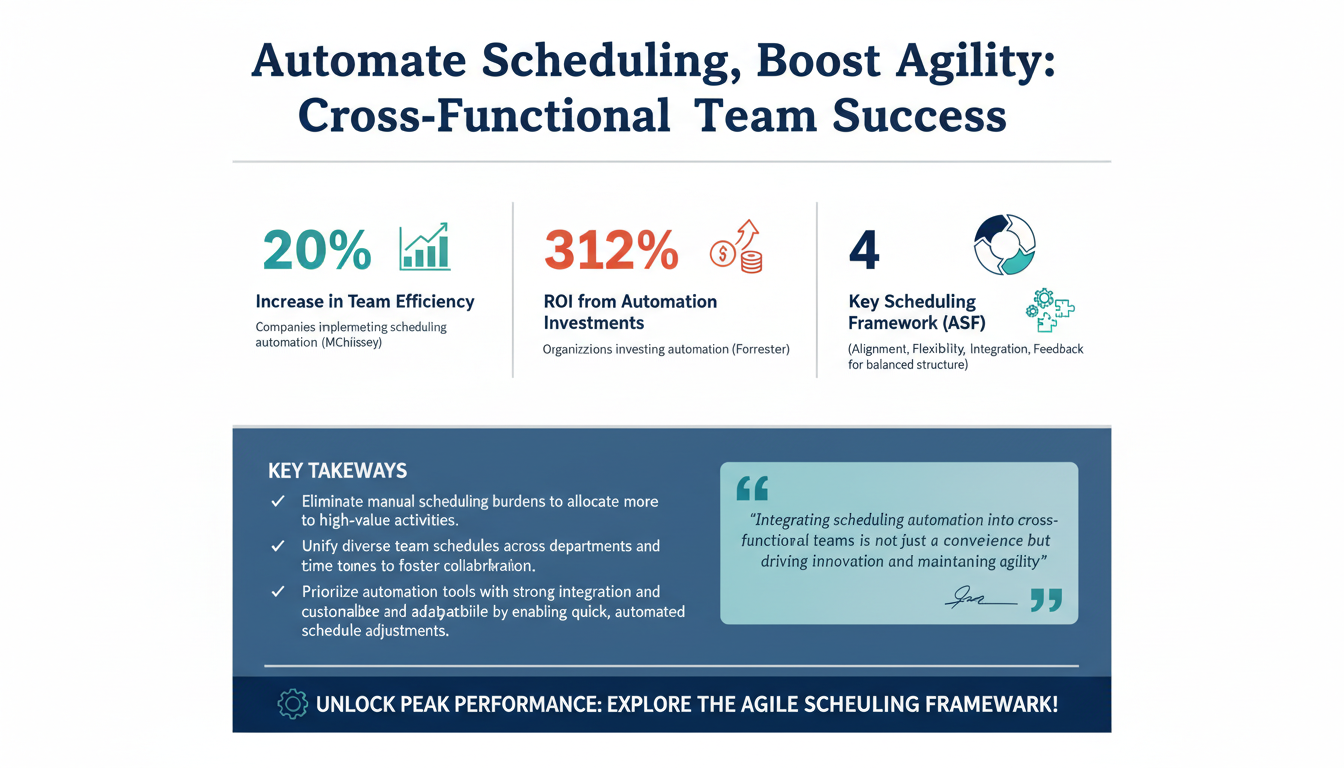
Scheduling automation is transforming the way cross-functional teams operate by removing the manual scheduling burdens that often hinder productivity. According to a report by McKinsey, companies that implement automation in their scheduling processes experience a 20% increase in team efficiency. This means team members can allocate more time to high-value activities rather than getting bogged down in logistical coordination.

Cross-functional teams consist of members from various departments, each with their own schedules and priorities. Scheduling automation can reconcile these differences by offering a unified platform that considers individual availability while optimizing for team goals. This not only boosts productivity but also fosters a culture of collaboration and mutual respect. For instance, using tools like Google Calendar or Microsoft Teams, which can integrate with automated scheduling systems, teams can easily coordinate across different time zones and departments.
Moreover, automated scheduling tools can integrate seamlessly with existing project management and communication software, ensuring a smooth workflow. This integration is vital for maintaining the agility of cross-functional teams, allowing for real-time updates and adjustments to keep everyone aligned. According to Forrester, organizations can achieve a 312% ROI from automation investments, underscoring the financial advantages of implementing such systems. By automating scheduling, teams can cut down on administrative tasks, thereby reducing operational costs and increasing profitability.
Additionally, the ability to quickly adjust schedules in response to unforeseen changes is a major advantage of automation. For example, if a team member is suddenly unavailable due to illness or other emergencies, the system can automatically reassign tasks and notify affected parties, minimizing disruptions. This proactive approach to scheduling enhances the team's overall resilience and adaptability in a dynamic business environment.
Pro Tip: When selecting scheduling automation tools, prioritize those that offer strong integration capabilities and customizable features. This ensures that the tool can adapt to your team's specific needs and workflows, maximizing its effectiveness.
In conclusion, integrating scheduling automation into cross-functional teams is not just a convenience but a necessity. It provides the structure needed to manage complex team dynamics while preserving the agility that is essential for innovation.
Building the Agile Scheduling Framework
To optimize scheduling automation without losing agility, it is crucial to establish a robust framework. Introducing the Agile Scheduling Framework (ASF), a proprietary model designed to balance structure with flexibility. This framework consists of four key components: Alignment, Flexibility, Integration, and Feedback.

Alignment for Unified Objectives
Alignment is the cornerstone of ASF. It ensures that all scheduling activities are in line with the team's objectives and priorities. This is achieved through regular planning sessions where team members align their tasks with overarching goals. A study by Harvard Business Review suggests that teams aligned on goals are 38% more likely to meet their targets. For example, consider a product development team where marketing, design, and engineering departments must work in concert. Regular alignment meetings ensure that everyone is working towards the same milestones and deadlines.
Flexibility to Adapt and Overcome
Flexibility within ASF allows teams to adapt to changes without disruption. Scheduling automation tools offer dynamic rescheduling capabilities, accommodating unforeseen changes in workload or resource availability. This adaptability is vital for maintaining team morale and momentum. For instance, if a critical team member suddenly becomes unavailable, the system can quickly adjust schedules to accommodate the change without causing project delays. Keeping the team adaptable is crucial in today’s ever-changing market environments.
Integration for Seamless Operations
Integration is another critical component of the ASF. By ensuring that the scheduling system communicates seamlessly with other tools, teams can streamline their workflows. This interoperability is key to maintaining agility, as it minimizes the time spent switching between platforms. Tools like Zapier, which connect different apps and automate workflows, exemplify how integration can enhance team efficiency. A well-integrated system reduces friction and supports seamless operations across team functions.
Feedback for Continuous Improvement
The final component, Feedback, is essential for continuous improvement. Regular feedback loops enable teams to refine their processes and adjust their scheduling practices as needed. According to Deloitte, feedback-driven teams are 25% more effective in achieving their goals. Feedback mechanisms, such as anonymous surveys or regular check-ins, provide valuable insights into what is working and what needs improvement. These insights feed into the next cycle of planning and adaptation.
Expert Insight: Consider implementing a bi-weekly feedback session where team members can openly discuss challenges and successes with the current scheduling system. This fosters a culture of transparency and continuous improvement, ensuring the scheduling framework evolves with the team’s needs.
Implementing the Agile Scheduling Framework requires commitment from all team members and a willingness to embrace change. However, the benefits in terms of efficiency and agility make it a worthwhile investment.
Integrating Automation Tools with Existing Systems
The integration of scheduling automation tools with existing systems is a critical step in optimizing their effectiveness for cross-functional teams. Tools like Schedly can seamlessly connect with project management software, communication platforms, and calendars, enabling a unified workflow. This connectivity ensures that all team members have access to the most current information, reducing the likelihood of miscommunication.

Mapping Out Workflows
According to a study by Gartner, 70% of organizations have reported improved productivity through the integration of automation tools. This integration reduces duplicate data entry and ensures that information is consistent across all platforms, avoiding the common pitfall of information silos. For example, integrating a tool like Asana with Slack can automate task updates, ensuring everyone is informed without the need for separate emails or meetings.
Choosing the Right Tools
To achieve successful integration, it is essential to map out existing workflows and identify potential bottlenecks. By understanding these pain points, teams can choose the right automation tools that address their specific needs. This tailored approach ensures that the tools enhance rather than hinder team performance. For instance, a marketing team might need different integrations compared to a sales team, tailored to their unique workflow requirements.
Training for Effective Use
Furthermore, training is a crucial component of integration. Teams must be adequately trained to use new tools effectively. Providing comprehensive training sessions and resources helps in reducing the learning curve and increases user adoption rates. Online courses or workshops focusing on the new tools can significantly enhance understanding and usage. Ensuring that the team is comfortable with the new system is key to its successful implementation.
Pro Tip: Develop a detailed integration roadmap that includes timelines, milestones, and key performance indicators to track the effectiveness of the integration process. This will help maintain focus and ensure alignment with strategic goals.
Regular System Audits
Finally, regular system audits ensure that integrations remain effective over time. By evaluating the performance and impact of automation tools, teams can make informed decisions about upgrades or changes, maintaining optimal efficiency.
In summary, integrating automation tools with existing systems requires careful planning and execution. However, when done correctly, it can significantly enhance the agility and efficiency of cross-functional teams.
Ensuring Data Security and Privacy in Automated Scheduling
While scheduling automation offers numerous benefits, it is imperative to address data security and privacy concerns. Cross-functional teams often deal with sensitive information, making it essential to ensure that data is protected at all times. According to PwC, 85% of consumers are concerned about how companies use their data. To address these concerns, organizations must implement robust security measures, such as encryption and access controls, to safeguard information.

Compliance with Regulations
Compliance with regulations such as GDPR and CCPA is non-negotiable. These regulations set the standard for data protection, and failure to comply can result in significant penalties. Scheduling automation tools must be equipped with features that facilitate compliance, such as data anonymization and audit trails. Ensuring that your software provider complies with these regulations can alleviate many potential risks.
Fostering a Culture of Awareness
Additionally, organizations should foster a culture of data protection awareness. Regular training and updates on data security best practices ensure that all team members understand their role in safeguarding information. Simple practices, such as using two-factor authentication and regularly updating passwords, can significantly enhance security.
Partnering with Reputable Vendors
Finally, partnering with reputable vendors known for their commitment to data security enhances trust and reduces risk. Selecting vendors that adhere to industry standards and undergo regular security audits provides an additional layer of assurance.
Expert Insight: Conduct regular data protection workshops to keep the team updated on the latest security protocols and practices. This proactive approach helps maintain a high standard of security and compliance.
In conclusion, while automation streamlines scheduling, maintaining data security and privacy is paramount. By prioritizing these elements, organizations can protect their information and build trust with stakeholders.
Measuring the Impact of Scheduling Automation on Team Performance
To truly optimize scheduling automation, it is crucial to measure its impact on team performance. By tracking key performance indicators (KPIs), organizations can assess the effectiveness of their automation strategies and make data-driven decisions. Some essential KPIs to monitor include time savings, resource utilization, and task completion rates. According to a report by IDC, companies that track these metrics see a 30% increase in operational efficiency.
Tracking Time Savings
Time savings can be measured by evaluating the reduction in manual scheduling tasks. Automated systems should significantly decrease the time spent on scheduling, allowing team members to focus on strategic initiatives. For instance, if a team previously spent 10 hours a week on scheduling and now spends only 2, the time savings are significant and can be redirected to other critical tasks.
Evaluating Resource Utilization
Resource utilization is another critical metric. By analyzing how resources are allocated and used, teams can optimize their workflows and ensure that no resources are under or over-utilized. This can involve analyzing how team members are allocated across projects and ensuring that workloads are balanced to prevent burnout.
Monitoring Task Completion Rates
Task completion rates offer insights into the overall productivity of the team. A higher rate suggests that the automation tools are effectively supporting team objectives, while a lower rate may indicate potential issues that need addressing. Monitoring these rates over time can help identify trends and areas for improvement.
Pro Tip: Set up a dashboard that visualizes these KPIs in real-time, allowing team leaders to quickly identify areas that require attention and respond proactively.
By regularly measuring these KPIs, organizations can continuously refine their scheduling automation strategies, ensuring that they remain effective and aligned with team goals.
Common Mistakes to Avoid When Implementing Scheduling Automation
Implementing scheduling automation can transform cross-functional team dynamics, but it is not without its challenges. To maximize the benefits, it is crucial to avoid common pitfalls that can hinder success.
Involving Stakeholders
One frequent mistake is failing to involve all stakeholders in the implementation process. Scheduling automation affects various departments, and their input is invaluable in selecting the right tools and strategies. According to BCG, projects are 70% more likely to succeed when stakeholders are actively engaged. Involving stakeholders from the outset ensures that the chosen solutions meet everyone’s needs.
Emphasizing User Training
Another mistake is underestimating the importance of user training. Without proper training, teams may struggle to adopt new tools, leading to frustration and underutilization. Comprehensive training programs and resources are essential for smooth transitions. These can include hands-on workshops, detailed user manuals, and ongoing support.
Customizing Tools for Team Needs
Additionally, neglecting to customize automation tools to fit team-specific needs can lead to suboptimal outcomes. Each team has unique workflows, and tools should be tailored to support these processes effectively. Customization might involve setting up specific templates or automating recurring tasks to fit the team's workflow.
Continuous Monitoring and Adjustment
Finally, failing to monitor and adjust strategies over time can lead to stagnation. Regular reviews and adjustments ensure that automation tools continue to meet evolving team needs and objectives. Setting up regular check-ins to discuss what is and isn't working can help keep the strategy aligned with team goals.
Expert Insight: Establish a feedback loop with users to continuously improve the automation process. Regularly solicit input on what works and what could be improved, and be prepared to make iterative changes.
By being aware of these common mistakes and proactively addressing them, organizations can ensure a successful implementation of scheduling automation, maximizing its benefits for cross-functional teams.
Leveraging Scheduling Automation for Continuous Improvement
Scheduling automation is not a one-time solution but a continuous journey towards improvement. By leveraging automation, organizations can foster a culture of innovation and adaptability. Continuous improvement involves regularly evaluating the effectiveness of automation tools and strategies. This includes gathering feedback from team members and making necessary adjustments to optimize performance. As highlighted by Accenture, organizations that prioritize continuous improvement see a 35% increase in productivity.
Facilitating Continuous Learning
Automation tools can also facilitate continuous learning by providing insights into team performance and identifying areas for development. By analyzing data, teams can pinpoint inefficiencies and implement corrective measures. For example, if data shows a delay in task completion, the team can investigate the cause and adjust processes accordingly.
Supporting Innovation
Moreover, scheduling automation can support innovation by freeing up time for creative problem-solving and strategic planning. With less time spent on administrative tasks, teams can focus on exploring new ideas and driving growth. This might involve dedicating time to brainstorming sessions or exploring new technologies that could enhance team performance.
Pro Tip: Allocate a portion of team meetings to discuss potential improvements and innovations that automation could facilitate. Encourage team members to bring ideas and share experiences that could lead to process enhancements.
Maintaining a Competitive Edge
Finally, embracing a mindset of continuous improvement ensures that teams remain agile and responsive to changes in the business environment. By continuously refining scheduling processes, organizations can maintain a competitive edge.
In conclusion, leveraging scheduling automation for continuous improvement is essential for maintaining team agility and driving long-term success. By fostering a culture of innovation and adaptability, organizations can thrive in a rapidly changing business landscape.
Frequently Asked Questions (FAQs)
What are the key benefits of scheduling automation for cross-functional teams?
Scheduling automation enhances productivity, fosters collaboration, and reduces administrative burdens, allowing teams to focus on high-value tasks. It also provides real-time updates and integrations with existing tools, ensuring seamless workflows.
How can I ensure data security in scheduling automation?
To ensure data security, implement robust encryption, access controls, and compliance with regulations such as GDPR. Partnering with reputable vendors and fostering a culture of data protection awareness are also crucial steps.
What are some common mistakes to avoid when implementing scheduling automation?
Avoid neglecting stakeholder involvement, underestimating user training, and failing to customize tools to team needs. Regular monitoring and adjustments are essential to maintain effectiveness over time.
How do I measure the effectiveness of scheduling automation?
Measure effectiveness by tracking key performance indicators such as time savings, resource utilization, and task completion rates. Regular evaluations help refine strategies and ensure alignment with team goals.
How can scheduling automation support continuous improvement?
Scheduling automation supports continuous improvement by providing insights into team performance, facilitating continuous learning, and freeing up time for innovation and strategic planning.
Conclusion: Embrace the Future of Scheduling Automation
As businesses continue to evolve, the need for efficient scheduling automation becomes increasingly apparent. Cross-functional teams require tools that not only streamline operations but also preserve the agility necessary for innovation. By implementing the strategies outlined in this guide, organizations can optimize their scheduling processes and unlock new levels of productivity.
Consider complementing your efforts with tools like Apparatuz for workflow automation, Applicantz for recruitment, or Supportly for customer support. Together, these approaches create a comprehensive solution for your business needs.
Ready to get started? Explore our platform features and view our pricing plans to find the right fit for your organization.
By embracing scheduling automation and continuously refining your strategies, your organization can thrive in today's dynamic business environment. The future of scheduling is here, and it's time to seize the opportunities it offers.