
Schedly resources
Legal Meeting Scheduling: Efficient Consultations For Law Firms

Law firms lose thousands of hours annually to scheduling chaos. Missed appointments, double bookings, and endless email chains drain resources that should go toward client work.
At Schedly, we've seen firsthand how legal meeting scheduling becomes a bottleneck that frustrates both attorneys and clients. The solution isn't working harder-it's automating the process entirely.
Where Your Scheduling Time Really Goes
The Email Chain That Never Ends
Email ping-pong over appointment times costs law firms far more than most realize. When a client emails to request a consultation, your staff member responds with three available time slots. The client picks one, but then your attorney's calendar shifts due to a court hearing. Another email goes out. The client doesn't respond for two days. Meanwhile, that slot sits blocked, unavailable to other prospects.
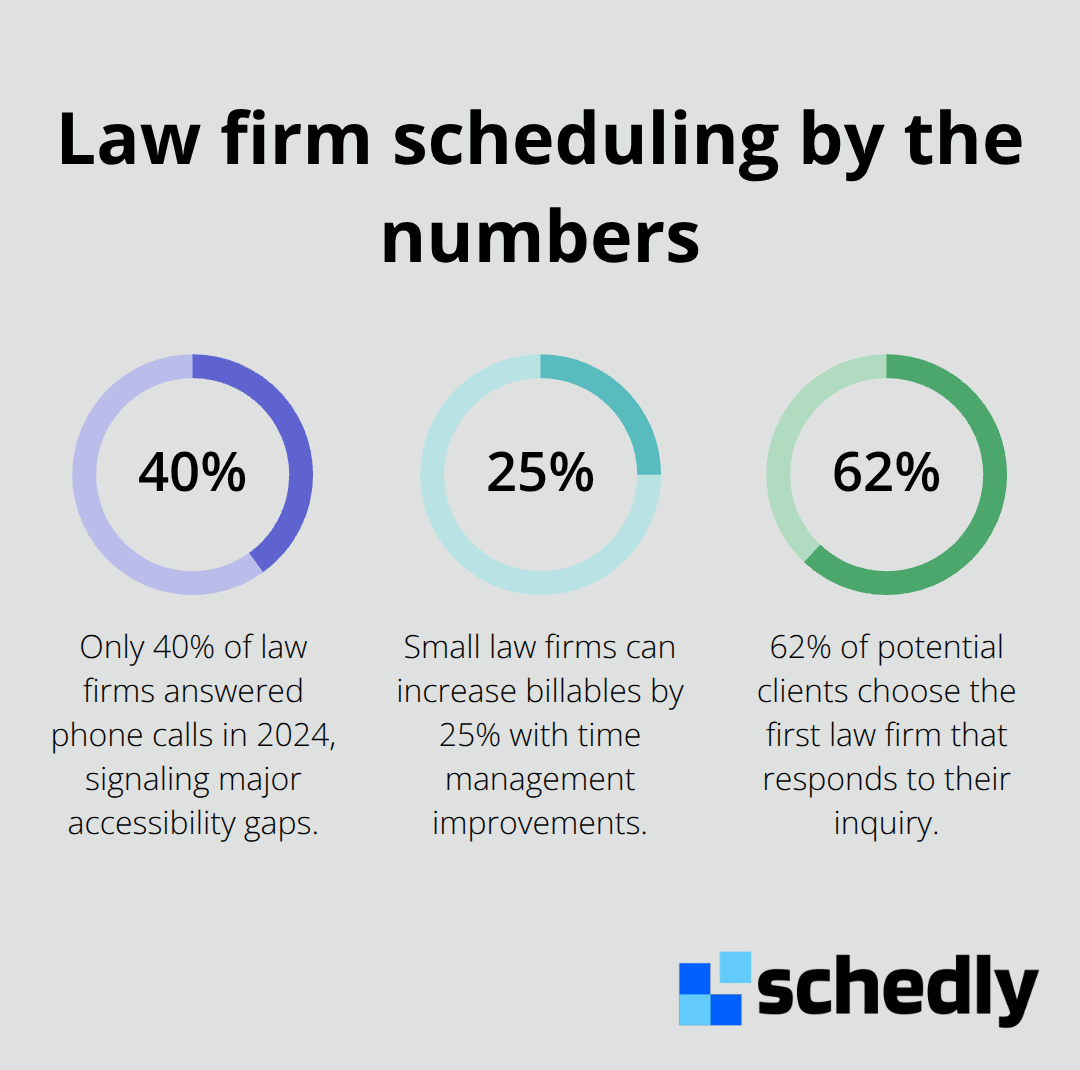
Only 40% of law firms answered phone calls in 2024, revealing how severely scheduling friction has degraded accessibility. Thomson Reuters research showed that small law firms implementing time management improvements can increase billables by 25%, yet most firms waste hours weekly on scheduling coordination that could vanish with automation.
A single back-and-forth email chain over a meeting time typically takes 15–30 minutes of staff attention. Multiply that by 10–15 client inquiries per week, and you lose 150–450 minutes monthly just negotiating calendar slots. That time belongs to actual legal work, client intake, or business development instead.
Calendar Conflicts That Damage Your Reputation
Double bookings happen because your attorney's calendar lives in one place while your scheduling system exists somewhere else. One person blocks time for a client meeting, another schedules a court deadline reminder in the same slot, and suddenly you have a conflict that damages your credibility. Clients see this as disorganization. They interpret missed or rescheduled appointments as a sign your firm doesn't value their time, which directly affects retention and referrals.
The Cost of Limited Availability
When prospects can only book during business hours, you miss the 9 PM inquiry from someone with an urgent legal issue. A prospect who can't book a same-day or next-day slot often moves to a competitor who offers 24/7 online scheduling. You lose revenue not because your legal work is inferior, but because your scheduling system forces clients to wait.
Automation Replaces Manual Chaos
The solution isn't hiring more staff to manage calendars. Automated scheduling replaces the manual process entirely with a system that handles booking, conflict prevention, and client communication automatically. When prospects book their own time slots through a secure scheduling page, your team gains hours back each week. Conflicts disappear because the system syncs across all calendars in real time. Availability expands because clients can schedule outside traditional office hours. Your firm stops losing deals to scheduling friction and starts converting more inquiries into retained clients.
The real question isn't whether your firm needs better scheduling-it's how much revenue you're leaving on the table while you wait.
How Automated Scheduling Actually Saves Time
Staff Reclaim Hours Every Week
Automated scheduling eliminates the administrative work that drains your team's capacity. When clients book their own appointments through a scheduling page, your staff no longer spends time coordinating availability, sending confirmation emails, or managing back-and-forth messages. A single prospect inquiry that once required three to five email exchanges now takes zero staff intervention. The system handles everything: it blocks your attorney's calendar automatically, sends confirmation and reminder notifications, and syncs across all connected tools in real time.
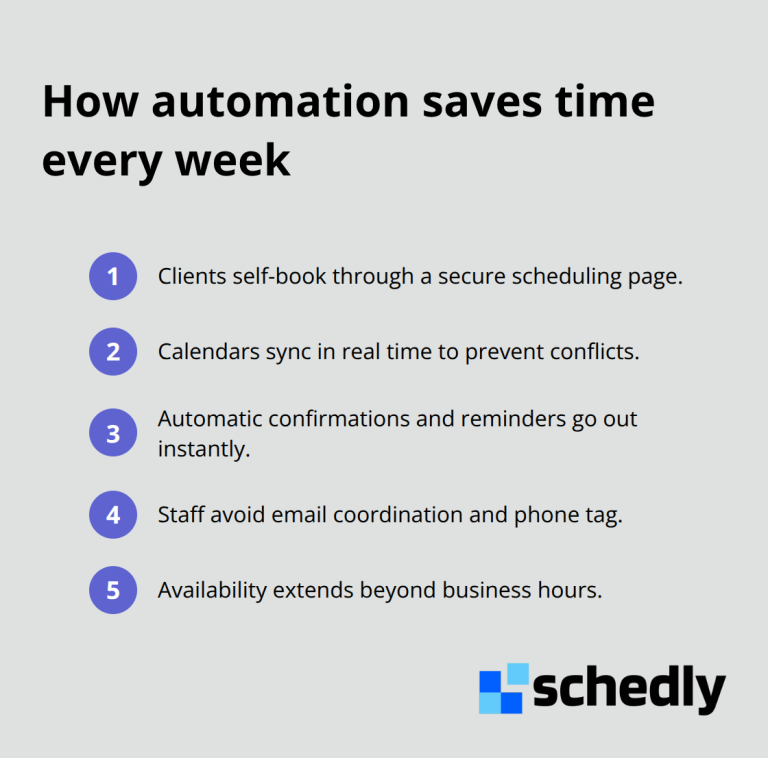
This isn't marginal efficiency-it's fundamental operational relief. Firms that implement automated scheduling report reclaiming 40 hours per week of administrative time through streamlined case management and automated processes. That time redirects toward actual legal work, client strategy, or business development instead of calendar management.
The Financial Impact Compounds Quickly
The cost savings add up fast. If your staff costs $25 per hour and you recover just 8 hours weekly, you save $10,400 annually on labor alone. Beyond cost, automation eliminates human error. Your attorney no longer double-books because the system prevents scheduling conflicts in real time. Clients no longer experience reschedules because availability reflects reality across all platforms. The result is a firm that operates with fewer moving parts and higher reliability.
Availability Shapes How Clients Perceive Your Firm
When prospects can book consultations at 10 PM on a Sunday, they book immediately instead of calling a competitor Monday morning. Clio's Legal Trends Report found that 62% of potential clients choose the first law firm that responds to their inquiry, and 24/7 scheduling removes the response-time barrier entirely. Your firm captures inquiries regardless of when they arrive because the booking system works around the clock.
Same-day or next-day appointment slots are particularly powerful for time-sensitive matters like family law emergencies or business disputes. Clients perceive firms with immediate availability as more organized and responsive, which directly improves satisfaction and referral likelihood.
Reminders Cut No-Shows and Keep Revenue Predictable
Automated reminders reduce no-shows significantly. When clients receive SMS or email confirmations and reminders before their scheduled time, attendance improves by 20 to 30 percent. Fewer no-shows means your attorney's calendar stays productive and revenue predictable.
Integration Prevents Information Silos
The integration with existing tools-Google Calendar, Zoom, Salesforce, or your current practice management system-ensures scheduling information flows seamlessly across your firm. When a client books through your scheduling page, that appointment automatically appears on your attorney's calendar, syncs with billing systems, and triggers follow-up workflows without manual data entry. This unified approach keeps your entire team aligned on what's happening and when, which sets the stage for the next critical piece: choosing the right scheduling software features that protect your clients and support your firm's growth.
What Makes Scheduling Software Actually Work for Law Firms
Scheduling software lives or dies based on three factors: whether it protects client data, whether it fits into your existing workflow, and whether clients actually want to use it. Most scheduling platforms fail on at least one of these fronts. You need a system that handles sensitive legal information with the security standards your firm requires, integrates seamlessly with the tools your team already uses daily, and presents clients with a professional, frictionless booking experience.
Data Security Protects Your Firm and Your Clients
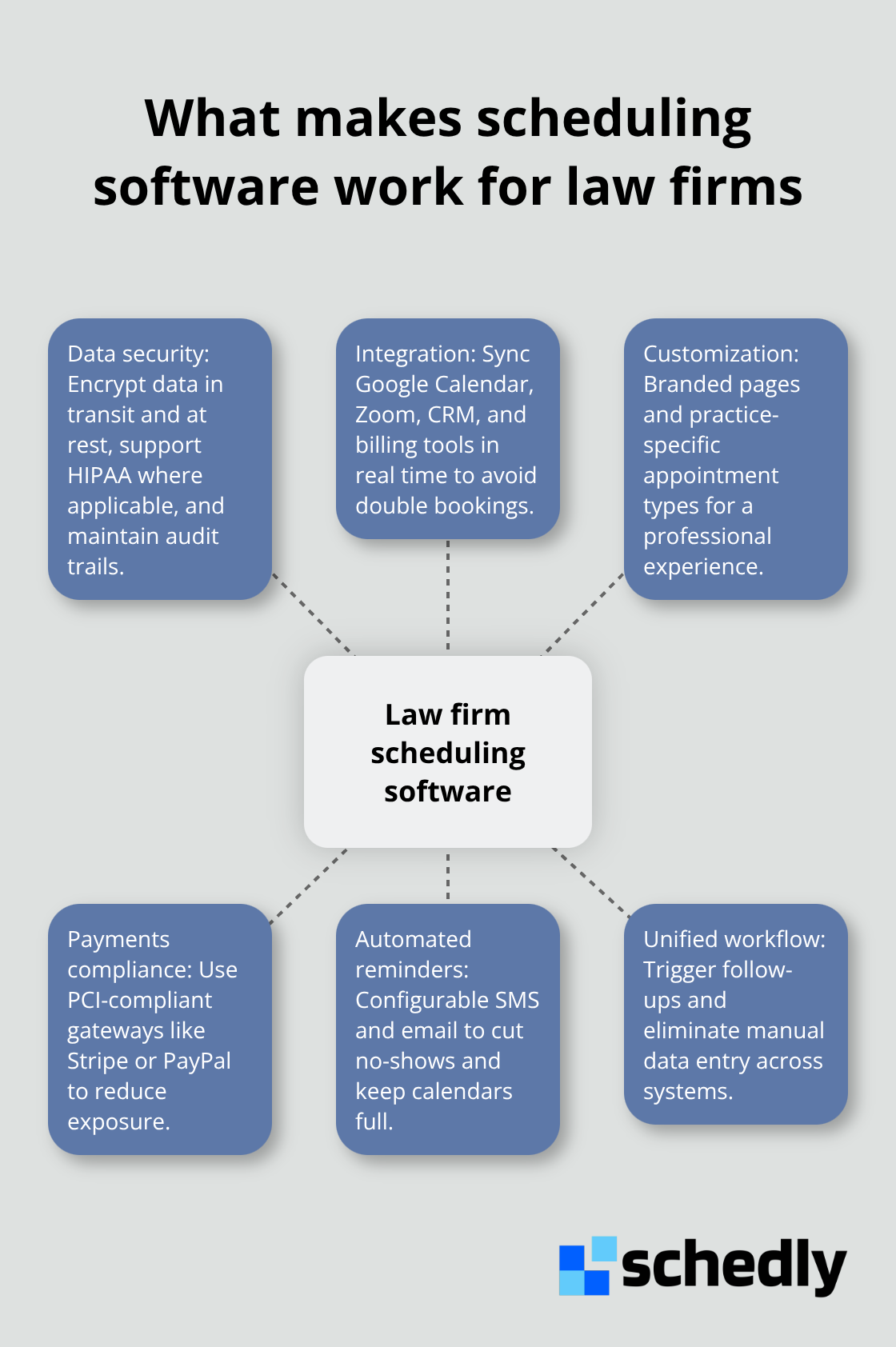
Data breaches in legal practice are catastrophic. A single unauthorized access to client files doesn't just create liability-it destroys trust and generates malpractice exposure. Your scheduling software must encrypt all client information in transit and at rest, comply with industry standards like HIPAA if you handle health-related cases, and provide audit trails showing who accessed what and when.
Payment processing deserves equal scrutiny. If your scheduling system collects retainer fees or consultation deposits directly through the booking page, that payment gateway must be compliant with the Payment Card Industry Data Security Standard. Established gateways like Stripe and PayPal carry their own compliance certifications and reduce your firm's direct exposure to payment data. Avoid systems that store raw credit card information on their servers-that creates unnecessary liability.
Integration Determines Whether Your Team Actually Uses It
Integration determines whether your scheduling software becomes a timesaver or another disconnected tool your team ignores. Your attorney uses Google Calendar for personal scheduling, your case management system tracks deadlines, and your billing software records time entries. A scheduling system that doesn't connect these platforms forces your staff to manually enter the same appointment data three times, defeating the entire purpose of automation.
Calendar synchronization across devices eliminates double bookings and scheduling conflicts. Your attorney books a court appearance on their phone while your scheduler checks availability on a desktop. Without real-time syncing, conflicts emerge instantly. A robust scheduling system prevents double bookings by showing a single, unified view of availability across all calendars and team members. When a client books through your scheduling page, that appointment syncs automatically to your attorney's calendar, a Zoom link generates instantly for virtual consultations, and your CRM updates with prospect information without manual entry.
Customization Builds Your Brand and Reduces Friction
Customizable scheduling pages give your firm control over how prospects experience booking. A generic scheduling interface damages your brand. Instead, your firm should present a branded page that matches your website design, includes your logo, and displays information specific to your practice areas. A family law firm, for example, should show scheduling options for initial consultations, retainer agreements, and follow-up meetings-not generic appointment types.
Automated reminders reduce no-shows dramatically. When a client receives an SMS reminder 24 hours before their consultation and an email reminder 2 hours before, attendance improves significantly. These reminders should be configurable, allowing your firm to customize the message tone and timing based on case type or client preference. The combination of data protection, seamless integration, and professional customization separates scheduling software that actually works from platforms that create more problems than they solve.
Final Thoughts
Legal meeting scheduling automation transforms how law firms operate by redirecting staff hours toward client strategy and business development instead of calendar management. Double bookings disappear, client satisfaction rises because prospects can book consultations whenever they need them, and your firm stops losing deals to scheduling friction. The financial impact compounds quickly-when you eliminate 8 to 10 hours of weekly administrative work, you recover thousands of dollars annually in labor costs alone, and automation prevents human error that damages your reputation.
Implementation starts with choosing software that protects client data, integrates with your existing tools, and presents clients with a professional booking experience. Your scheduling system must encrypt sensitive information, comply with payment processing standards, and sync seamlessly with Google Calendar, Zoom, and your case management platform. Customizable scheduling pages let you control how prospects experience booking, while automated reminders reduce no-shows and keep your calendar productive.
Schedly provides the scheduling infrastructure law firms need to master legal meeting scheduling. The platform offers branded scheduling pages, 24/7 online booking, secure payment processing, and integrations with Google Calendar, Zoom, and Salesforce, while workflow automation handles appointment confirmations and reminders without manual intervention.