
Schedly resources
Online Booking Platform Essentials For Small Businesses
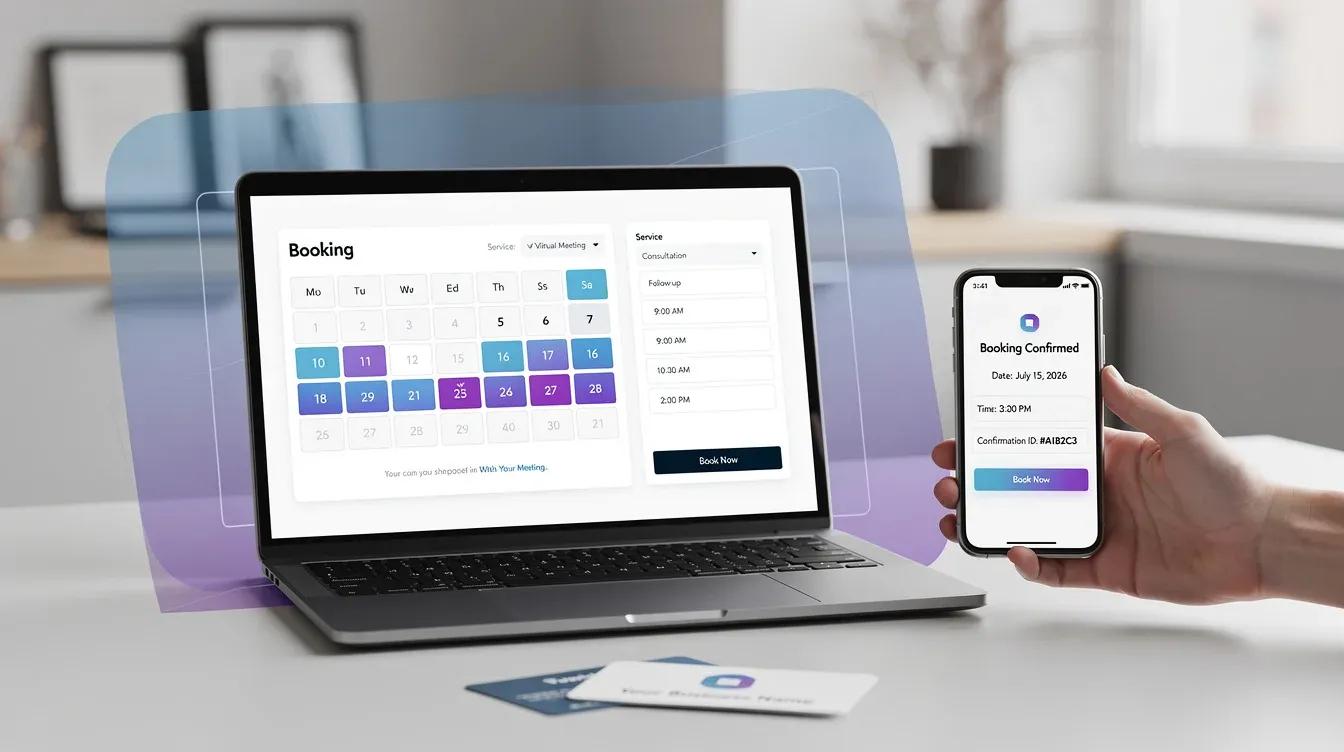
Small businesses lose thousands of dollars every year to manual scheduling headaches and missed bookings. An online booking platform cuts through that chaos by automating your calendar and letting customers book around the clock.
At Schedly, we've seen firsthand how the right booking system transforms small business operations. This guide walks you through what actually matters when choosing a platform that fits your business.
Why Online Booking Saves Small Businesses Money
According to a recent study conducted by Slack, a Salesforce company, small business owners are losing an average of 96 minutes of productivity daily. That's the equivalent of three months of full-time labor you could redirect toward growing your business instead of managing calendars. The math is brutal: if your hourly rate is even $50, you're bleeding $25,000 annually to tasks a system completes in seconds. Online booking eliminates this entirely. Customers select their time slot, the system confirms it, and your calendar updates instantly across all channels. No double-bookings, no back-and-forth messaging, no missed appointments because someone forgot to update the shared spreadsheet.
Automated Reminders Cut No-Shows in Half
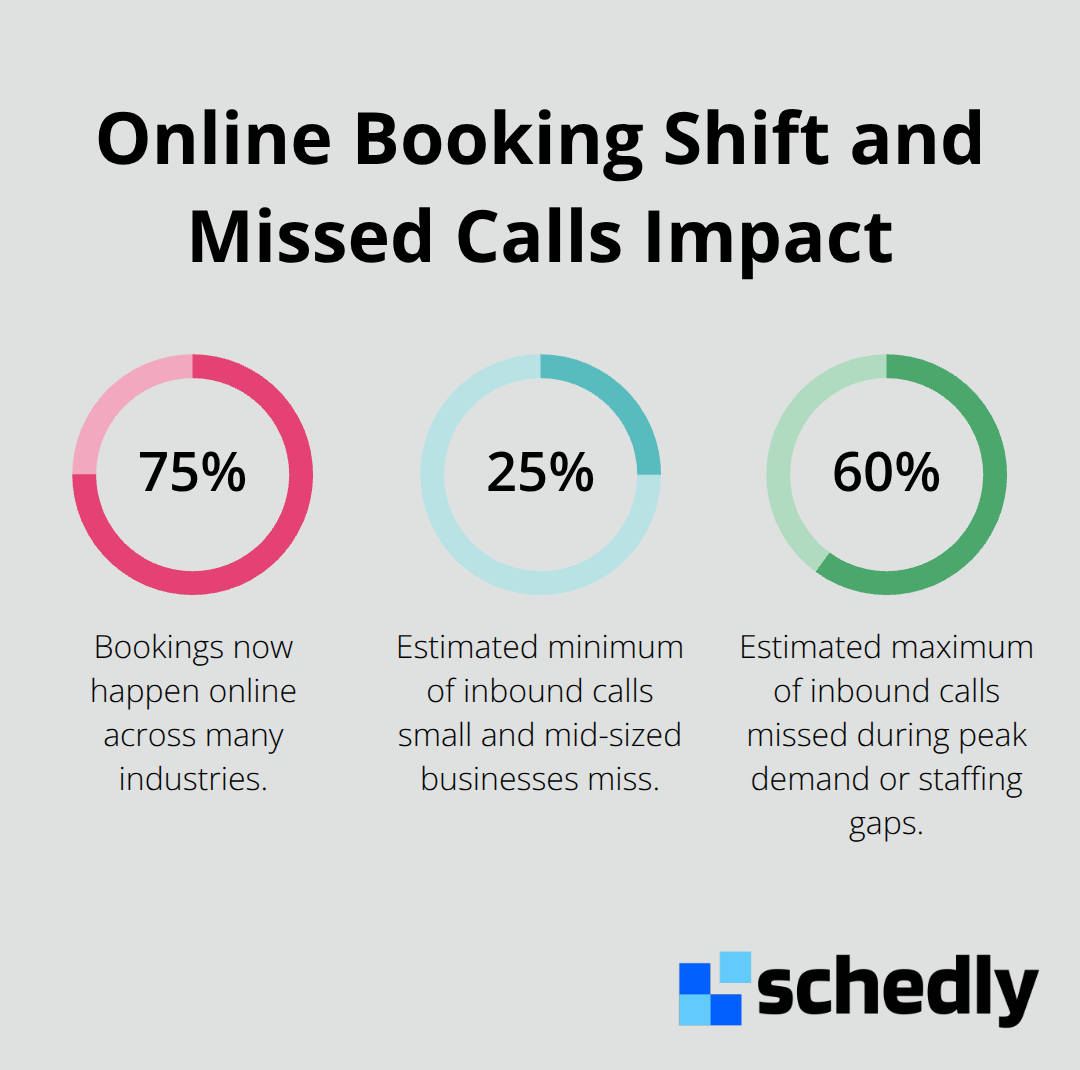
No-shows represent a direct revenue loss that most small businesses underestimate. Research shows that 75% of bookings now happen online, and more than one-third of those bookings occur outside standard business hours. This shift means customers expect instant confirmation and automated reminders.
Capture Bookings Outside Your Operating Hours
Most small businesses operate 9-to-5 or similar fixed schedules. Your potential customers don't. Studies consistently show that one-third of booking attempts happen after hours, on weekends, or during times your team isn't available. Without an online system, you lose those bookings entirely. Small and mid-sized businesses miss an estimated 25%–60% of inbound calls, with performance declining during peak demand and staffing gaps. A fitness studio open 6am-10pm might receive a booking request at midnight from someone planning their week. A dental office might get an appointment request at 7pm from a patient with sudden pain. With online booking, these become confirmed appointments instead of lost revenue. The platform queues them, and your team addresses them during business hours. Stripe and PayPal integration means payments process instantly, so your cash flow improves immediately. You're not waiting for checks or handling payment disputes because the system handles it securely before the appointment even happens.
Payment Processing Happens Instantly
Secure payment integration transforms how you handle money. When customers book through your platform, they pay upfront using their preferred method (cards, digital wallets, or other gateways). This eliminates payment delays and reduces the administrative burden of chasing invoices or managing cash on site. Your revenue arrives in your account faster, improving cash flow and reducing financial uncertainty. Customers appreciate the convenience of one-click checkout, especially when they've booked with you before. The system stores their payment details securely, so repeat bookings take seconds instead of minutes. This speed and security build trust and encourage customers to book again.
Your Next Platform Choice Matters More Than You Think
The features you prioritize in a booking platform determine whether you'll actually use it consistently or abandon it for spreadsheets and phone calls. The right system should feel natural to your workflow, not add friction to it. Understanding what separates a good platform from a mediocre one helps you avoid costly mistakes that waste time and money.
What Makes a Booking Platform Actually Usable
Your booking platform lives or dies based on whether it fits seamlessly into how you actually work. A system with every feature imaginable becomes useless if your customers can't find it, your team won't use it, or it doesn't talk to your existing tools. The platforms that succeed handle the boring details correctly: they look professional, process payments without friction, sync with calendars your team already uses, and keep customer information organized in one place. SuperSaaS and SimplyBook.me both excel here because they prioritize these fundamentals over flashy add-ons. When you evaluate options, ignore the marketing noise and focus on how the platform actually performs in your day-to-day operations.
Your Booking Page Is Your First Sales Tool
Most small businesses treat their booking page like an afterthought, but it's actually your most important sales asset after the initial inquiry. A generic, unbranded scheduling interface tells customers you don't care about details. A professional page that matches your branding builds immediate trust. SuperSaaS and Acuity Scheduling both allow you to customize colors, fonts, and layouts so the booking experience feels like an extension of your business, not a third-party tool tacked on. More importantly, a well-designed booking page reduces friction at checkout. If customers fill out unnecessary forms, search through confusing staff lists, or navigate a clunky interface, they abandon the booking and call a competitor instead. Your page should display availability clearly, let customers select services and staff in two clicks, and show pricing upfront. Mobile optimization is non-negotiable here-more than half of booking attempts happen on phones, so if your page doesn't work smoothly on mobile, you lose revenue directly. Test your booking page on an iPhone and Android device before launch. If it feels slow or cramped, your customers feel the same frustration.
Calendar Sync Prevents Double-Bookings and Chaos
A calendar that doesn't sync with your existing tools creates a management nightmare. You open Google Calendar to check availability, but the booking system shows different times because it hasn't updated yet. A customer gets confirmed for a slot that's actually taken. Your team member schedules personal time in Outlook, but the booking system ignores it and assigns them three appointments. These conflicts damage your reputation and waste time fixing mistakes. Calendar synchronization with Google Calendar and Outlook should be automatic and bidirectional-changes in your calendar reflect immediately in the booking system, and vice versa. If you use multiple calendars for different purposes, the platform should let you specify which calendar it pulls from and which it updates. Some systems like YouCanBookMe offer round-robin scheduling, where bookings automatically distribute across available staff members, eliminating the need for manual assignment. This feature alone saves hours weekly on larger teams.
Payment Processing Must Be Secure and Invisible
Payment processing is where most small businesses get nervous, but modern platforms handle it correctly. Stripe and PayPal are the industry standard because they're trusted by customers worldwide. Your platform should store payment details securely so repeat customers don't re-enter information every time they book. One-click checkout reduces friction and increases repeat bookings significantly. Deposits for high-value services should be an option-a contractor booking a $5,000 project might pay 50% upfront through the system, confirming commitment and protecting your time. Acuity Scheduling and SimplyBook.me both support deposits and partial payments, which matters for service businesses with longer project timelines. Automated receipts and payment confirmations go out immediately, eliminating customer confusion about whether their payment went through. If a customer doesn't receive a receipt, they'll call you worried, creating unnecessary support work.
Customer Data Lives in One Place
Your team wastes hours searching through emails, texts, and notes to find customer information. A platform with built-in customer management (CRM) centralizes everything-contact details, booking history, preferences, and notes all live in one searchable location. When a customer calls to reschedule, your team pulls up their profile instantly and sees their entire history with you. This context transforms customer service from reactive to proactive. You notice a regular client hasn't booked in three months and reach out to check in. You see that a customer always requests the same staff member and automatically assign them. You track which services generate the most revenue and which customers spend the most. This information drives smarter business decisions without extra work.
The Right Platform Connects to Your Existing Workflow
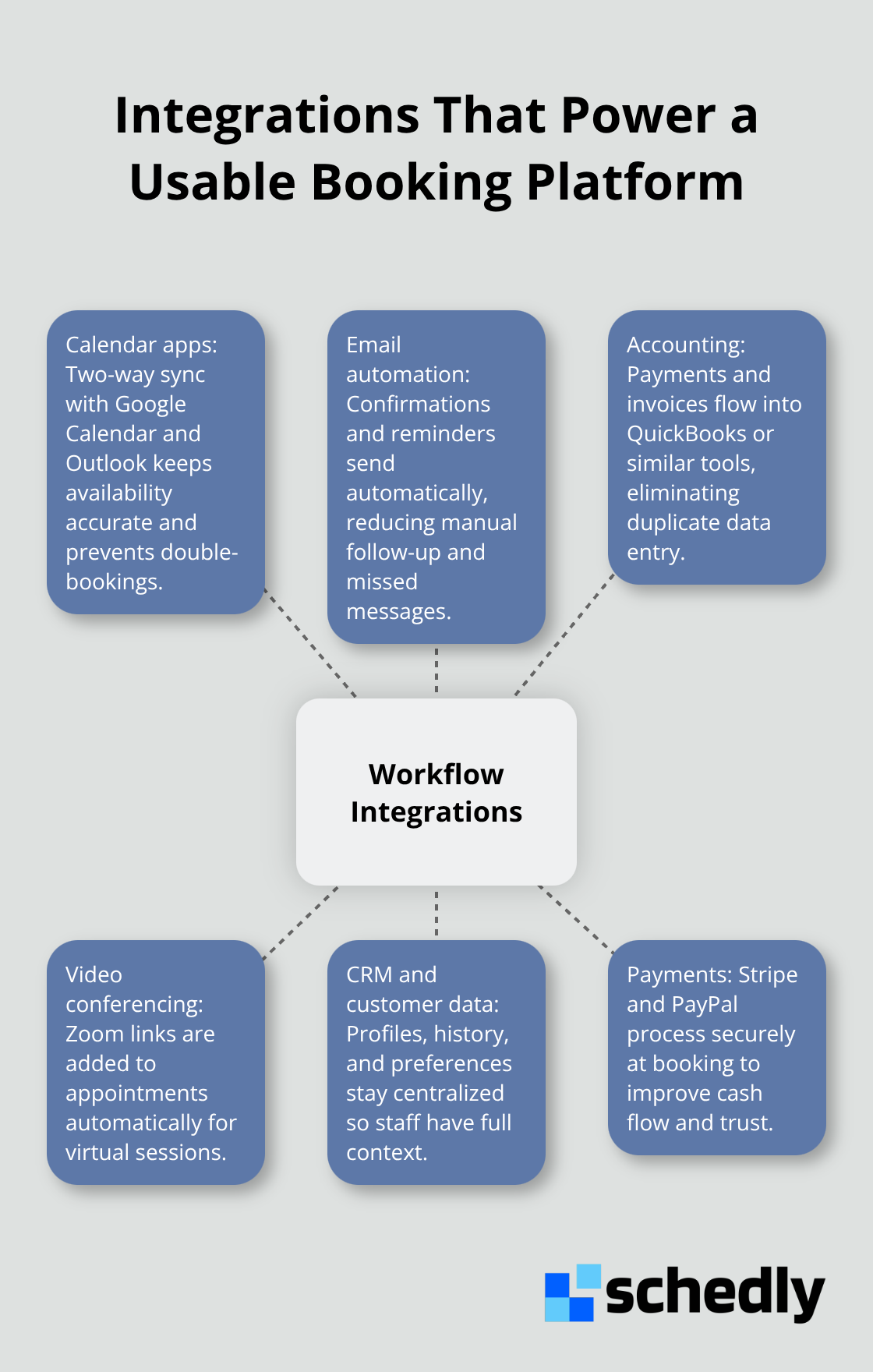
Your booking system shouldn't exist in isolation. It needs to talk to the tools you already use-your calendar, your email, your accounting software, your video conferencing app. Integrations eliminate manual data entry and keep information synchronized across platforms. If your platform integrates with Zoom, appointments automatically include video meeting links. If it connects to your accounting software, payment data flows directly into your financial records. If it syncs with your email, customer confirmations and reminders send automatically without your team touching them.
Three Mistakes That Kill Your Booking Platform Investment
Most small businesses choose a booking platform and regret it within three months. The system looked good in the demo, checked boxes on a feature list, and promised to solve scheduling chaos. Then reality hits: your team avoids using it because the interface feels clunky on their phones, it doesn't talk to the tools they already use daily, or you have no idea whether it's actually driving more bookings. The platform sits abandoned while you're back to managing calendars manually. These aren't random failures. They follow predictable patterns that appear when small business owners prioritize the wrong criteria during evaluation. Understanding what actually matters prevents expensive mistakes.
Mobile Optimization Isn't Optional, It's Where Revenue Happens
Your team books appointments on phones. Your customers book on phones. Yet most small businesses test platforms only on desktop before committing. When your staff member pulls up the admin dashboard on their iPhone to confirm an appointment while away from the office, and the interface is cramped or slow, they'll call the customer instead of using the system. That defeats the entire purpose of having a platform. More critically, your customers won't complete bookings if the experience feels broken on mobile. Test every platform you're considering on both iOS and Android before signing a contract. Scroll through the booking page slowly. Try selecting a service, then a staff member, then a time slot. If any step takes more than two taps or feels unintuitive, eliminate that platform from consideration. SimplyBook.me and SuperSaaS both perform well on mobile, but many platforms don't. Poor mobile experience isn't a minor inconvenience. It's a revenue leak you'll pay for every single day.
Integration Gaps Create Double Work and Broken Data
A booking platform that doesn't integrate with your existing tools becomes a data silo that actually increases work instead of reducing it. Your team uses Google Calendar to manage their schedules. Your accounting software is QuickBooks. You send reminders through email marketing tools. If your booking platform doesn't connect to these systems, information lives in separate places and falls out of sync. Someone reschedules an appointment in the booking system, but Google Calendar doesn't update. Your team wastes time checking multiple places to see the real schedule. Payment data lands in the booking platform but doesn't flow into QuickBooks, forcing someone to manually enter transactions. Customer contact information exists in three different systems with different versions of their phone number. These gaps multiply across your business and waste far more time than the platform saves. Before you evaluate any platform, list every tool your team uses at least weekly: calendar apps, email systems, accounting software, video conferencing, customer databases. Then verify that the booking platform integrates with at least 80% of those tools. If integration is missing with critical systems, that platform will fail regardless of how good its other features are.
Analytics Reveal Whether Your Platform Actually Works
You've implemented a booking platform for six months, but you don't know if it's actually generating more revenue or just replacing your old system. This happens constantly because most small businesses never look at the analytics. The platform collects data on every booking, every cancellation, and every customer action, but that information sits unused. Without analytics, you can't answer basic questions: Are more customers booking online or still calling? Which services generate the most revenue? What time slots fill fastest? Do customers book with specific staff members? Which marketing channels drive the most bookings? This blindness means you can't optimize anything. You might attract customers who never actually book, wasting marketing money. You might have capacity available at certain times but no customers booking those slots, missing revenue opportunities. You might have staff members who consistently get booked while others stay idle, indicating scheduling or marketing problems you can't see. When you evaluate platforms, ignore those that don't provide clear reporting on booking trends and customer behavior. If the platform doesn't make this data visible and accessible, you'll never know whether it's actually working or just sitting there processing the bookings you would've handled anyway.
Final Thoughts
An online booking platform solves three problems that drain small business resources every single day: wasted time on manual scheduling, lost revenue from no-shows and after-hours booking requests, and payment delays that hurt cash flow. The right system eliminates these friction points entirely. Your customers book when they want, your team stops managing calendars manually, and money arrives in your account faster.
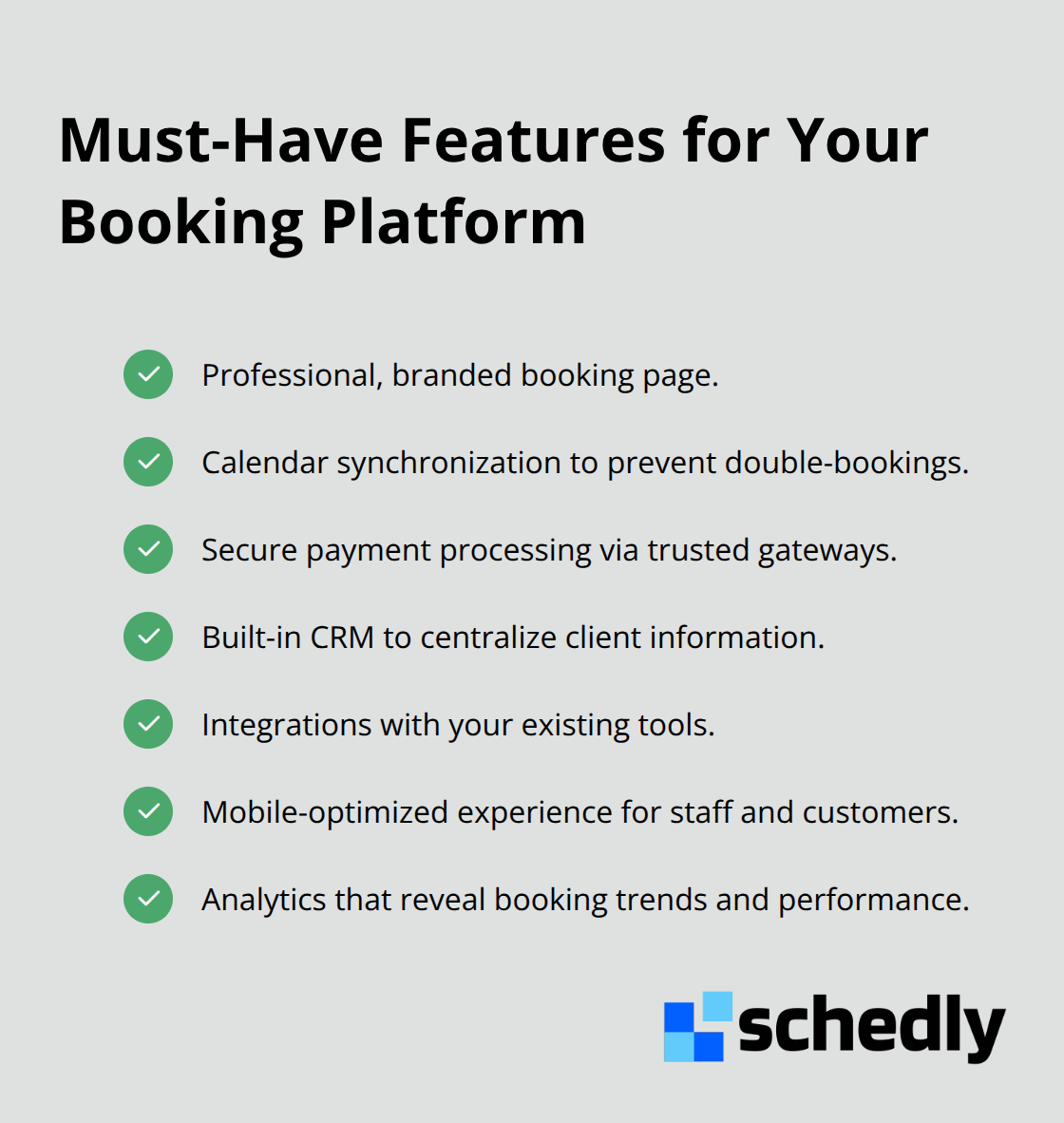
The features that actually matter are straightforward. Your booking page must look professional and match your branding because it's your first impression on potential customers. Calendar synchronization prevents the chaos of double-bookings and conflicting schedules. Secure payment processing through trusted gateways builds customer confidence and accelerates revenue.
Most small businesses fail with booking platforms because they ignore these fundamentals. They choose systems without testing mobile performance, skip integration verification, or never look at analytics to confirm the platform is working. Test your online booking platform on your phone, confirm it connects to your existing tools, and check that it provides clear reporting on booking trends before you commit to any system. Visit Schedly to explore how automated scheduling transforms your business.