
Schedly resources
Reminder Timing Optimization: Fine-Tune Alerts To Cut No-Shows
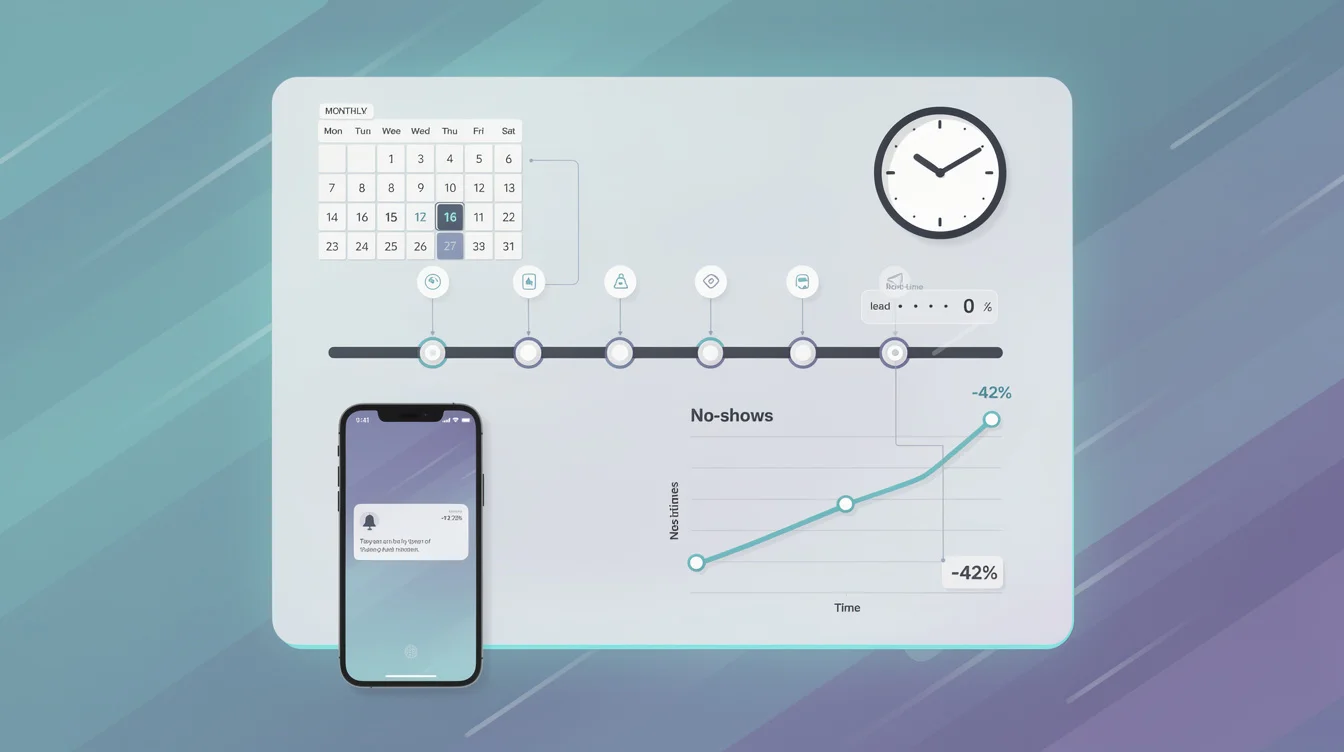
No-shows cost businesses real money. A single missed appointment can mean lost revenue, wasted staff time, and frustrated customers.
The timing of your reminders makes the difference between a customer who shows up and one who doesn't. At Schedly, we've seen how reminder timing optimization directly impacts attendance rates across industries. This guide walks you through the data, the strategies, and the mistakes to avoid.
When Should You Actually Send Reminders
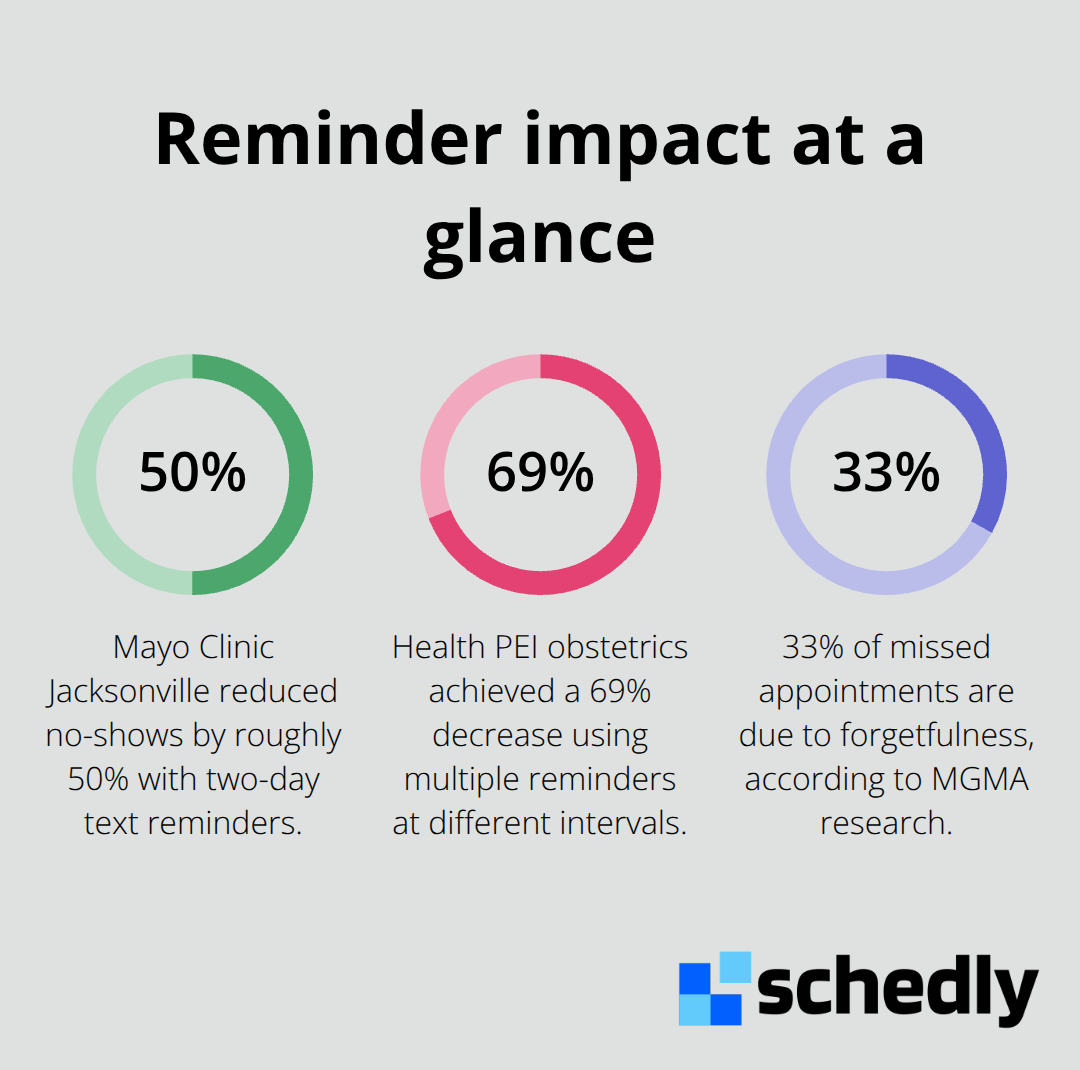
The data is clear: one reminder is not enough. Mayo Clinic Jacksonville reduced no-shows by roughly 50% using text reminders sent two days before appointments, but that's a single touchpoint. Health PEI's obstetrics clinic achieved a 69% decrease in no-shows with multiple reminders across different time intervals. The pattern works because people forget. About 33% of patients who miss appointments cite forgetfulness as the reason, according to MGMA research. A single reminder catches some of them. Multiple reminders catch most of them.
We recommend the 3-1-0 cadence: send a reminder three days before the appointment for awareness, one day before for confirmation, and on the day of the appointment as a final nudge. Add a day-of reminder 2 to 4 hours before the appointment. This approach consistently outperforms single-message strategies across healthcare, dental, and service industries. Cleveland Clinic reported a 20% drop in no-shows with automated text messaging, while Optum documented a 30% reduction in missed appointments through automated reminders. The timing matters more than you might think. Community Health Network tracked a 98% open rate for text reminders with most responses arriving within 90 seconds. Those fast responses mean you get real-time confirmation data that lets you fill slots before the appointment window closes.
The Hour Matters More Than the Day
Sending a reminder at 6 PM generates higher confirmations than a noon send. Optimal windows exist: 9-10 AM works well for same-day and one-day reminders, while 5-7 PM performs better for three-day advance notices. Avoid sending before 8 AM or after 9 PM. These windows align with when people actually check their phones and act on messages. For morning appointments, send your day-before reminder in the evening around 6-7 PM so the appointment sits fresh in their mind when they wake up. For afternoon or evening appointments, a morning reminder works better. The goal is positioning your reminder in the gap between when someone can actually act on it and when they're likely to forget.
Different Industries Need Different Schedules
Dental offices perform best with a 72-hour lead time rather than 48 hours. Patients need extra time to mentally commit to non-urgent dental work. Imaging centers typically require a full week of lead time to communicate prep instructions like fasting or contrast requirements, followed by a 48-hour check-in reminder. Primary care practices see strong results with 48-hour reminders. Mental health appointments often benefit from 24-48 hour windows. The variation exists because different appointment types carry different friction. A routine checkup requires minimal preparation. A colonoscopy requires specific prep steps that patients need time to process and complete. Your reminder strategy should match what the appointment actually demands from the customer.
Matching Reminders to Appointment Complexity
High-friction appointments demand more lead time and more touchpoints. New patient visits require a one-week heads-up to account for intake forms, records, and prep requirements. Routine follow-ups work fine with a 48-hour primary reminder plus a day-of nudge 2-4 hours before the appointment. Procedural or test prep appointments need a one-week reminder that includes clear prep steps, then a 48-hour check-in to confirm readiness. This tiered approach (one week out, then 48 hours, then day-of) yields better show rates for new patients, older patients, and high-value visits. Beyond three reminders, you hit diminishing returns and risk customer fatigue. The key is matching your cadence to what the appointment actually requires, not what feels safe or standard.
Building Your Reminder System
SMS as Your Primary Channel
SMS should be your primary channel. Text messages achieve a 98% open rate, with most responses arriving within 90 seconds. This speed matters because it gives you real-time confirmation before the appointment window closes. Email works as a secondary channel for detailed information like prep instructions or parking details. Phone calls serve as an escalation tool for patients who don't respond to text or email, particularly older patients. Healthcare organizations using this three-tier approach report significantly better confirmation rates than those relying on a single channel.
Tailoring Channels to Your Audience
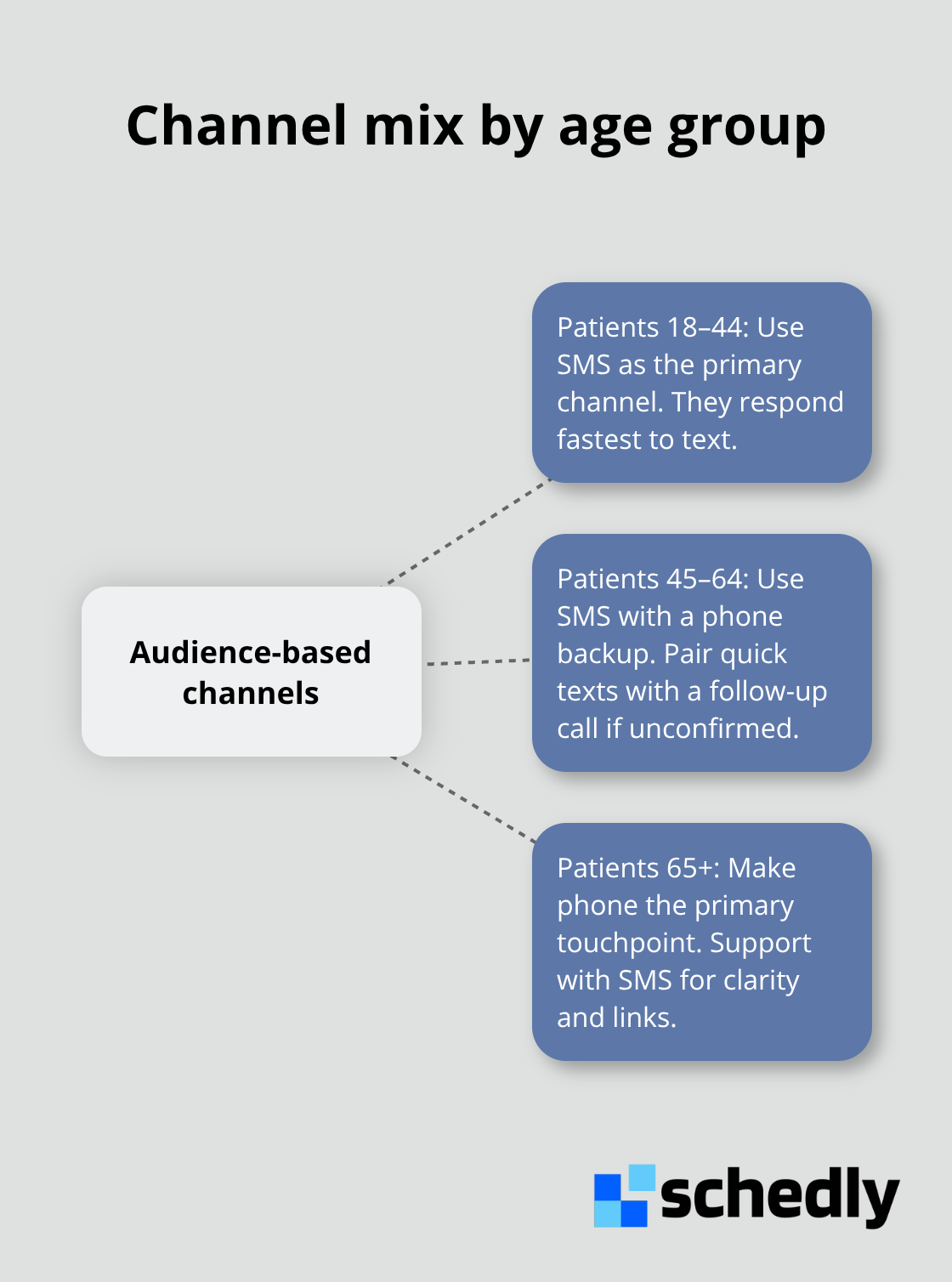
The specific mix depends on your patient demographics. Patients aged 18-44 respond fastest to SMS. Patients aged 45-64 need both SMS and a phone backup. Patients 65 and older often require a phone call as the primary touchpoint, with SMS as support.
Personalization That Drives Action
Personalization dramatically increases engagement. Include the patient's name, exact appointment date and time, location, and the specific service or provider name. A message reading "Hi Sarah, your appointment with Dr. Chen on Thursday, June 6 at 2:30 PM at our downtown clinic is coming up" converts better than a generic automated message. Add one clear call-to-action with simple response options: reply C to confirm, R to reschedule, or tap a link to manage your appointment online. This specificity removes friction and enables instant action.
Integration and Automation
Automation platforms that integrate directly with your scheduling software eliminate manual entry errors and keep reminders synchronized with your actual calendar. Without integration, you risk sending reminders for appointments that were already cancelled or rescheduled, which damages credibility and frustrates customers. The system should update instantly when cancellations or rescheduling occur, so your reminder queue reflects your current schedule.
Measuring What Actually Works
Track confirmation rates as your primary metric. Try for 70% or higher, which indicates your timing and messaging resonate with your audience. Confirmation rates below 50% signal you need to adjust when you send reminders, what you say, or which channels you prioritize. Run simple A/B tests by changing one variable at a time: test 48-hour sends versus 72-hour sends, or morning sends versus evening sends. Measure no-show rates, confirmation rates, and response times for each test over a full month before drawing conclusions. Most practices see measurable improvements within 30-60 days of implementing this structured approach. Once you establish your baseline metrics, you can identify which channels and timing windows perform best for your specific audience-and that data becomes the foundation for scaling your reminder strategy across multiple locations or service types.
Common Mistakes That Sabotage Your Reminder Strategy
Treating All Appointments the Same Way
The most common mistake is applying one reminder cadence to every appointment type. Practices send reminders at identical intervals for routine checkups and colonoscopy prep, then wonder why dental no-shows stay high while primary care attendance improves. Mayo Clinic Jacksonville cut no-shows 50% with two-day reminders, but Health PEI obstetrics achieved a reduction with multiple touchpoints at different intervals. The gap between those results reflects precision, not luck. When you send a reminder for a routine checkup at the same cadence as a colonoscopy prep appointment, you optimize for neither. Colonoscopy patients need a full week to process prep instructions and mentally prepare. Routine checkup patients start forgetting after 48 hours. Send the colonoscopy reminder at 48 hours and you waste your lead time. Send the checkup reminder at one week and you create unnecessary fatigue. Audit your current reminder schedule and match each appointment type to its actual friction level. Imaging centers need seven days minimum for prep communication. Dental offices perform better at 72 hours than 48. Mental health appointments often work at 24 to 48 hours. This specificity matters more than having a perfectly polished message.
Ignoring When Patients Actually Respond
The second mistake involves sending reminders when it feels safe rather than when patients actually respond. MGMA research shows forgetfulness drives 33% of no-shows, but timing windows matter enormously for response rates. A 6 PM send outperforms noon, yet many practices default to morning sends because it fits their workflow. Community Health Network tracked text reminders that helped improve patient medical compliance and appointment reminders. Those fast responses only happen if you hit the window when someone is actually available to act. Send at 9 to 10 AM for same-day or one-day reminders. Send at 5 to 7 PM for three-day advance notices. Avoid sending before 8 AM and after 9 PM entirely. These aren't suggestions-they're the actual windows where people respond.
Over-Communicating and Creating Fatigue
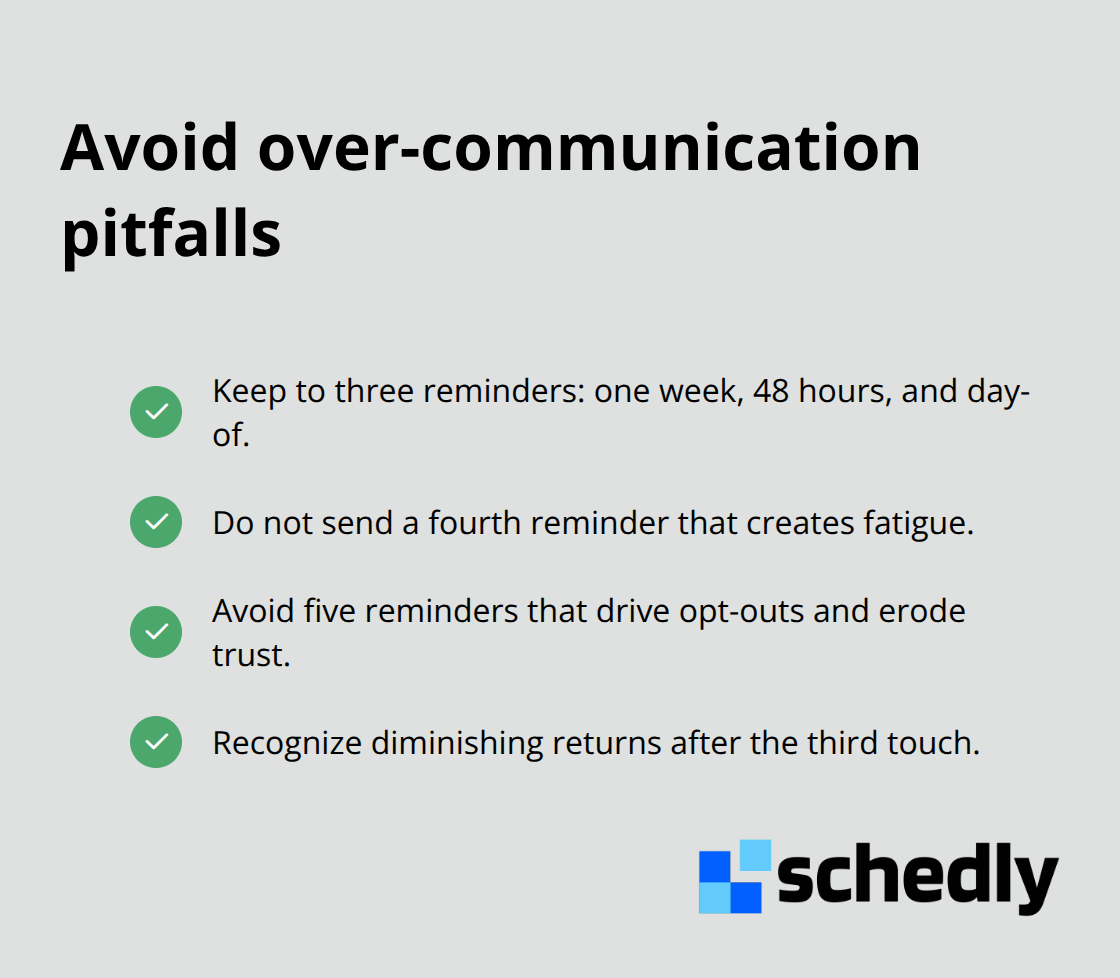
Three reminders (one week, 48 hours, day-of) work effectively. Four reminders start creating fatigue. Five reminders guarantee opt-outs and damaged trust. Beyond three touches, you hit diminishing returns and risk customers ignoring all your messages.
Disrespecting Customer Channel Preferences
Practices ignore what customers actually say they want. SMS should be your primary channel because 97% of patients want reminders via text and achieve 98% open rates. Yet some practices still rely on email or phone calls as their main touchpoint. Even worse, some practices ignore opt-out requests or send through channels customers explicitly rejected. This destroys credibility. If someone opts out of email but confirms via text, respect that preference. Your reminder system should track individual channel preferences and honor them, not impose a standard sequence on everyone.
Final Thoughts
Reminder timing optimization isn't a one-time setup-it's a system you build, measure, and refine based on what your actual customers do. Practices that match reminder cadence to appointment complexity, send at windows when people actually respond, and respect channel preferences see no-show reductions of 20 to 50% within 30 to 60 days. That translates to fuller schedules, recovered revenue, and less wasted staff time.
Start with the 3-1-0 cadence: three days out for awareness, one day before for confirmation, and day-of for the final nudge. Send SMS as your primary channel at 9 to 10 AM for same-day reminders and 5 to 7 PM for advance notices. Personalize every message with the patient's name, exact time, location, and a clear call-to-action, then track confirmation rates, no-show rates, and response times by timing window and channel. Run A/B tests by changing one variable at a time, and most practices discover their optimal windows within a month.
We at Schedly built our scheduling platform to automate this process entirely. Schedly integrates directly with your calendar, tracks confirmations in real-time, and lets you set custom reminder cadences by appointment type so you can implement reminder timing optimization without the manual work. Your no-show rate will drop, and your revenue will follow.