
Schedly resources
Reminders Prevent No Shows: Keep Cancellations Low
No-shows drain your business faster than most people realize. A single missed appointment costs you revenue, wastes your team's time, and chips away at customer trust.
The good news? Reminders prevent no-shows. At Schedly, we've seen firsthand how a solid reminder system transforms your schedule and protects your bottom line.
What No-Shows Actually Cost Your Business
No-shows hit your business in three distinct ways, and most business owners underestimate the damage. A missed appointment means lost revenue, wasted staff time, and eroded customer trust. According to research from NHS Health Scotland, a single missed outpatient appointment costs roughly 120 GBP, and that's just the direct cost. For a three-doctor practice with a 6,000-patient panel, poor scheduling and missed appointments can drive up to 57 million dollars in revenue losses over three years. The math is brutal. If you see 20 patients per day and experience a 20% no-show rate (which is actually below the healthcare no-show rate of 23%), you lose four appointments daily. At 200 dollars per new patient visit, that's 800 dollars gone every single day. Over a year, that's nearly 300,000 dollars in revenue that never reaches your bank account. Your fixed costs-rent, payroll, utilities-stay the same whether those chairs are filled or empty. The gap between your overhead and actual revenue widens with every no-show.
The Productivity Drain Your Team Faces
Your team's schedule falls apart when no-shows pile up. Staff members arrive ready to serve a patient who never shows, then scramble to find other work or sit idle. A call center handling 2,000 calls per day typically staffs only 60% of peak demand, leaving about 23 agents short during busy periods. When patients don't show, your team can't fill those gaps efficiently. Appointment slots represent your most valuable asset-once they pass, they're gone forever. You can't resell yesterday's 2 PM slot. This inefficiency compounds across your operation. Employees spend time confirming appointments, managing cancellations, and rescheduling. The STAR-SI program, which studied 67 addiction outpatient clinics, found that clinics cutting no-show rates from 37.4% to 19.9% freed up significant staff capacity. That freed capacity translates directly to either serving more patients or reducing overtime costs. Your team's morale suffers too. Waiting for no-shows creates frustration and burnout. Staff members feel their time doesn't matter when appointments are routinely missed. This directly impacts the quality of service you deliver to patients who do show up.
How Revenue Loss Compounds Across Your System
An AI-based appointment system tested at a 600-bed university hospital in Istanbul demonstrated what happens when no-shows drop. The hospital went from 75–85% capacity utilization (due to cancellations and no-shows) to raising utilization by roughly 6% capacity utilization. That single improvement generated approximately 570,000 dollars in cumulative revenue over five months. The hospital's data showed appointments recovered from about 59.2% kept to 63.4% utilization-a modest percentage change that produced massive financial gains. Your business operates on thin margins. Every empty slot is margin you'll never recover. A new patient visit generates roughly 200 dollars in revenue. Four visits per year equal about 800 dollars. The lifetime value of approximately 12,000 dollars represents what an established patient is worth to your practice. When patients no-show, you don't just lose that single appointment-you risk losing the entire patient relationship. Customers who miss appointments often feel embarrassed or frustrated with your business, and they frequently don't return. This compounds your revenue loss. You lose the immediate appointment revenue plus the lifetime value of that customer.
The financial damage is clear. What's less obvious is how to stop it. Reminders work-and they work fast.
How Reminders Actually Stop No-Shows
The Gap Where No-Shows Happen
Reminders work because they interrupt the space between when someone books an appointment and when they need to show up. That space is where no-shows happen. Life gets in the way-work deadlines shift, childcare plans change, other commitments emerge. A patient books three weeks out and genuinely intends to attend, but by week two, your appointment has slipped to the back of their mind. Automated reminders pull your business back into focus at exactly the right moment.
The data backs this up: providers using automated reminders report about 51% more appointment confirmations than those who don't. That's not a marginal improvement-it's a fundamental shift in how many people actually show up.
Why SMS Reminders Outperform Other Channels
SMS reminders reach patients where they live: on their phones. Text messages have an open rate around 98%, compared to email open rates that typically hover between 15% and 25%. When you send a text reminder 24 hours before an appointment, you catch people in the exact window when they can still adjust their plans.

A hospital in Istanbul that implemented AI-powered reminders alongside backup appointment slots saw appointments increase from 59.2% kept to 63.4% utilization-a shift that generated 570,000 dollars in revenue over five months. The reminder wasn't flashy or complicated. It was simply there, at the right time, in the right format.
Layering Multiple Reminders Creates Compounding Effect
The real power comes from sending multiple reminders across different windows. A single reminder the day before an appointment reduces no-shows, but layering reminders creates a compounding effect. An immediate confirmation after booking establishes that the appointment exists. A reminder 24 to 48 hours before gives patients time to rearrange schedules. A final 1-hour reminder before the appointment catches people who need a last-minute nudge.
This sequence works because it acknowledges how people actually operate: some need early notice, others respond better to last-minute reminders.
Personalization and Two-Way Communication Drive Engagement
Personalization amplifies reminder effectiveness. A generic message saying your appointment is tomorrow performs worse than a message addressing the patient by name, specifying what service they're receiving, and including the exact location or virtual link. When you include specific details-the provider's name, the address with parking information, or the Zoom link for telehealth-you remove friction points that cause cancellations.
Patients who receive personalized reminders with clear logistics report higher satisfaction because the message feels directed at them, not broadcast to a crowd. Two-way texting takes this further by letting patients confirm, reschedule, or ask questions directly from the reminder. Instead of calling your office to change an appointment, they reply to the text. This reduces the administrative burden on your team while giving patients the flexibility they want.
Real-World Results From Multi-Tactic Approaches
The STAR-SI program worked with 67 addiction outpatient clinics to reduce no-shows. Reminder phone calls reduced no-shows by an average of 19%. Combined with other tactics like reduced wait times and increased capacity, reminders became part of a system that cut no-show rates from 37.4% to 19.9% across participating clinics.
Reminders aren't standalone solutions, but they're non-negotiable components of any strategy to fill your schedule. The next step is understanding exactly how to implement these reminders so they integrate seamlessly into your operations without creating extra work for your team.
Setting Up Your Reminder Schedule the Right Way
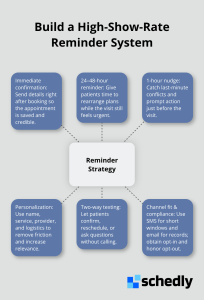
The timing of your reminders determines whether patients actually respond or delete the message unread. Too early and they forget. Too late and they've already committed to something else. The optimal reminder timing of 24 to 48 hours before the appointment, when patients can still rearrange their schedules but the appointment feels immediate enough to act on. A second reminder 1 hour before serves as a final nudge for people running late or those who need that last jolt to get moving. An immediate confirmation after booking also matters, though for a different reason: it establishes that the appointment exists in your system and gives patients the details they need to save the date.
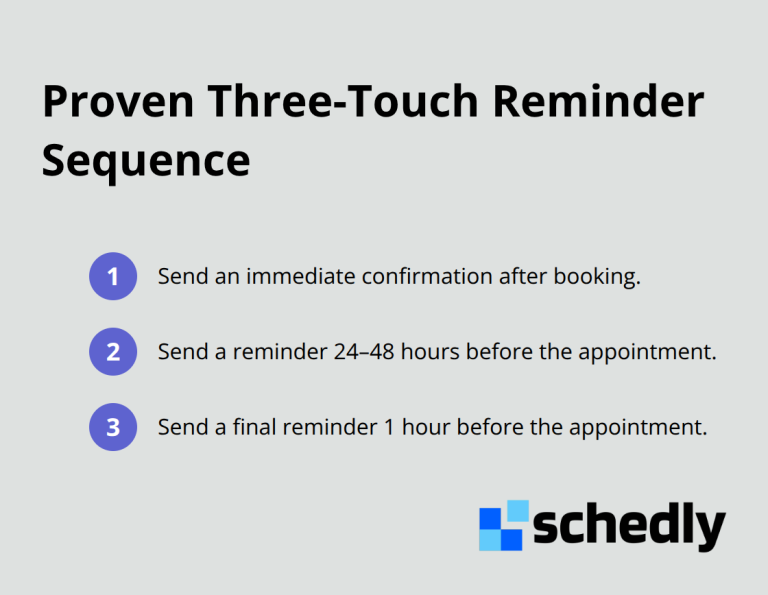
This three-touch sequence works because it acknowledges that people operate on different schedules. Some patients need early warning to arrange childcare or time off work. Others respond better to last-minute reminders that create urgency. Spreading your reminders across this timeline captures both types. The Istanbul hospital study showed that combining appointment reminders with backup scheduling increased kept appointments to 63.4%, generating 570,000 dollars in revenue over five months. Timing alone wasn't the solution, but it was essential to their success.
Choose the Right Channel for Each Reminder
Most businesses send all reminders through one channel at one time. Text messages work best for the 24-hour and 1-hour reminders because people check their phones constantly. Email works for the initial confirmation because it creates a written record patients can reference. If you operate a telemedicine practice, include the video join link in your 1-hour reminder so patients don't waste time searching for it. For in-person appointments, include a map link to your location in the 24-hour reminder.
These small details reduce friction that causes last-minute cancellations. Compliance matters too: obtain explicit opt-in consent before sending texts, and honor opt-out requests immediately. Most scheduling platforms handle this automatically, ensuring you stay compliant with regulations while your reminders actually reach people.
Personalize Messages to Drive Response Rates
The content of your reminders determines whether patients read them or ignore them. Generic messages saying your appointment is tomorrow perform worse than personalized messages that include the patient's name, the specific service they're receiving, and the provider's name. A message reading "John, your haircut with Marcus is tomorrow at 2 PM at our downtown location" converts better than a message saying "You have an appointment tomorrow."
Personalization signals that the message is directed at them, not broadcast to hundreds of people. Include specific logistics that remove excuses for no-shows: parking information, pre-appointment instructions, or confirmation requirements. Two-way texting amplifies engagement by letting patients confirm, reschedule, or ask questions directly from the reminder instead of calling your office. This reduces administrative burden on your staff while giving patients the flexibility they want.
Enable Easy Rescheduling Within Reminders
A patient who receives a reminder and can text back "C" to confirm takes 10 seconds. A patient who has to call your office ties up a staff member for several minutes. The key was that reminders worked best when paired with the ability to actually change plans.
If your reminder says "confirm by replying YES" but patients can't easily reschedule, you've created frustration. Build rescheduling into your reminder: include a direct booking link or your phone number so patients can adjust if needed. Different appointment types need different messaging. A reminder for a medical procedure should emphasize any preparation required. A reminder for a consultation should include what documents to bring. A reminder for a recurring appointment should reference whether anything has changed since the last visit.
Customize Templates for Appointment Types
This customization takes minimal extra effort if you use templates in your scheduling software. Create separate templates for initial bookings, 24-hour reminders, 1-hour reminders, virtual appointments, new patients, and recurring appointments. Test your reminders with internal appointments before launching to verify that timing works, links function, and your call-to-action is clear. Scheduling automation tactics that support template customization allow you to save multiple versions and deploy them automatically based on appointment type, reducing manual work while maintaining personalization at scale.
Final Thoughts
Reminders prevent no-shows, and the data proves it. Providers using automated reminders report 51% more appointment confirmations than those who don't, while the Istanbul hospital study generated $570,000 in revenue over five months by combining reminders with strategic scheduling. These aren't theoretical numbers-they're real results from real businesses that took action and transformed their schedules.
The path forward requires three core elements: send confirmations immediately after booking, follow with a 24-to-48-hour message, and close with a 1-hour nudge. Personalize each message with the patient's name, service type, and specific logistics like parking or virtual links. Enable two-way communication so patients can confirm or reschedule without calling your office, which frees your team from manual reminder work while dramatically improving your show rates.
Schedly automates the entire booking process, including customizable reminder sequences, two-way texting, and integration with your calendar and payment systems. You set up your reminder templates once, and the system handles the rest automatically-your schedule fills, your revenue stabilizes, and your team stops wasting time on no-shows.