
Schedly resources
Reminders Reduce No-Shows: A Practical Playbook
No-shows cost businesses billions annually. A single missed appointment drains revenue, wastes staff time, and damages customer relationships.
At Schedly, we've seen firsthand how reminders reduce no-shows dramatically. The right reminder strategy transforms your scheduling from chaotic to reliable.
The Real Cost of No-Shows
No-shows aren't just scheduling inconveniences-they're direct hits to your bottom line. A missed primary care appointment costs a practice $150–$300 in lost revenue. A 4-provider practice with 20% no-shows and 80 daily visits loses roughly $130,000–$160,000 per year. That's not theoretical damage. That's money vanishing from your bank account every single month. Even smaller practices feel the impact sharply. If you run a salon, dental office, or fitness studio with tighter margins, a 20% no-show rate compounds quickly into a serious cash flow problem. The VA learned this the hard way: in 2008, roughly 12% no-shows across 26.5 million outpatient visits cost the VA around $564 million. Your practice doesn't operate at that scale, but the math works the same way.
Why Your Staff Stops Caring
The real damage extends beyond lost revenue. When no-shows become routine, your staff stops treating them as fixable problems and starts treating them as inevitable. Schedulers block time for patients who never show up. Clinicians finish early but can't leave because the next appointment might happen. Front desk staff spend hours calling patients who already cancelled, creating friction that wears down morale. This is why no-show rates matter for retention-burnout follows chaos. The operational cost of managing a no-show (rescheduling, calling, rebooking) often exceeds the appointment itself. Your team gets frustrated, your best staff members start looking elsewhere, and quality drops across the board.
No-Shows Follow Predictable Patterns
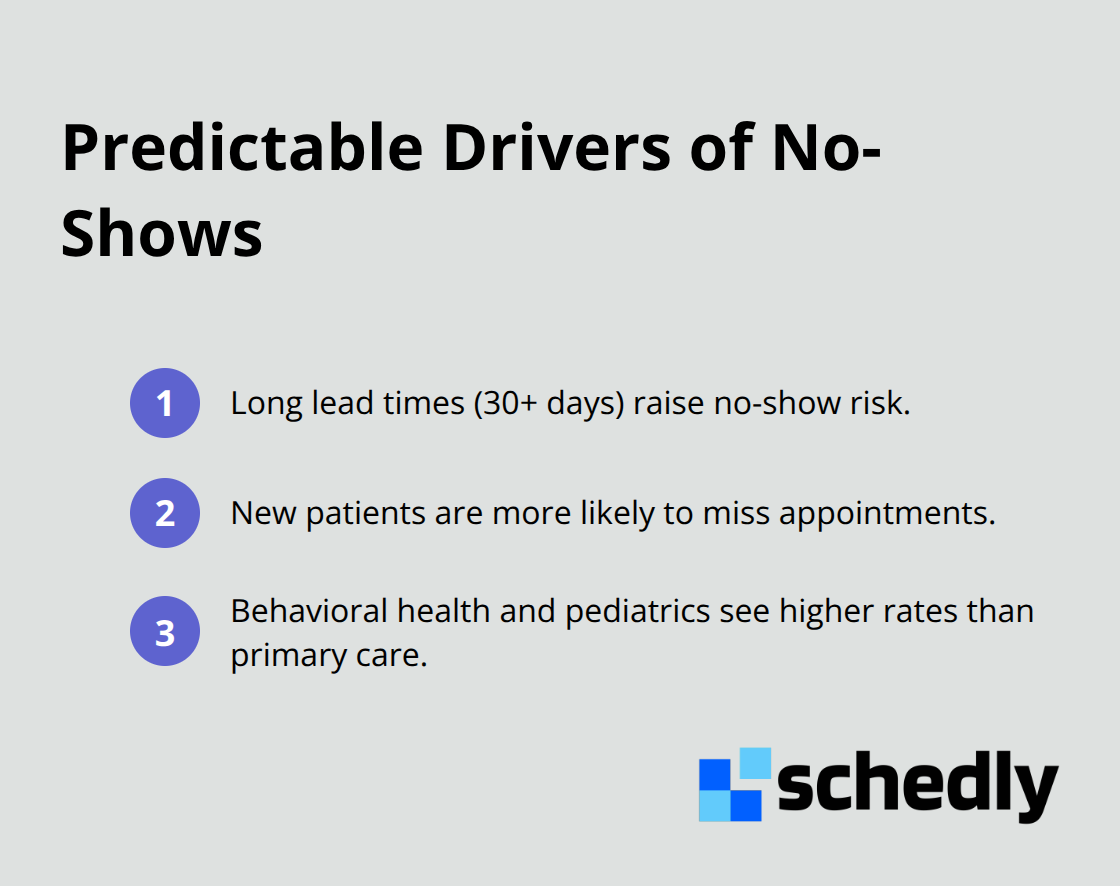
Here's where most practices get it wrong: they treat no-shows as random bad luck. They're not. No-show risk concentrates in specific patterns. Appointments scheduled more than 30 days out have significantly higher no-show rates. New patients miss appointments more often than established ones.
Targeting High-Risk Patients Works
The good news: once you see the patterns, you can target them. High-risk patients with two or more prior no-shows respond to direct outreach. Same-day appointments get kept more often than distant ones. Telehealth conversions prevent some cancellations. But none of this works without identifying who's actually at risk, not just hoping everyone shows up. A predictive model trained on appointment data can flag high-risk appointments before they happen. This approach lets you focus your outreach effort where it matters most, rather than sending reminders to everyone equally. The next chapter shows you exactly how to build that reminder strategy.
How Reminders Actually Work
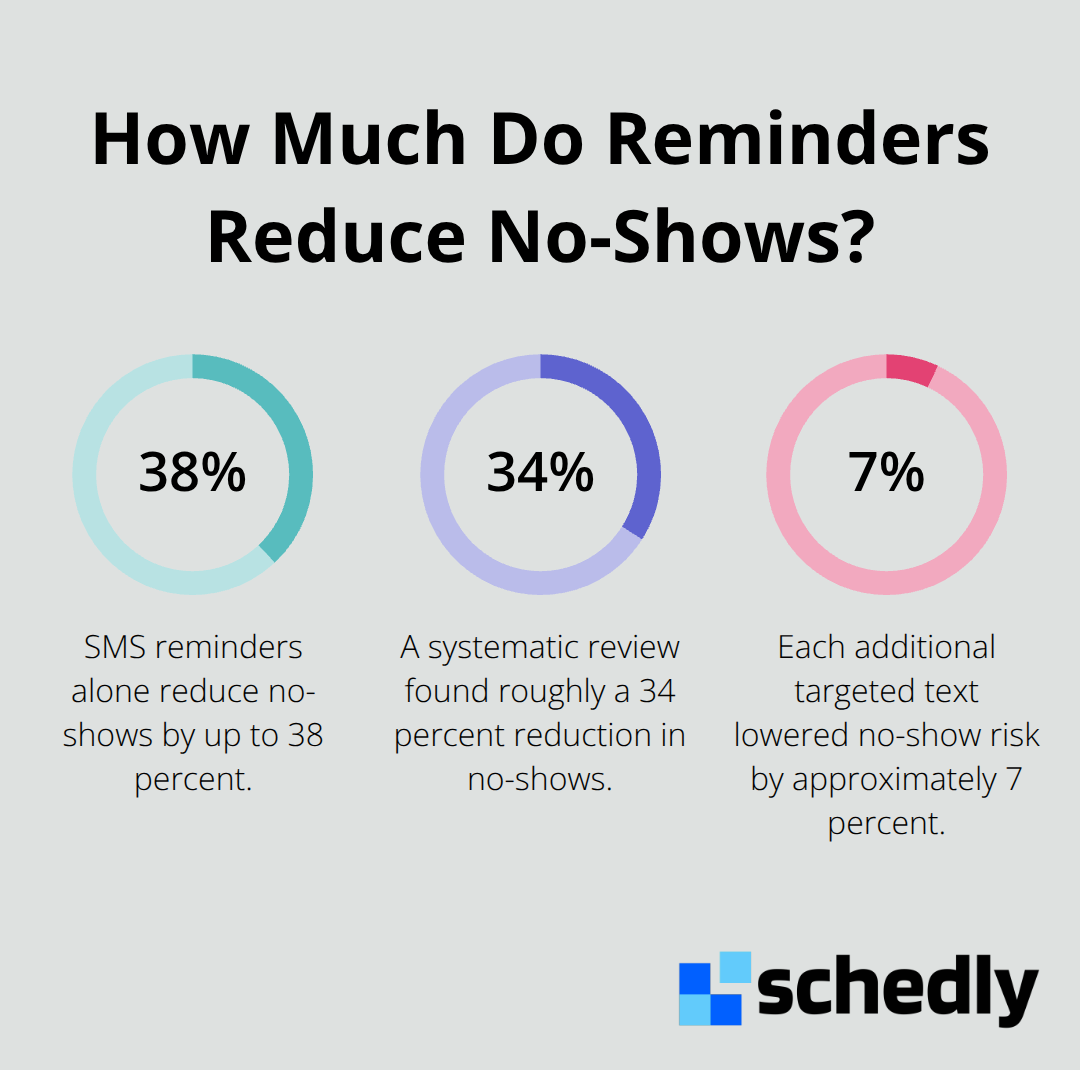
Reminders work because they interrupt the forgetting curve. A patient books an appointment weeks in advance, life happens, and the appointment slips their mind entirely. SMS reminders sent 72 hours before an appointment, then again 24 hours before, then 2 hours before create friction against that forgetting. Research from Imperial College London shows SMS reminders alone reduce no-shows by up to 38 percent. A systematic review across 19 randomized trials found roughly a 34 percent reduction in no-shows when reminders are deployed. Kaiser Permanente tested this in 2022 and found each additional targeted text for high-risk visits lowered no-show risk by approximately 7 percent.
Timing matters more than the message itself. A letter or postcard sent one week out gives patients time to adjust their calendar. Texts work best 1–2 days before the appointment when memory is still fresh but urgency kicks in. What fails: sending five different reminders across five different channels and wondering why patients ignore them all. Veterans Affairs sent 134 million text reminders to 7 million veterans in the first year of their VEText program, but internal feedback revealed reminder fatigue was real. Patients complained they received duplicate content across phone calls, texts, and letters. The solution isn't more reminders-it's smarter reminders.
The Three-Touch Sequence That Works
Send a confirmation SMS immediately after booking to lock in the appointment. Send a second reminder 24–36 hours before the appointment with the exact date, time, location, and a one-tap reschedule link. Send a final reminder the morning of the appointment or at least 8 hours before early slots.
Include only what matters: business name, service, exact time using a clear format like Tuesday, March 3 at 2 PM, location or virtual link, parking details if relevant, and what to bring. Skip the marketing copy. Skip the policy explanation in the SMS-save that for email. Text should stay short and scannable.
Why Live Outreach Beats Automation Alone
A randomized study in a Cleveland safety-net clinic tested live outreach calls on top of automated reminders for high-risk patients and achieved a 32.8 percent no-show rate versus 36.2 percent with standard reminders alone. The biggest win came from actually reaching the patient: when schedulers made contact, no-shows dropped to 26.4 percent compared to 32.4 percent when they couldn't reach anyone.
This tells you that automation alone isn't enough. High-risk patients-those with two or more prior no-shows-need human contact 48 hours before the appointment. A 60-second confirmation call asking if they plan to attend costs far less than a missed appointment. The call also creates an opportunity to offer telehealth conversion or reschedule if the patient signals hesitation.
Email Reminders for Complex Instructions
Email reminders work best for longer services or complex prep instructions where you need space to explain what patients should bring or how to prepare. Include the rescheduling policy with a specific window (12 or 24 hours) and any associated fees so expectations are clear upfront. This clarity prevents disputes later and signals that you take attendance seriously.
The next chapter shows you how to identify which patients need the most aggressive outreach and how to build a no-show policy that actually sticks.
Building Your Reminder Strategy
Automation handles the volume, but strategy handles the results. Most practices send reminders to everyone equally and wonder why no-show rates stay flat. The real approach segments patients by risk, deploys the right channel at the right time, and treats reminders as a system rather than isolated messages.
SMS as Your Primary Channel
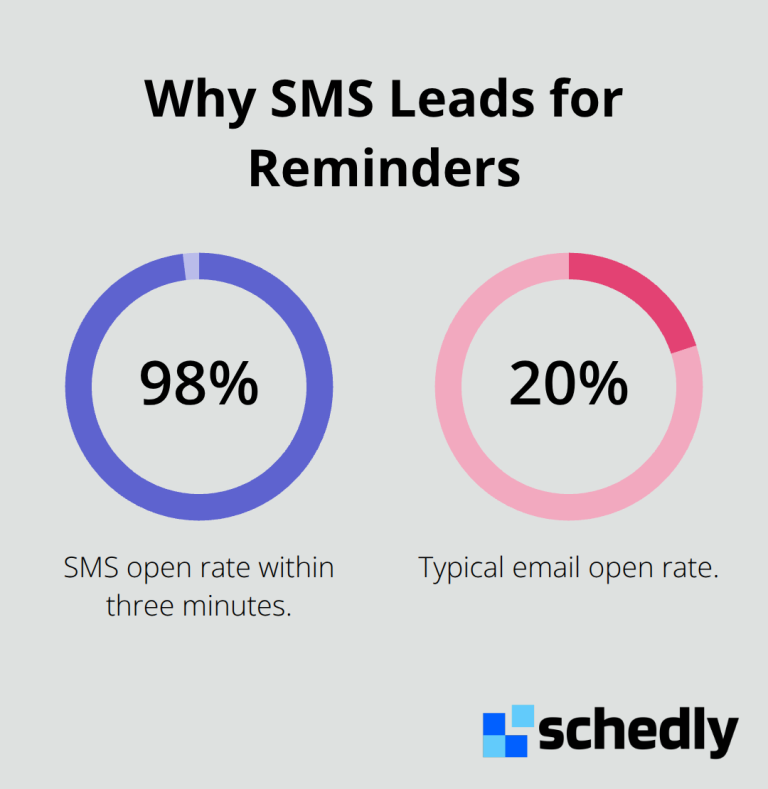
Start with SMS as your primary channel because text messages have a 98 percent open rate within three minutes, far outpacing email which sits around 20 percent.
Send a confirmation text immediately after booking to lock in the appointment and set expectations. This first touch should state the exact date using a clear format like Tuesday, March 3 at 2 PM, the location or virtual meeting link, and a one-tap reschedule option. Forty-eight to seventy-two hours before the appointment, send your second message with visit details, parking information if relevant, and what to bring. On the day of the appointment or at least eight hours before early morning slots, send your final reminder. Keep each message short and scannable-patients skim texts in seconds. Reserve detailed policy language for email or a separate message so SMS stays focused on logistics.
Targeting High-Risk Patients with Live Calls
High-risk patients demand different treatment entirely. If a patient has missed two or more appointments previously, SMS reminders alone won't cut it. A study found that when schedulers made live confirmation calls to high-risk patients 48 hours before appointments, no-show rates dropped significantly. That's a meaningful difference that justifies the staff time.
A sixty-second call asking if the patient plans to attend costs far less than a missed appointment slot. During that call, offer telehealth conversion if the patient seems hesitant or unable to attend in person, and provide a one-tap rescheduling link so they don't have to navigate phone menus. This human contact creates accountability that automation cannot replicate.
Scheduling Software Integration
Integration with your scheduling software matters because manual reminder sending fails at scale. Most modern scheduling platforms automate reminder sequences, track which reminders were delivered and opened, and flag high-risk appointments for staff intervention. The software should allow you to customize message templates for different service types-a dental cleaning needs different prep instructions than a therapy session.
Look for platforms that segment patients automatically based on historical no-show rates and appointment lead time, so your team knows exactly who needs the live outreach call without manual review. This automation frees your staff to focus on the calls that matter most rather than sending identical messages to everyone.
Email Reminders and Clear Policies
Email reminders work best when paired with clear rescheduling policies. Include the specific cancellation window (12 or 24 hours notice), any associated fees, and hardship exceptions so patients understand the stakes upfront. This clarity prevents disputes and signals that you take attendance seriously. The goal is to make attendance the path of least resistance while making cancellation require deliberate action rather than passive drift.
Final Thoughts
Reminders reduce no-shows when you treat them as a system rather than an afterthought. SMS confirmations, targeted outreach to high-risk patients, and clear policies work together to transform your no-show rate-a 4-provider practice loses $130,000–$160,000 annually to no-shows at current rates, but implementing a three-touch reminder sequence with live calls for high-risk patients recovers a meaningful portion of that revenue within months. Your staff stops managing chaos and starts managing schedules, clinicians finish on time, and front desk staff spend less time on damage control and more time on patient care.
Start small if you need to by picking one high-risk patient segment-those with two or more prior no-shows-and testing live confirmation calls 48 hours before their appointments. Measure your no-show rate before and after, and most practices see a 5–10 percent improvement within the first month. Once you see results, expand the system to include automated SMS sequences for all patients and email reminders for complex services.
Schedly automates reminder sequences, segments patients by risk, and integrates with your calendar so you don't manage reminders manually. The software handles the volume while your team handles the high-touch calls that matter most, and no-shows become predictable and preventable rather than inevitable.