
Schedly resources
Smart scheduling tips to Maximize Bookings
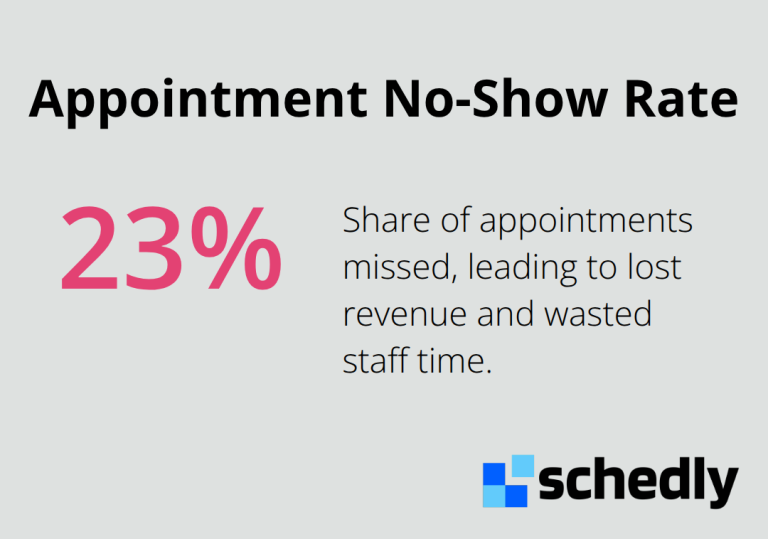
No-shows cost businesses real money. A study by Calendly found that 23% of appointments are missed, which translates to lost revenue and wasted staff time.
At Schedly, we've seen firsthand how smart scheduling tips transform booking rates. The businesses that win aren't just accepting whatever comes their way-they're actively optimizing every step of the booking experience, from the moment a customer lands on their page to the moment they show up for their appointment.
Optimize Your Booking Page for Conversions
Make Your Call-to-Action Buttons Impossible to Ignore
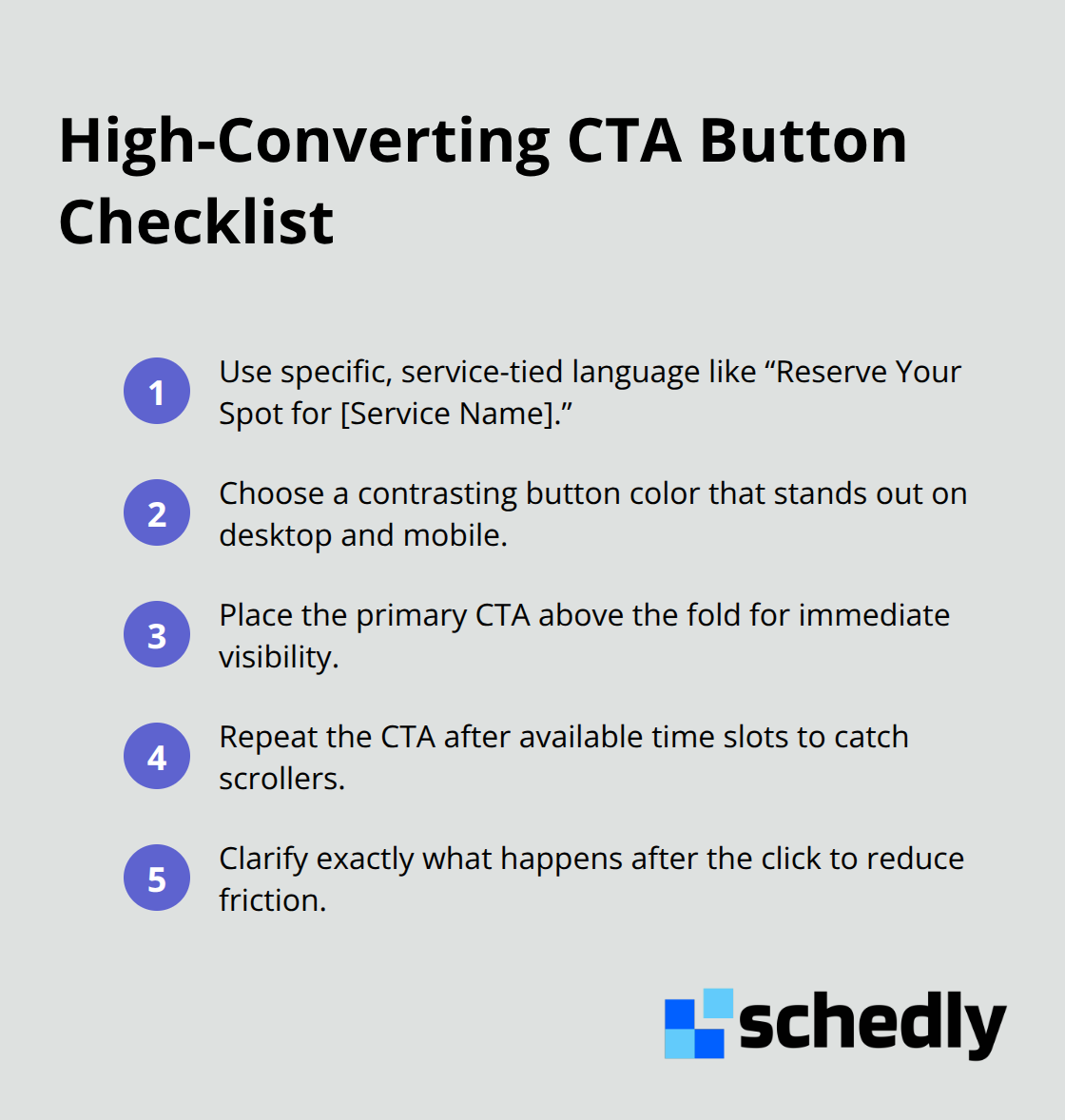
Your call-to-action button is the moment interest converts to action. Vague language like "Book Now" or "Schedule Here" underperforms compared to specific language tied to the actual service. Use "Next Available" or "Reserve Your Spot for [Service Name]" instead. The button color must contrast sharply against the background so it stands out on both desktop and mobile devices. Test button placement too: positioning it above the fold and repeating it after available time slots increases clicks significantly. A strong call-to-action removes friction and tells customers exactly what happens when they click.
Build Trust with Professional Visual Design
Low-quality images, mismatched fonts, or cluttered layouts signal to customers that you don't take your business seriously, and they'll book elsewhere. Use clean, professional photography relevant to your service. Maintain consistent colors and fonts across the entire booking flow. Remove any visual distractions that compete for attention. Professional design is a trust signal that gives users confidence in your credibility. Professional branding transforms a booking page from a necessary evil into a trust-building asset.
Display Real-Time Availability at the Top
Customers hate discovering after filling out a form that their preferred time is gone. Display available time slots prominently at the top of the page and update them in real-time as bookings come in. If you use scheduling software with calendar synchronization, your booking page should pull directly from your live calendar so customers always see accurate availability. This reduces frustration and abandoned bookings. Real-time availability also cuts down on follow-up emails asking whether a slot is still open.
Connect Your Booking Page to Your Live Calendar
The fastest path to a booked appointment wins. When your booking page connects to your actual calendar system, customers see what's truly available, not what you think might be available. This eliminates the gap between your scheduling software and your customer-facing page. Synchronization prevents the awkward moment when a customer books a time that's already taken, then receives a cancellation email minutes later. A seamless connection between your calendar and your booking page removes one of the biggest sources of booking friction.
Leverage Automation to Reduce No-Shows and Cancellations
No-shows destroy profitability. A 23% no-show rate means nearly one in four appointments generates zero revenue while tying up your staff's time.
Send Reminders Across Multiple Channels
Automated reminders work because they interrupt busy schedules and force customers to consciously decide whether to show up or cancel. Email reminders alone capture customers who check email regularly, but adding SMS confirmations and push notifications reaches people through the channels they actually monitor. Research shows that combining reminders across phone, email, and text produces the strongest results.
Timing matters significantly. Send a reminder 24 hours before the appointment to catch cancellations early, then follow up with another reminder 2 hours before to catch last-minute no-shows. This two-touch approach gives customers two chances to reschedule rather than simply vanishing.
Make Confirmations Specific and Actionable
Confirmation messages work best when they include concrete details. Instead of a generic "Your appointment is confirmed," send a message that includes the service type, time, location, parking instructions if relevant, and what to bring. Specific confirmations reduce confusion and anxiety, which drives cancellations.
The goal of automation isn't to bombard customers with messages-it's to remove friction at every stage so that showing up becomes easier than not showing up.
Convert Cancellations Into Future Bookings
Automated rescheduling removes the biggest barrier to cancellations: the effort required to call and find a new time. When a customer receives a cancellation confirmation that immediately offers alternative time slots they can claim with a single click, many will reschedule instead of simply disappearing. This approach converts potential no-shows into confirmed future appointments, protecting your revenue pipeline.
Workflow automation handles this by sending rescheduling options within the cancellation message itself, letting customers stay in control without requiring staff intervention. The customer selects a new time and confirms instantly-no phone calls, no back-and-forth emails. This frictionless process transforms what could be a lost appointment into a rebooked one.
Reducing no-shows through multi-channel reminders and automated rescheduling sets the stage for the next critical step: analyzing which time slots actually drive the most bookings and adjusting your availability to match customer demand.
Strategic Scheduling Practices That Drive More Bookings
Analyze Peak Booking Times and Adjust Staff Accordingly
Winning businesses track which time slots fill fastest, which days generate the most revenue, and where gaps exist in their schedule. Pull reports from your scheduling software to identify your peak booking windows. Most businesses discover that Tuesday through Thursday afternoons outperform Monday mornings and Friday afternoons, but your actual pattern depends on your industry and customer base. Once you know when demand peaks, staff accordingly.
Offer Multiple Appointment Formats to Expand Your Reach
Customers increasingly expect choices: in-person, phone, video, or hybrid options. A legal consultation that could happen over video should not stay locked to office visits. A fitness coach can offer remote form checks via video alongside in-person training. A real estate agent can conduct initial consultations by phone before scheduling property tours. When you provide multiple formats, you capture customers who would otherwise book with competitors offering flexibility. The scheduling software you choose should support these multiple appointment types, allowing you to configure which services work in which formats and automatically display the right options to each customer.
Identify and Fill Scheduling Gaps with Data
The scheduling gaps that hurt most are the ones you don't see. Customers often want times that fall outside your published availability, and when your booking page offers no option, they move to a competitor. Track the booking requests that fail, the times customers ask about via email or phone, and the patterns in declined appointment offers. If customers repeatedly request Saturday morning slots and you're closed Saturdays, that's a scheduling gap costing you revenue. Adding even limited weekend availability or extending hours on high-demand days often pays for itself within weeks through increased bookings. The data from your scheduling software should show which specific time slots generate the most inquiries, allowing you to fill gaps strategically rather than guessing.
Stagger Availability Across Your Team
Some industries benefit from staggered scheduling where different team members have different availability windows, creating more options across the week. Others benefit from clustering availability around proven peak times. Your booking data determines which approach works for your business.
Final Thoughts
Smart scheduling tips work because they address a simple truth: customers book when the process removes friction and staff show up when reminders make canceling harder than attending. A professional booking page with real-time availability captures more clicks, automated reminders across email and SMS cut no-shows by nearly 20 percentage points, and data-driven scheduling adjustments fill gaps and match staff to peak demand. Each tactic alone improves results, but together they compound into measurable growth.
Modern scheduling software makes this integration possible by handling everything in one place instead of scattered across separate tools. Schedly automates your entire booking workflow, from the moment a customer lands on your branded scheduling page through post-appointment follow-ups, with real-time calendar synchronization that prevents double bookings, workflow automation that sends reminders without manual effort, and analytics dashboards that reveal which times drive the most revenue. Payment processing through Stripe or PayPal happens instantly, and integrations with Google Calendar and Zoom keep your entire operation connected.
The businesses winning right now implement these smart scheduling practices consistently and measure results. Start with one change-optimize your booking page or activate automated reminders-then track the impact on bookings and no-shows before layering in the next tactic.