
Schedly resources
Stripe Payment Processing: A Practical SMB Guide
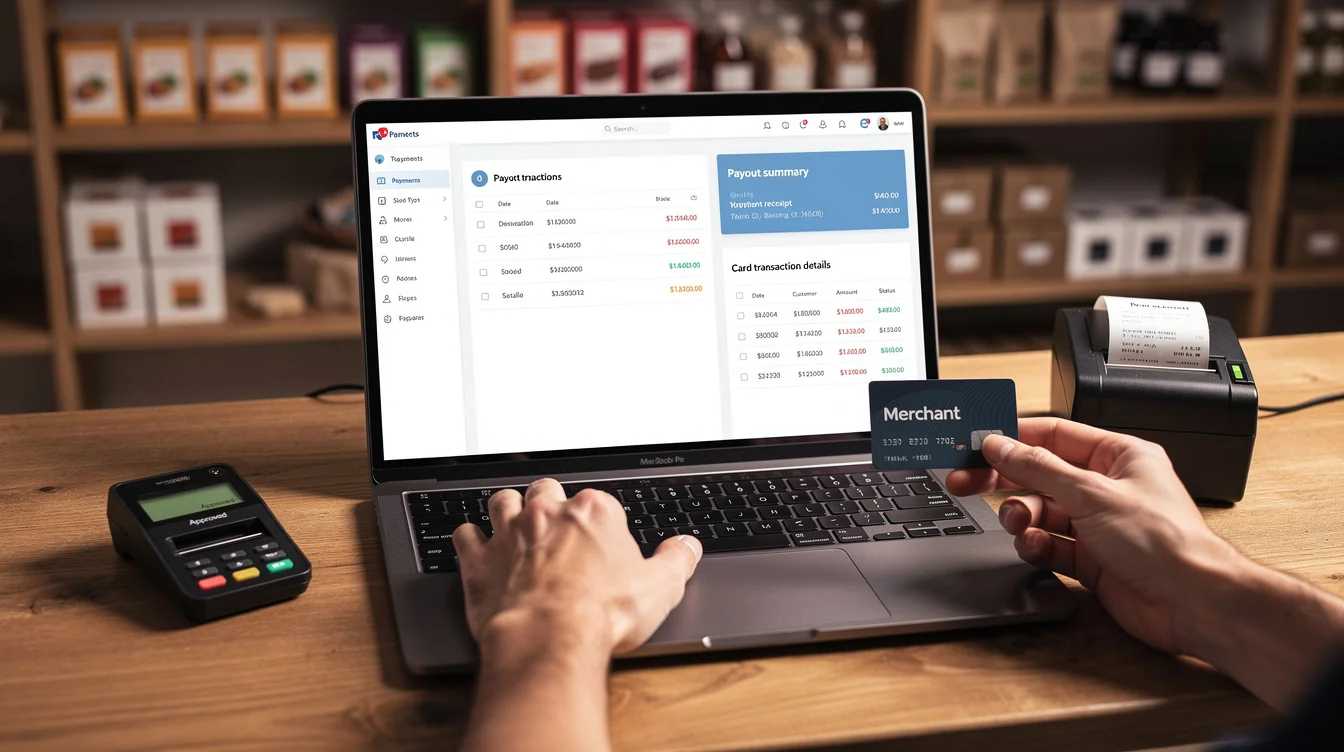
Payment processing shouldn't be complicated. At Schedly, we've seen countless small businesses struggle with outdated systems that drain time and money-but Stripe payment processing changes that equation.
This guide walks you through everything SMBs need to know: from setup and integration to boosting revenue and cutting payment friction. You'll find practical steps, real numbers, and mistakes to avoid.
Why SMBs Pick Stripe Over Other Payment Processors
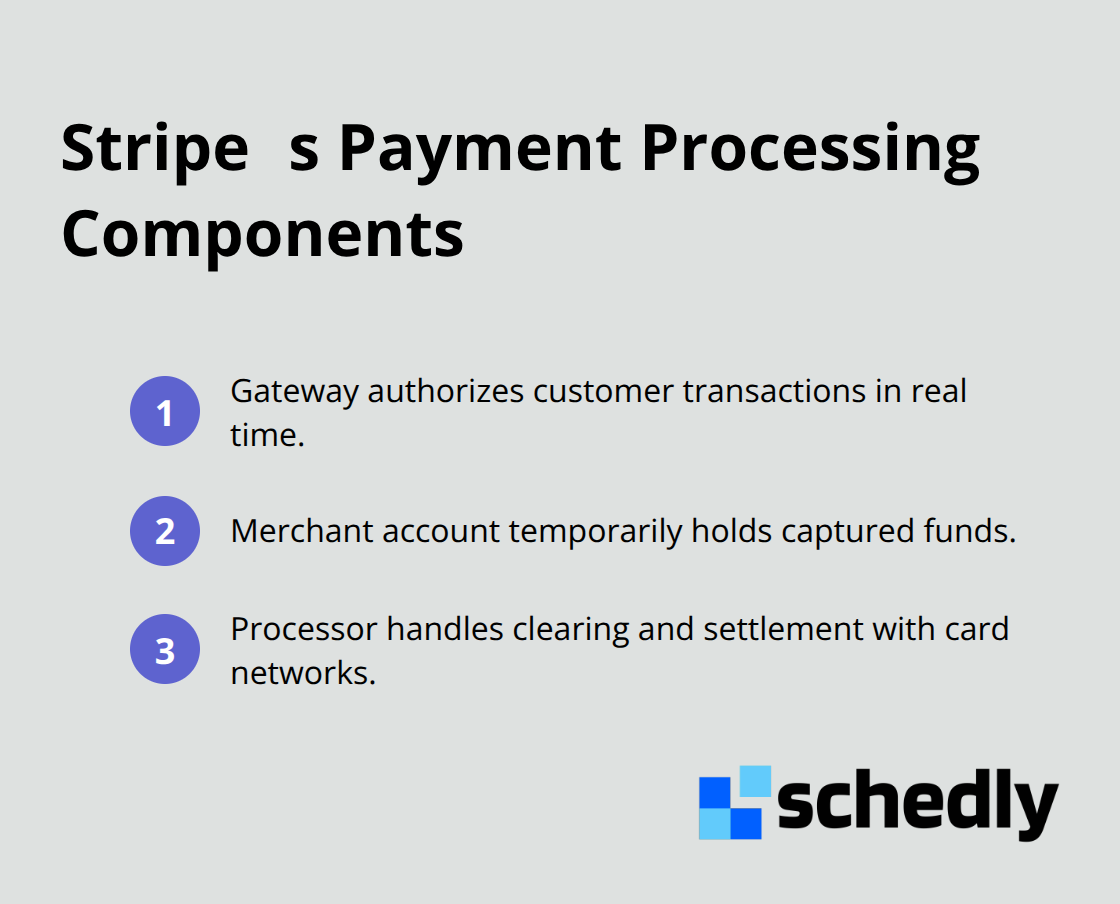
Stripe processes payments for over 1 million businesses globally, and the reason is straightforward: it solves real problems that plague smaller operations. Unlike traditional merchant account setups that demand banking details upfront and weeks of approval, Stripe lets you start accepting payments immediately with no contracts required. In 2024, US businesses paid a record $187.2 billion in processing fees to accept card payments, which underscores why efficiency matters. Stripe consolidates the three core components of payment processing-the gateway that authorizes transactions, the merchant account that holds funds, and the processor that facilitates settlement-all within one platform.
What Makes Stripe Stand Out
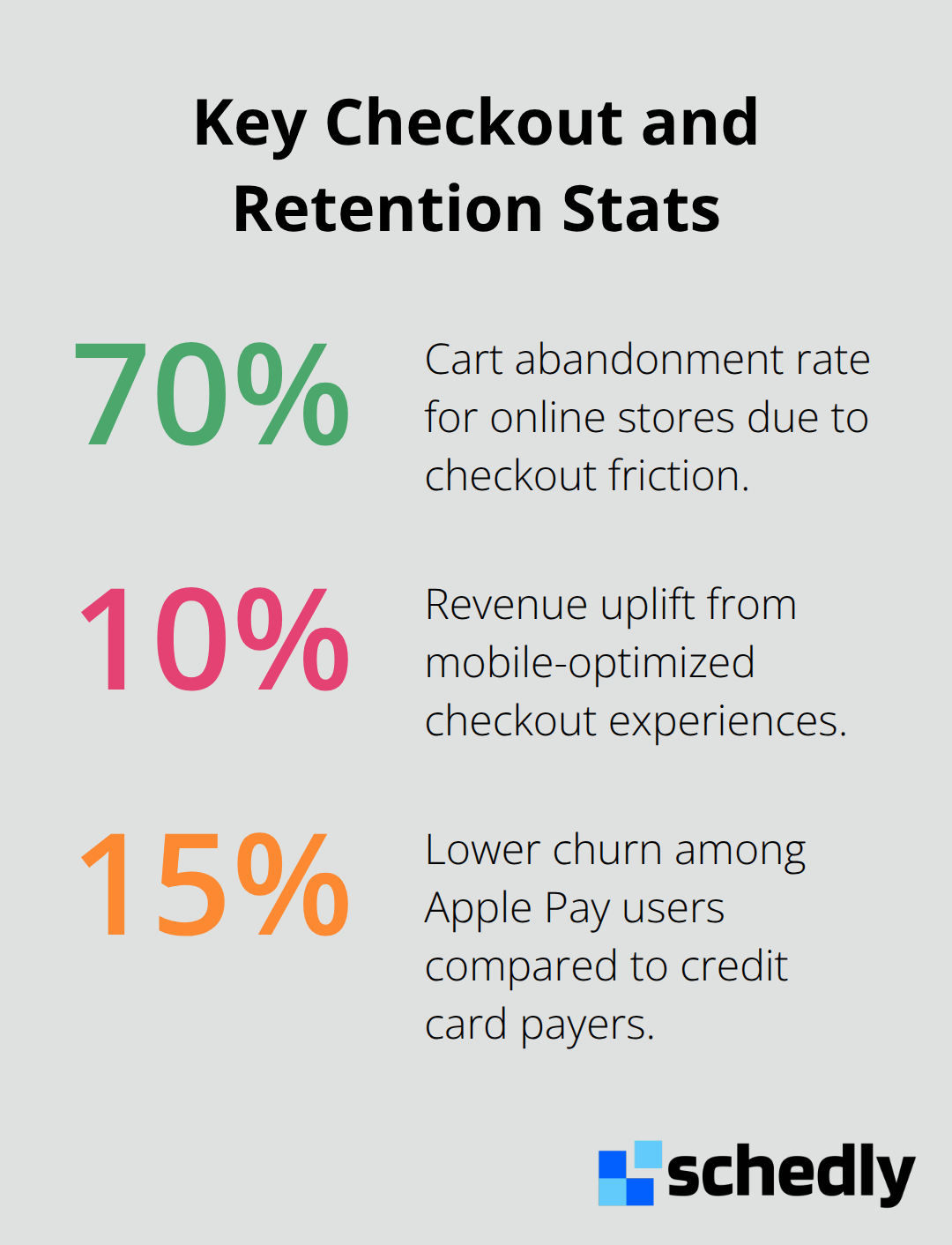
The platform supports over 100 payment methods across 195 countries in 135 currencies, which is substantial for businesses with even modest international ambitions. Stripe's checkout experience is mobile-optimized and has driven over a 10 percent revenue uplift for merchants who implement it. The company offers three distinct pricing models-Interchange-Plus (usually the best for predictable costs), flat-rate, and tiered pricing-so you can choose based on your card type mix rather than accepting whatever your processor dictates. Stripe Radar uses machine learning to detect fraud in real time, and the system is configurable so you set the risk rules that match your business, not a one-size-fits-all approach. For SMBs handling subscriptions, Stripe Billing supports one-time payments, recurring charges, and usage-based models, which means your billing architecture grows with your business model instead of forcing you into a box.
The Security and Compliance Reality
PCI DSS compliance is non-negotiable; violations trigger penalties that can reach $500,000 per incident for security breaches when merchants are not PCI compliant, so this is not theoretical. Stripe maintains PCI DSS Level 1 compliance and encrypts all data in transit and at rest, which transfers the heaviest compliance burden away from your team. The platform tokenizes card data so your internal systems never touch raw card numbers, and it supports 3D Secure 2.0 authentication to meet regulatory requirements like PSD2 while keeping friction low. Stripe's uptime sits at 99.9999 percent, which translates to roughly five minutes of downtime per year; for an SMB processing thousands of daily transactions, that reliability directly protects revenue. The real advantage here is that Stripe absorbs the infrastructure and compliance complexity, freeing your team to focus on selling rather than managing security audits or encryption certificates.
Moving From Selection to Implementation
You've identified why Stripe works for SMBs-now the practical work begins. The next chapter walks you through the actual setup process, from account creation to connecting Stripe with your website, app, and business software.
Setting Up Stripe and Integrating with Your Business Tools
Stripe account creation takes roughly 15 minutes from signup to your first test transaction, which contrasts sharply with traditional merchant account setups that demand weeks of underwriting. Visit Stripe's signup page and enter your business email, then verify your email address immediately. Stripe requires your legal business name, business type (sole proprietor, LLC, corporation), and your country of operation at this stage. Add your bank account details next-Stripe needs this for payouts, and US accounts typically receive funds within one to two business days once you process live transactions. You'll also provide personal identification; for sole proprietors, this is straightforward, but for LLCs or corporations, Stripe may ask for articles of incorporation or an EIN. The verification process happens in the background while you build your integration, which is why Stripe's no-contract approach actually works. Once verified, you move directly into your dashboard and can immediately generate API keys-a publishable key for your frontend and a secret key for your backend. These keys connect Stripe to your actual business infrastructure, so store the secret key securely and never expose it in client-side code.
Payment Links for Instant Collection
If you use a hosted checkout solution, Payment Links require zero development work. You create a link through your Stripe dashboard, set the product name and price, then share that link via email, SMS, or social media. This approach works best for service providers or consultants who need to collect payments without maintaining a full ecommerce site, and it reduces the friction of custom integration. Customers click the link, enter payment details on Stripe's secure form, and you receive the funds-no backend code required. This simplicity makes Payment Links ideal for businesses that need fast payment collection without technical overhead.
Checkout for Ecommerce Sites
For ecommerce sites, Stripe Checkout is the prebuilt option that handles the entire payment form and reduces your PCI compliance scope dramatically because customer card data never touches your servers. You add a single JavaScript snippet to your website, create a Stripe session on your backend with the products and prices you want to sell, then redirect customers to Stripe's hosted checkout page. This approach delivers a mobile-optimized experience, and it handles 3D Secure authentication automatically without additional configuration. The checkout form adapts to mobile screens, which matters because mobile commerce now represents a substantial portion of online transactions.
Custom Applications and Mobile Apps
For custom applications or mobile apps that require deeper control, you'll use Stripe's SDKs. Android and iOS SDKs are available alongside REST API libraries for backend languages like Python, Node.js, Ruby, and PHP. You build your payment form in your app, collect card details securely through Stripe Elements (which tokenizes the data before it reaches your servers), then send the token to your backend for processing. This approach gives you design flexibility while maintaining security, though it requires more development work than Checkout or Payment Links.
Connecting to Your Business Software
Stripe connects to accounting software, CRM platforms, and scheduling tools through direct integrations or middleware. For accounting, Stripe's data tools sync transaction records directly into QuickBooks Online or Xero, which eliminates manual entry and reduces reconciliation time significantly. You set up these integrations in your Stripe dashboard under Connected apps, authorize the accounting platform once, and transactions flow automatically. Scheduling software like Schedly accepts Stripe as a payment gateway, meaning customers book appointments and pay through your scheduling page without leaving the platform.
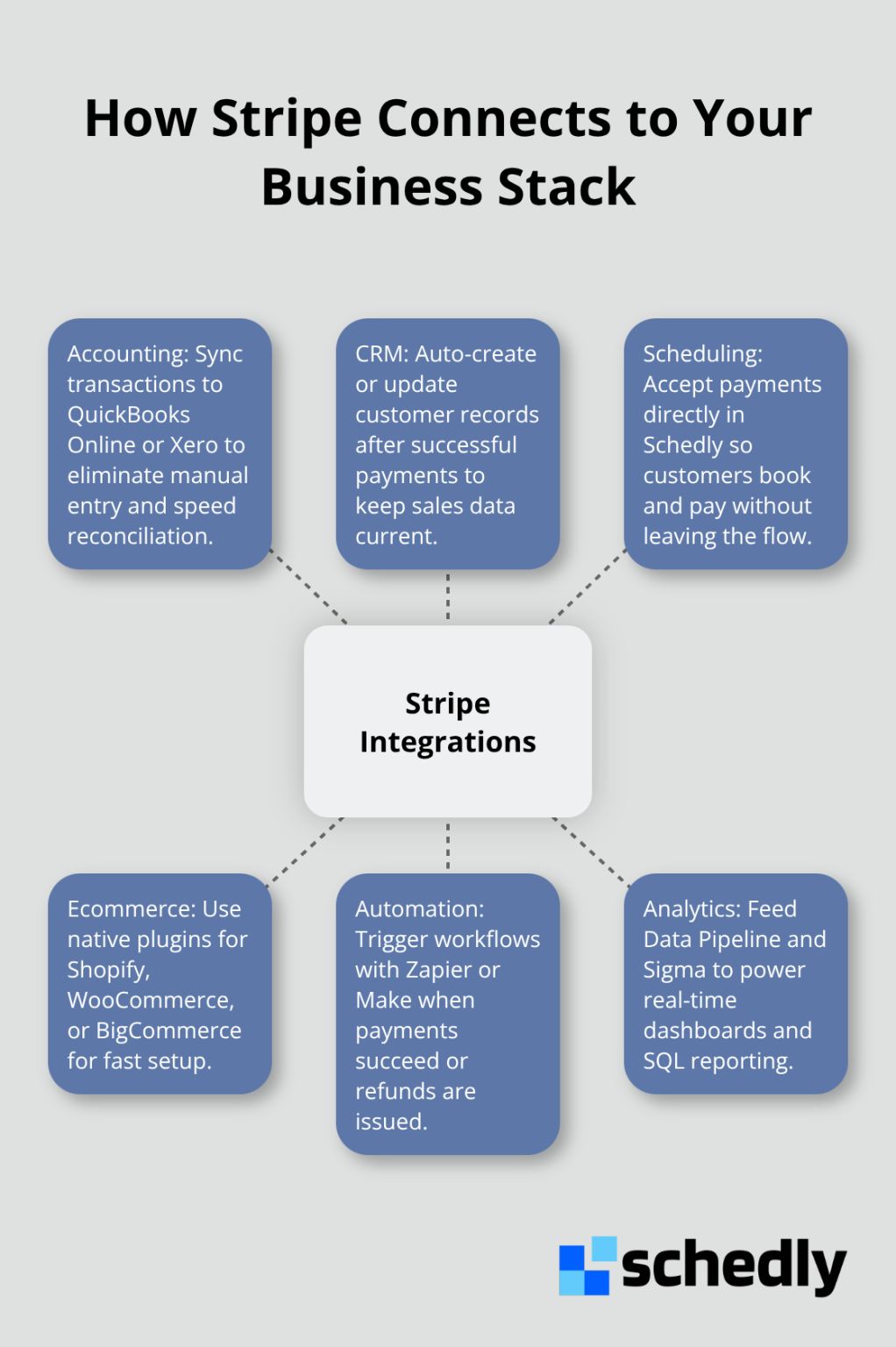
With Stripe connected to your infrastructure and business software, you're ready to focus on the revenue side-optimizing your checkout experience and leveraging Stripe's tools to reduce friction and increase customer lifetime value.
Maximizing Revenue and Reducing Payment Friction
Optimize Your Checkout Experience to Stop Losing Sales
Your checkout page costs you money every single day. Mobile-optimized checkout experiences drive revenue uplift, yet most SMBs still deploy generic payment forms that frustrate customers on mobile devices. The problem isn't complexity-it's friction. Each extra field, each page load, each moment of uncertainty pushes customers away. Stripe Checkout adapts to mobile screens, pre-fills customer information when possible, and displays payment methods that match the customer's device and location.
Cart abandonment rates hover around 70 percent for online stores, and a significant portion stems from payment page friction rather than pricing concerns. If you process $50,000 monthly in transactions and recover even 5 percent of abandoned carts through a smoother checkout, that's $2,500 in additional revenue with zero marketing spend. Replace custom payment forms with Stripe Checkout or Payment Links immediately.
Build Recurring Revenue With Subscription Models
Recurring revenue powers SMB growth, yet most businesses handle subscriptions poorly. Stripe Billing supports one-time payments, recurring charges at daily, weekly, monthly, or custom intervals, and usage-based models where customers pay for what they actually consume. Usage-based billing aligns your revenue with customer value-a SaaS company charging by API calls, a scheduling tool charging by bookings processed, or a fitness platform charging by class attendance all benefit from this approach.
Recurring payments reduce processing costs compared to one-time transactions, and they improve retention because customers commit upfront. Configure billing cycles in your Stripe dashboard by setting the product, price, and billing interval, then embed the subscription form in your app or website. Stripe handles the recurring charges automatically, manages failed payment retries, and sends customers renewal reminders. For businesses using scheduling software like Schedly, subscription models work particularly well because customers book regularly and expect predictable monthly charges.
Track Payment Performance With Real-Time Analytics
Analytics separate high-performing SMBs from struggling ones. Stripe Sigma lets you write custom SQL queries against your transaction data, and the Data Pipeline syncs that data directly into your warehouse or accounting software. Instead of exporting spreadsheets, you see real-time dashboards showing payment success rates, average transaction value, customer lifetime value, and churn patterns.
A scheduling business might discover that customers who complete their first appointment within 48 hours have 40 percent higher retention than those who book weeks out-that insight drives operational changes. Another business might find that customers paying via Apple Pay have 15 percent lower churn than credit card payers, suggesting a need to promote digital wallets. These aren't hypothetical improvements; they're data-driven changes that directly impact revenue. Set up Stripe Sigma reporting by connecting to your data warehouse, then build dashboards around metrics that matter to your business: payment failure rates, time-to-first-transaction, refund patterns, and geographic performance. Review these metrics monthly and adjust your checkout experience, pricing, or product based on what the data reveals.
Final Thoughts
Stripe payment processing removes obstacles between your business and revenue. You've learned how to set up an account in minutes, connect it to your website or scheduling software, and optimize every step of the customer payment journey. The real payoff comes when you treat payments as a growth lever instead of a back-office function.
Start with what matters most to your business right now. If you lose customers at checkout, implement Stripe Checkout and measure the conversion lift within two weeks. If you operate on subscriptions, configure Stripe Billing and let recurring charges flow automatically. If you need visibility into payment performance, build a Sigma dashboard and review it monthly.
Avoid the mistakes that drain SMB profitability: don't leave checkout unoptimized, don't ignore failed payments, and don't skip analytics. Integrate Stripe with scheduling software like Schedly to embed payments directly into your customer workflow and eliminate extra steps. Sign up, run a test transaction, and connect Stripe to your business tools-the revenue gains follow from there.