
Schedly resources
Time Saving Scheduling: How to Eliminate Bottlenecks and Save Hours
Scheduling inefficiencies cost businesses real money. Between manual confirmations, double bookings, and endless back-and-forth emails, your team loses hours every week that could go toward actual work.
At Schedly, we've seen firsthand how time-saving scheduling transforms operations. The good news is that automation can eliminate most of these bottlenecks without requiring a complete system overhaul.
Where Your Scheduling Falls Apart
Manual confirmation processes Drain Hidden Hours
Manual confirmation processes consume your team's time in ways that feel invisible until you track them. A typical appointment confirmation involves a client email, a staff member responding, back-and-forth clarifications, and finally a calendar entry. McKinsey research shows that disengagement and inefficiency cost a median S&P 500 company about $228 million annually, and scheduling friction contributes directly to this waste. When you add up the minutes spent sending confirmation emails across dozens of daily appointments, you lose hours per week to administrative tasks that don't move your business forward. The real problem isn't the individual confirmation-it's the system that requires human intervention at every stage.
Double bookings Create Cascading Problems
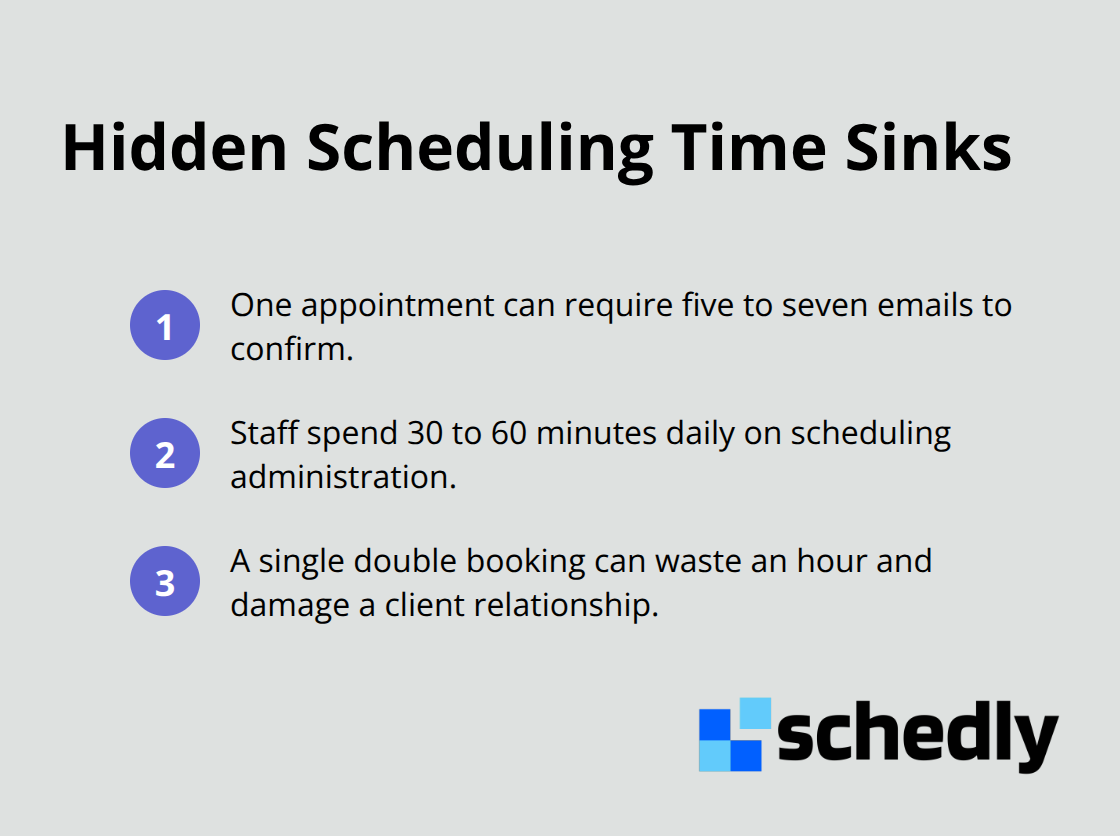
Double bookings and scheduling conflicts create a second layer of waste. These happen because your staff manages multiple calendars manually, or clients book time that overlaps with existing appointments because they can't see real-time availability. Each conflict requires rescheduling conversations, apology emails, and frustrated clients. A single double booking costs you a client relationship and wastes an hour of staff time just to resolve it.
Back-and-forth communication Multiplies the Damage
Back-and-forth communication with clients about availability is perhaps the most insidious bottleneck because it feels normal. A client asks if you have openings next Tuesday, your staff checks the calendar, sends options, the client responds with preferences, your staff confirms, and the client sends a final confirmation. That's five to seven emails for one appointment. Multiply that across 20 or 30 daily bookings and you lose entire workdays just coordinating availability.
The Real Cost of Manual Scheduling
These bottlenecks accumulate into significant time losses. Staff members spend 30 to 60 minutes daily on scheduling administration alone, time that could go toward client service or revenue-generating work. When a single appointment requires multiple confirmation steps, each step introduces the possibility of human error, miscommunication, and delays. Clients increasingly expect to book online without waiting for staff availability, and when they can't, they move to competitors who offer that convenience. The cost isn't just the lost appointment-it's the lost reputation and the likelihood they won't return.
Your team also experiences decision fatigue from managing scheduling manually. Each confirmation requires context switching, which slows down other work and creates stress. Staff members end up working after hours to catch up on scheduling tasks they couldn't complete during the day, which leads to burnout and higher turnover. This is why automation isn't optional for businesses handling more than a handful of appointments daily. The difference between manual and automated scheduling isn't marginal-it's transformational, which is exactly why the next section explores how automation eliminates these bottlenecks at their source.
How Automation Eliminates Scheduling Friction
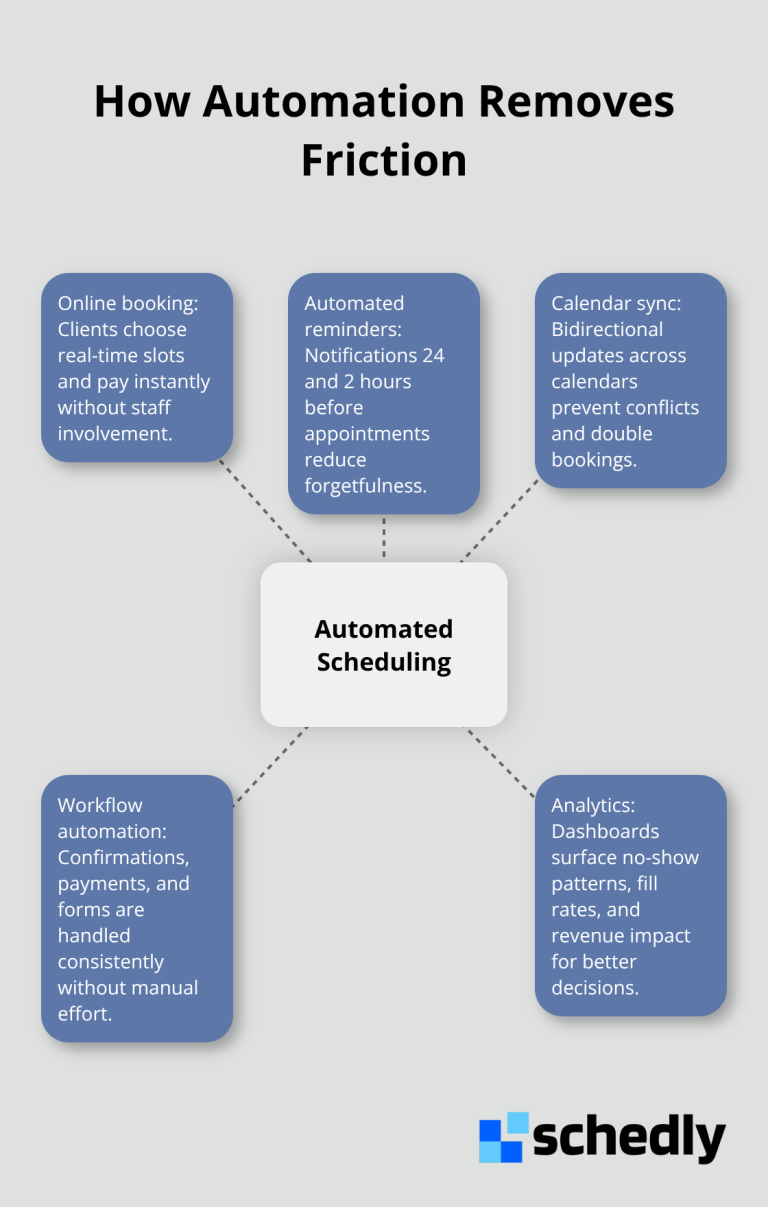
Automation transforms scheduling from a time sink into a competitive advantage. When you remove manual intervention from the booking process, your team stops wasting hours on administrative tasks that clients could handle themselves. Instead of your staff checking calendars and sending confirmation emails, clients book directly into available time slots online at any hour. This shift alone saves time and money, according to scheduling efficiency research. Modern clients expect to book without waiting for human approval, and automation delivers exactly that. The platform handles appointment confirmations automatically, syncs bookings across your calendar systems instantly, and sends reminders before appointments without anyone lifting a finger. This isn't marginal improvement-it's the difference between drowning in administrative work and actually running your business.
Automated reminders cut no-shows dramatically
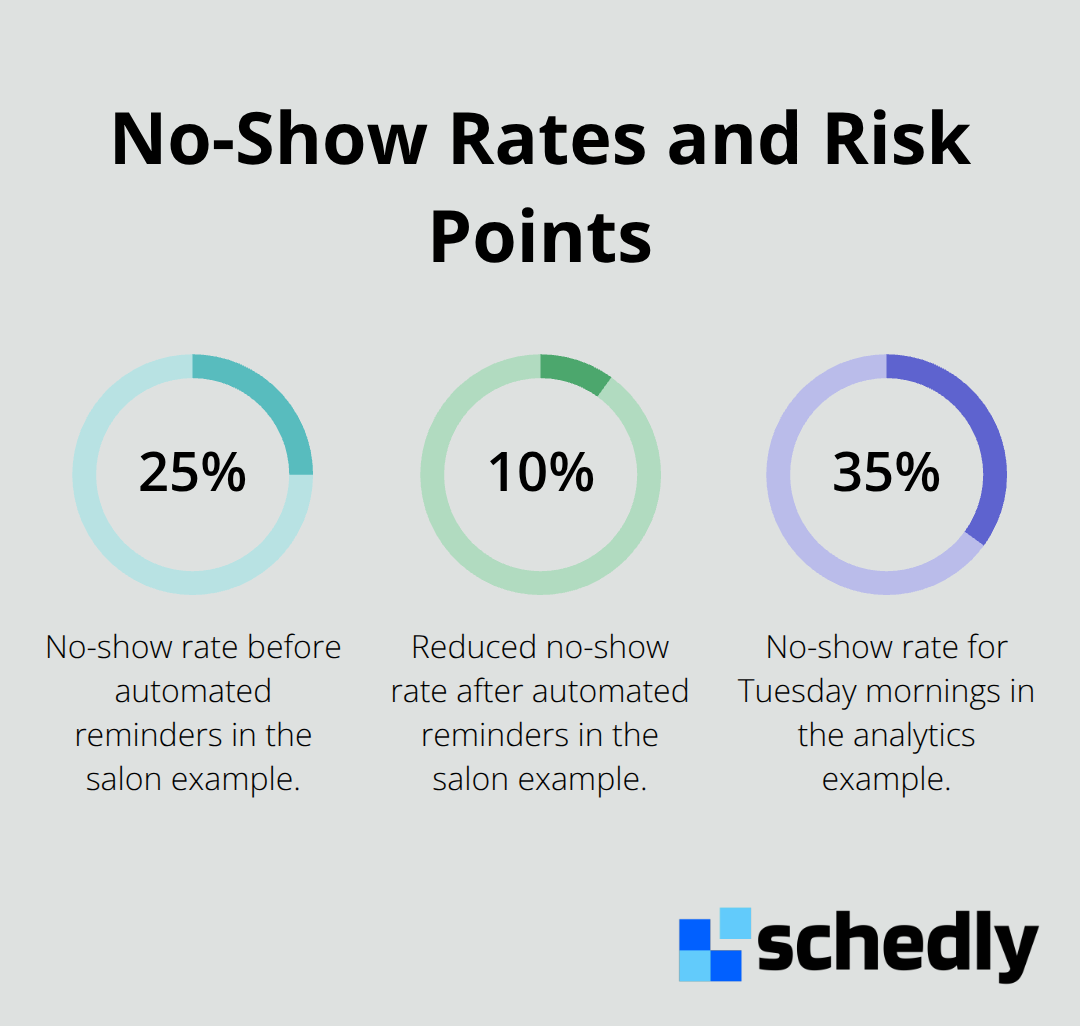
No-shows represent pure revenue loss. A typical business loses 20 to 30 percent of booked appointments to no-shows when they rely on manual reminders or no reminders at all. Automated reminder systems change this equation entirely. Clients receive notifications 24 hours before their appointment, then again 2 hours before, delivered via email or SMS depending on their preference. This repetition works because it removes the excuse of forgetting. Clients know exactly when and where they need to be, and the friction of remembering disappears. The cost of sending thousands of automated reminders is negligible compared to the revenue recovered from even a few prevented no-shows. A salon that books 50 appointments weekly and reduces no-shows from 25 percent to 10 percent recovers 7 to 8 appointments per week-that's substantial income that manual reminders simply cannot match.
Online booking availability changes client behavior
Clients want to book at midnight on Sunday, not during your business hours. When you offer 24/7 online booking, you capture appointments that would otherwise go to competitors or disappear entirely. The friction of calling during business hours, waiting on hold, and discussing availability vanishes. Clients see your real-time calendar, select their preferred time, and complete payment instantly. This self-service model also eliminates the back-and-forth communication that wastes so much time. No more emails asking about Tuesday availability, no more clarifications about time zones, no more uncertainty about whether the booking actually went through. Automation handles all of this without human involvement. Your team stops playing calendar tetris and starts focusing on delivering excellent service during the appointments that do happen.
Calendar integrations prevent conflicts before they start
Multiple calendars create the conditions for double bookings. Your staff manages Google Calendar, your business uses Outlook, and your team members maintain personal schedules elsewhere. Clients book into what they think is available, but the information doesn't sync across systems. Calendar integrations solve this by pulling real-time availability from all your platforms into one source of truth. When a client books a time slot, the system instantly updates every calendar connected to your account. Your team members see the same availability, clients see only open times, and conflicts disappear. This integration (whether through Google Calendar, Outlook, or other platforms) prevents the rescheduling conversations and apology emails that waste hours every week.
Workflow automation handles routine tasks without staff
Confirmation emails, payment processing, and appointment details all require human action in manual systems. Workflow automation handles these tasks instantly and consistently. A client books an appointment, the system sends a confirmation email with all relevant details, processes their payment, and adds the appointment to your calendar-all without staff intervention. This automation extends beyond booking. Follow-up emails, intake forms, and pre-appointment questionnaires all trigger automatically based on the appointment type or time. Your team never touches these routine tasks, which means they focus on actual client service instead of administrative work. The result is faster turnaround times, fewer errors, and clients who feel like your business operates smoothly.
These automation capabilities work together to transform how your business handles scheduling. With manual processes eliminated, your team reclaims hours daily. Clients experience faster booking, fewer delays, and better communication. The next section explores how to identify which bottlenecks affect your specific operation and which tools address them most effectively.
Building the Right Scheduling Infrastructure
The tools you choose determine whether your scheduling system works for you or against you. Many businesses make the mistake of layering new software on top of broken processes, which just means you automate inefficiency. The real power comes from selecting tools that work together seamlessly and actually fit how your business operates. Teams often waste months trying to integrate incompatible platforms when the right unified system would have saved them from day one. Your scheduling infrastructure should eliminate friction at every stage, from the moment a client wants to book through follow-up communication after the appointment ends.
Calendar synchronization stops the bleeding immediately
Most businesses use multiple calendar systems simultaneously. Your staff might work in Google Calendar, your business operates through Outlook, and your team members maintain personal schedules elsewhere. This fragmentation creates the exact conditions for double bookings and scheduling chaos. Calendar synchronization pulls real-time availability from all your platforms into one source of truth, which prevents the conflicts that waste hours in rescheduling conversations. When you implement proper integration, a booking in one system instantly updates everywhere else. Your team stops managing availability across multiple tabs and instead focuses on actually serving clients. The integration needs to work bidirectionally, meaning changes flow both ways without manual intervention. Google Calendar, Outlook, and other major platforms support this level of integration when you use scheduling software designed to handle it. Without this synchronization, you essentially ask your team to remember what's booked across multiple systems, which is a recipe for human error and client frustration.
Workflow automation removes repetitive work that buries your team
Confirmation emails, payment processing, intake forms, and appointment reminders trigger automatically in a properly configured scheduling system. Your team never touches these routine tasks, which means they reclaim hours daily for actual client service. Workflow automation extends beyond simple confirmations. Follow-up emails trigger based on appointment type, pre-appointment questionnaires populate automatically, and clients receive exactly the information they need at exactly the right time. This consistency matters because clients experience the same high-quality communication every time, which builds confidence in your business. A business with 30 daily appointments might spend significant time daily on confirmations, follow-ups, and administrative work. Automation eliminates this entirely. Your team stops being administrative processors and starts being service providers, which improves both their job satisfaction and your client experience.
Data-driven scheduling decisions come from measuring what actually happens
Analytics dashboards show which appointment types have the highest no-show rates, which time slots fill fastest, and where bottlenecks actually exist in your scheduling process. Many businesses guess at these answers based on feeling, which leads to poor decisions. Real data changes everything. If your analytics reveal that Tuesday mornings have a 35 percent no-show rate while Wednesday afternoons have a 5 percent rate, you can adjust pricing, staffing, or reminder frequency for those slots specifically. You can identify which clients consistently cancel or no-show and adjust your booking policies accordingly. You can see exactly how much time staff members spend on scheduling tasks versus client-facing work, which quantifies the real cost of manual processes. Advanced analytics platforms track response times, booking completion rates, and revenue impact per time slot. This information lets you optimize your schedule around what actually drives profit, not what seems logical on paper.
Final Thoughts
Scheduling bottlenecks compound over time, consuming more staff hours, frustrating more clients, and costing more revenue with each passing week. The businesses that win eliminate these inefficiencies systematically, not tolerate them as normal operating costs. Manual confirmation processes, double bookings, and endless back-and-forth communication all vanish when you implement proper automation, and your team stops spending 30 to 60 minutes daily on scheduling administration.
The real impact shows up in your numbers. Businesses that implement time-saving scheduling systems typically see no-show rates drop from 20 to 30 percent down to 10 percent or lower, while staff members reclaim hours daily that previously disappeared into administrative work. Clients experience faster booking, fewer delays, and better communication, which builds loyalty and increases repeat business. These outcomes directly affect your bottom line.
Start by auditing your current scheduling process and tracking how much time your team actually spends on confirmations, calendar management, and client communication. Identify which bottlenecks cost you the most time and revenue, then implement the tools and strategies that address those specific problems. Schedly provides the infrastructure to make this transformation happen without requiring a complete system overhaul.